cscg25 - physdump
Overview
- CTF: Cyber Security Challenge Germany 2025
- Challenge name: physdump
- Author: 0x4d5a
- Category: misc
- Difficulty: medium
Challenge description
I captured a very spooky Windows malware 👻. It featured all kind of VM escapes, so I didn’t trust any established hypervisors like VMWare or VirtualBox to execute it. However, I executed it in my own hypervisor, which it didn’t knew.
With my limited hypervisor features I was only able to capture a raw physical memory and register dump. The guest OS physical memory was mapped @ 0x100000. The Windows OS is a Windwos 10 22H2 Lets go for a 🚶through various Windows kernel structures, identify the malware and get the flag!
Flagformat: dach2025{....}
Recon
The challenge gives us two files:
mem_100000_2146435072.bin(2.1 Gigabytes)register_dump.txt
Content of register_dump.txt:
RAX=0000000040000010 RBX=00007ff7763402b0 RCX=0000000000000000 RDX=00007ff776330658
RSI=0000000000000000 RDI=0000027e34adb970 RBP=000000f6c493f740 RSP=000000f6c493f6c0
R8 =00007ff7763402b0 R9 =000000f6c493f5d8 R10=0000000000000011 R11=000000f6c493f6b0
R12=0000000000000000 R13=0000000000000000 R14=0000000000000000 R15=0000000000000000
RIP=00007ff7763120ba RFL=00000246 [---Z-P-] CPL=3 II=0 A20=1 SMM=0 HLT=0
ES =002b 0000000000000000 ffffffff 00c0f300 DPL=3 DS   [-WA]
CS =0033 0000000000000000 ffffffff 0020fb00 DPL=3 CS64 [-RA]
SS =002b 0000000000000000 00000000 0040f300 DPL=3 DS   [-WA]
DS =002b 0000000000000000 ffffffff 00c0f300 DPL=3 DS   [-WA]
FS =0053 0000000000000000 00003c00 0040f300 DPL=3 DS   [-WA]
GS =002b 000000f6c4b08000 ffffffff 00c0f300 DPL=3 DS   [-WA]
LDT=0000 0000000000000000 00000000 00000000
TR =0040 fffff80155868000 00000067 00008900 DPL=0 TSS64-avl
GDT=     fffff80155869fb0 00000057
IDT=     fffff80155867000 00000fff
CR0=80050033 CR2=ffffde06200f1000 CR3=000000006654b000 CR4=00310ef8
DR0=0000000000000000 DR1=0000000000000000 DR2=0000000000000000 DR3=0000000000000000
DR6=00000000ffff0ff0 DR7=0000000000000400
CCS=0000000000000000 CCD=0000000000000000 CCO=EFLAGS
EFER=0000000000000d01
FCW=027f FSW=0000 [ST=0] FTW=00 MXCSR=00001f80
FPR0=0000000000000000 0000 FPR1=0000000000000000 0000
FPR2=0000000000000000 0000 FPR3=0000000000000000 0000
FPR4=0000000000000000 0000 FPR5=0000000000000000 0000
FPR6=0000000000000000 0000 FPR7=0000000000000000 0000
XMM00=0000000000000000 0000000200000000 XMM01=0000000000000000 0000000000000000
XMM02=0000000000000000 0000000000000000 XMM03=0000000000000000 0000000000000000
XMM04=0000000000000000 0000000000000000 XMM05=0000000000000000 0000000000000000
XMM06=0000000000000000 0000000000000000 XMM07=0000000000000000 0000000000000000
XMM08=0000000000000000 0000000000000000 XMM09=0000000000000000 0000000000000000
XMM10=0000000000000000 0000000000000000 XMM11=0000000000000000 0000000000000000
XMM12=0000000000000000 0000000000000000 XMM13=0000000000000000 0000000000000000
XMM14=0000000000000000 0000000000000000 XMM15=0000000000000000 0000000000000000
Code=e8 85 09 00 00 48 8b cb e8 1d 08 00 00 b8 10 00 00 40 33 c9 <0f> a2 48 8d 15 7d 82 02 00 e8 b8 01 00 00 48 8b d8 48 8b 08 48 63 49 04 48 03 c8 b2 0a e8
Solution
I identified two solution paths—one significantly harder than the other. Here’s both.
The hard way
First I tried to load the memory dump with volatility3. However for some reason it didn’t work and I couldn’t find anything useful online to fix the error I was getting. So let’s investigate the memory by hand!
The challenge states that we go for a walk through various windows kernel structures. So the first task for me was to find out where the kernel is in the memory dump.
In the register_dump.txt we see two kinds of addresses. The ones starting with 0x7ff7 are user space addresses and the ones starting with 0xffff are kernel space addresses.
However these addresses are currently of no use for us as they are virtual addresses. We need physical addresses to find anything in our memory dump. To get a physical address we can look at the value of CR3=0x6654b000. This register holds the physical base address of the page directory (PML4). We need this address to translate virtual to physical addresses.
Virtual address translation
The address translation on x86_64 processors uses either 4- or 5-level paging. 5-level paging is only available on newer CPUs and must be enabled. I will focus on 4-level paging here because that is what is needed to solve the challenge.
4-level paging has (as the name implies) 4 different levels:
- Page map level 4 (
PML4) - Page directory pointer (
PDP) - Page directory (
PD) - Page table (
PT)
The picture below (Intel SDM Volume 3, Chapter 4, Figure 5-8) describes the full translation process.
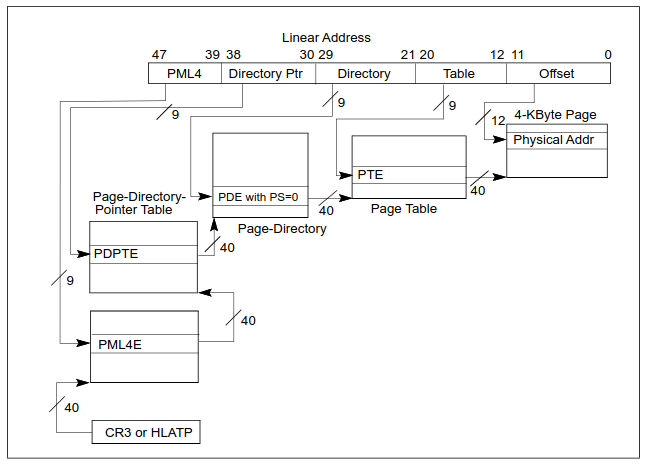
We start with our CR3 value (as that’s the base for the PML4 table) and bits [47:39] from the virtual address we are trying to translate. Adding these two values gives us the address of PML4E (E for entry). The value at this address points to the base of PDP. Adding bits [38:30] to PDP gives us PDPTE, which again points to the base of PD… I think the steps to calculate the physical address is clear now.
Following the above picture gives us a page of size 4 KB. But there also exist 2 MB and even 1 GB pages. When we have one of these larger pages the translation process fails. But why?
When translating virtual addresses of 2 MB and 1 GB pages the translation is slightly different. As we skip 1, or 2 steps respectively.
Below is the process for a 2 MB page which skips the page table and therefore has 21 bits for the last offset. We translate our virtual address like this if(and only if) bit 7 in PDE is set. Otherwise we continue our translation as usual.
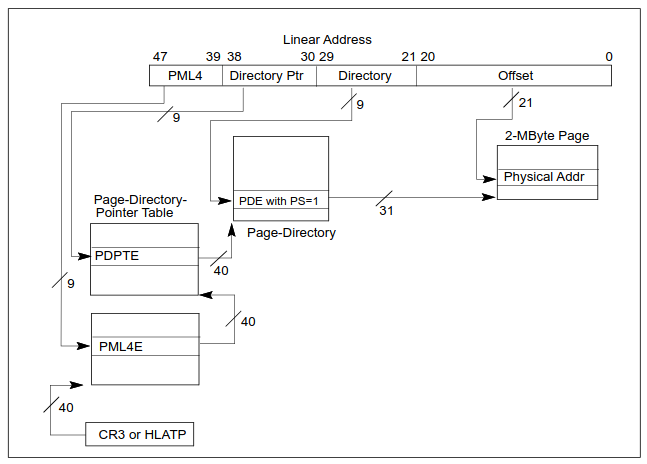 If bit
 7 was already set in PDPTE then our resulting page will be 1 GB in size, skipping the page directory and the page table.
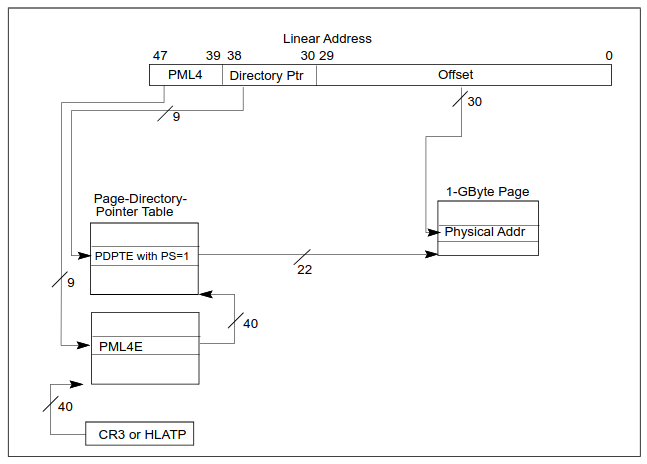 It took me forever to figure out why my implemented virtual address translation sometimes gives out nonsense values. All the websites describing the translation skipped this step. Only when I read through the Intel SDM it clicked for me.
To validate that the address translation works I translated RIP from register_dump.txt. The address it pointed to looked like proper assembly instructions and when looking at the bottom of register_dump.txt I noticed that it is the same sequence of bytes. Great!
Identifying the “malware”
Finding a process
Every windows process is represented in the kernel by an _EPROCESS struct. This is a massive struct (0xa40 bytes for windows 22H2) that contains information like:
UniqueProcessIdCreateTimeImageFileName- etc..
So it contains exactly the information we need to find a potentially malicious process. But how can we find such a struct in our
2 GBmemory dump?
struct _EPROCESS
{
    struct _KPROCESS Pcb;                     //0x0
    struct _EX_PUSH_LOCK ProcessLock;         //0x438
    VOID* UniqueProcessId;                    //0x440
    struct _LIST_ENTRY ActiveProcessLinks;    //0x448
    ...
    struct _FILE_OBJECT* ImageFilePointer;    //0x5a0
    UCHAR ImageFileName[15];                  //0x5a8
    ...
}
The _EPROCESS struct contains the _KPROCESS struct which in turn contains DirectoryTableBase. This field holds the PML4 base address, which we already have in the register_dump.txt. Searching for this address with binwalk gives out one address.
% binwalk -R '\x00\xb0Tf\x00\x00\x00\x00' mem_100000_2146435072.bin
DECIMAL       HEXADECIMAL     DESCRIPTION
--------------------------------------------------------------------------------
238416040     0xE35F0A8       Raw signature (\x00\xb0Tf\x00\x00\x00\x00)
To verify that 0xE35F0A8 is inside the _EPROCESS struct we subtract 0x28 to get the base of _EPROCESS. From there we add 0x5a8 to get the name of the process.
% xxd -l 96 -s 0xE35F628 mem_100000_2146435072.bin
0e35f628: 4879 7065 7263 616c 6c53 7475 6666 0002  HypercallStuff..
0e35f638: 0000 0000 0000 0000 10aa a6bd 8f88 ffff  ................
0e35f648: 88a6 6bbd 8f88 ffff d897 f3bc 8f88 ffff  ..k.............
0e35f658: 0000 ffff ff7f 0000 6855 a5bb 8f88 ffff  ........hU......
0e35f668: 6855 a5bb 8f88 ffff 0100 0000 33e2 1905  hU..........3...
0e35f678: 0100 0000 0000 0000 694d 97bd 8f88 ffff  ........iM......
Nice, this looks like the name of an actual process.
Finding more processes
The base of our “HypercallStuff” process is 0xE35F080. From there we can get to more processes via the ActiveProcessLinks list.
struct _LIST_ENTRY
{
    struct _LIST_ENTRY* Flink;       //0x0
    struct _LIST_ENTRY* Blink;       //0x8
};
Flink (or Blink) points to the next (or previous) process’ Flink (or Blink). Iterating the Blink pointer yields
HypercallStuff\x00 at 0xe35f080

MicrosoftEdgeU\x00 at 0x6043e340

conhost.exe\x00\x00\x00\x00 at 0x37175340

cyber_binary.e\x00 at 0x1defc340

SearchFilterHo\x00 at 0x1cbc9080
Cool, we have a process list!
Where is the malware?!?
At this point I was kind of stuck as I expected that the “malware” that I’m searching is somehow hiding from me. So I tried some things:
Finding processes that got unlinked from the ActiveProcessLinks list in _EPROCESS by scanning the whole memory for known fields in the _EPROCESS struct. I chose
CreateTime: has to be sometime in january 2025ImageFileName: has to contain valid asciiFlink/Blink: has to be a valid address Checking the validity of the above fields actually gave me good results. But nothing I did not already get with just iteratingFlink/Blink.
Another idea I head was scanning the processes for RWX pages as this is generally sus. I did this by walking the VadRoot tree in every _EPROCESS struct and checking vadFlags. This gave me some processes with RWX pages but these belonged to some windows antimalware programs, which are expected to have RWX pages.
The last thing I tried was checking if there is a process with a loaded DLL that has a weird name. You can find DLLs of a process by checking _EPROCESS->Peb->Ldr->InLoadOrderModuleList. However this approach also returned nothing.
Lmao, found the malware
After days of thinking about other approaches I decided to just look at the stuff I have a little bit closer. I started with getting the image base of “HypercallStuff” via _EPROCESS->SectionBaseAddress and decompiled it. I didn’t understand anything of the code so I quickly switched to the “cyber_binary” process.
Decompiling this gave me some code that looked suspiciously like a xor cipher.
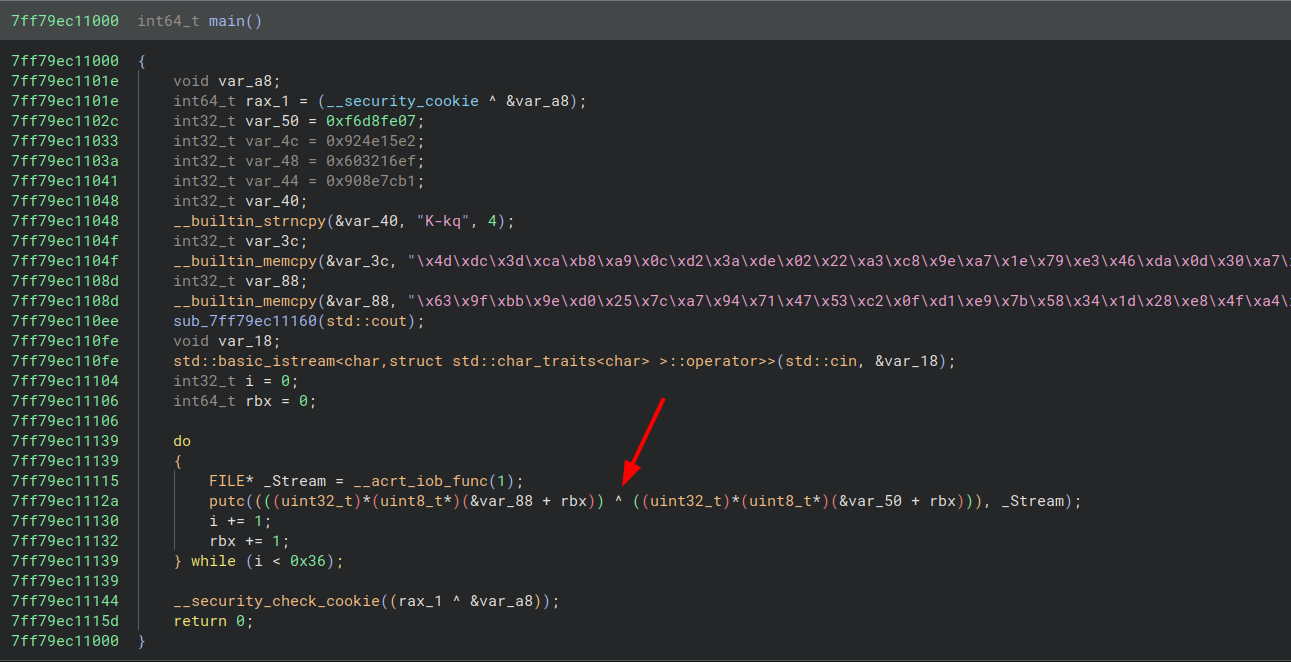 So I wrote a small python script to decrypt it:
a = b'\x63\x9f\xbb\x9e\xd0\x25\x7c\xa7\x94\x71\x47\x53\xc2\x0f\xd1\xe9\x7b\x58\x34\x1d\x28\xe8\x4f\xa4\xdd\xcd\x53\xa1\x0a\xb3\x67\x7d\xd1\xfc\xe9\xf8\x6c\x4d\x94\x19\xa8\x39\x47\xf8\x82\xaa\x5d\x7f\xe7\x85\xd8\xa1\xc0\x5b'

b = b'\x07\xfe\xd8\xf6\xe2\x15N\x92\xef\x162`\xb1|\x8e\x90\x4b\x2d\x6b\x71\x4d\xdc\x3d\xca\xb8\xa9\x0c\xd2\x3a\xde\x02\x22\xa3\xc8\x9e\xa7\x1e\x79\xe3\x46\xda\x0d\x30\xa7\xe4\x9a\x2f\x1a\x89\xf6\xe9\xc2\xb3\x26'

for i in range(len(a)):
	print(chr(a[i] ^ b[i]), end='')
Flag: dach2025{gu3ss_y0u_le4rned_s0me_r4w_r4w_r4w_f0rens1cs}
The easy way
At the beginning of the harder solution I said that I couldn’t get volatility3 to recognize the memory dump. Turns out that prepending the dump with 1 MB zeros makes volatility3 recognize the memory dump and we can work with it. So to achieve the same as above we need two commands. First find out the PID of the process:
% python vol.py -f mem.bin windows.pslist
PID     PPID    ImageFileName   Offset(V)       ...
...
4408    388     CompatTelRunne  0x888fbc0ca340  ...
3776    4408    conhost.exe     0x888fbc528080  ...
5764    4492    SearchFilterHo  0x888fbdcd3080  ...
5164    3248    cyber_binary.e  0x888fbd55b340  ...
5132    5164    conhost.exe     0x888fbdf4e340  ...
5776    3620    MicrosoftEdgeU  0x888fbdd95340  ...
4808    3248    HypercallStuff  0x888fbd95d080  ...
3932    4808    conhost.exe     0x888fbd6ba0c0  ...
3488    2192    MpCmdRun.exe    0x888fbdda7340  ...
Then dump the image of the process with:
% vol -f mem.bin windows.dump_process --pid 5164 --dump-dir ./out
Now we can analyze the binary and get the flag!
Appendix
Virtual address translation script
import struct

def dbg_print(string, debug):
    if debug:
        print(string)

def read8(addr: int, dump: bytes) -> int:
        try:
            return struct.unpack('<Q', dump[addr:addr+8])[0]
        except Exception as e:
            return -1

def is_bit_set(value: int, bit: int) -> bool:
    """returns true if `bit` is 1 in `value`"""
    return value & (1 << bit) == 1

def present_bit_set(value: int) -> bool:
    """Returns true if the present bit (1) is set in `value`"""
    return is_bit_set(value, 0)

def ps_bit_set(value: int) -> bool:
    """returns true if the ps bit (7) is set in `value`"""
    return is_bit_set(value, 7)

# see intel sdm volume 3, chapter 4, figure 4-8, 4-9, 4-10
def resolve(virtual_addr: int, global_offset: int, pml4_base: int, mem: bytes, debug: bool) -> int:
    dbg_print(30 * '*', debug)
    pml4_offset = (virtual_addr >> 39) & 0x1FF # bits [47..39]
    pdpt_offset = (virtual_addr >> 30) & 0x1FF # bits [38..30]
    pd_offset = (virtual_addr >> 21) & 0x1FF   # bits [29..21]
    pt_offset = (virtual_addr >> 12) & 0x1FF   # bits [20..12]
    offset = virtual_addr & 0xFFF              # bits [11..0]
    dbg_print(f'* offsets: pml4:{hex(pml4_offset)}, pdpt:{hex(pdpt_offset)}, pd:{hex(pd_offset)}, pt:{hex(pt_offset)}, page:{hex(offset)}', debug)

    # Level 4: PML4
    pml4e = read8(pml4_base + (pml4_offset * 0x8) - global_offset, mem)

    # Level 3: PDPT (Page-Directory-Pointer Table)
    if not present_bit_set(pml4e):
        raise ValueError("PML4E has present bit (0) not set")
    pdpt_base = pml4e & 0xFFFFF000
    pdpte = read8(pdpt_base + (pdpt_offset * 0x8) - global_offset, mem)
    dbg_print(f'* pdpt: 0x{pml4e:016X} & 0xFFFFF000 -> *(0x{pdpt_base:016X}+8*0x{pdpt_offset:04X})=0x{pdpte:016X}', debug)
    if ps_bit_set(pdpte): # pdpte maps a 1GB page if true
        dbg_print('-> 1GB page', debug)
        page_frame = pdpte & 0xFFC0000000   # bits [51..30] of pdpte
        offset = virtual_addr & 0x3FFFFFFF  # bits [29..0] of virtual_addr
        dbg_print(30 * '*', debug)
        return page_frame + offset - global_offset

    # Level 2: PD (Page-Directory)
    if not present_bit_set(pdpte):
        raise ValueError("PDPTE has present bit (0) not set")
    pd_base = pdpte & 0xFFFFF000
    pde = read8(pd_base + (pd_offset * 0x8) - global_offset, mem)
    dbg_print(f'* pd:   0x{pdpte:016X} & 0xFFFFF000 -> *(0x{pd_base:016X}+8*0x{pd_offset:04X})=0x{pde:016X}', debug)
    if ps_bit_set(pde): # pde maps a 2MB page if true
        dbg_print('-> 2MB page', debug)
        page_frame = pde & 0xFFFFFE00000  # bits [51..21] of pde
        offset = virtual_addr & 0x1FFFFF  # bits [20..0] of virtual_addr
        dbg_print(30 * '*', debug)
        return page_frame + offset - global_offset

    # Level 1: PT (Page)
    if not present_bit_set(pde):
        raise ValueError("PDE has present bit (0) not set")
    pt_base = pde & 0xFFFFF000
    pte = read8(pt_base + (pt_offset * 0x8) - global_offset, mem)
    dbg_print(f'* pt:   0x{pde:016X} & 0xFFFFF000 -> *(0x{pt_base:016X}+8*0x{pt_offset:04X})=0x{pte:016X}', debug)

    # Level 0: Physical Address
    if not present_bit_set(pte):
        raise ValueError("PTE has present bit (0) not set")
    page_base = pte & 0xFFFFF000
    physical_addr = page_base + offset - global_offset
    dbg_print(f'* page: 0x{pte:016X} & 0xFFFFF000 ->   0x{page_base:016X}+1*0x{offset:04X} =0x{physical_addr:0X}', debug)
    dbg_print('-> 4KB page', debug)
    dbg_print(30 * '*', debug)

    return physical_addr