byu25 - baby android 1 & 2
Overview
- CTF: BYUCTF25
- Challenge name: baby-android-1 / baby-android-2
- Author: overllama
- Category: rev
- Difficulty: easy
- ctf files: baby_android-1, baby_android-2
Challenge description
The descriptions for both challenges were identical:
If you’ve never reverse engineered an Android application, now is the time!! Get to it, already!! Learn how they work!!
I started with the second challenge since it had significantly more solves than the first when I began working on them.
Spoiler: Challenge 1 is more interesting.
Baby Android 2
This challenge includes one file named baby_android-2.apk, which is obviously an Android application. After installing the app on an emulator using adb install baby_android-2.apk, we see the following screen when launching the app:
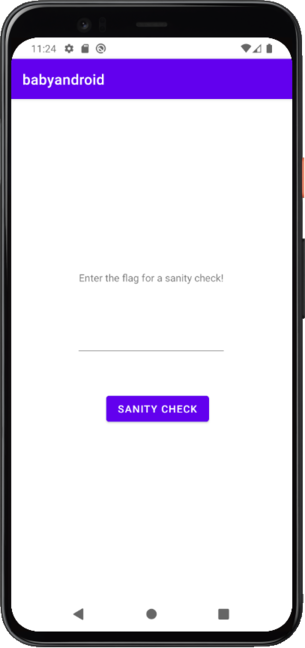
To find the flag we have to find the code that checks for the correct flag. By running the command apktool decode baby_android-2.apk we can extract the contents of the application into a folder.
% ls -l baby_android-2
total 8
-rw-r--r-- 1 tom tom 2647 May 17 13:36 AndroidManifest.xml
-rw-r--r-- 1 tom tom 2344 May 17 13:36 apktool.yml
drwxr-xr-x 1 tom tom   58 May 17 13:36 lib
drwxr-xr-x 1 tom tom   38 May 17 13:36 original
drwxr-xr-x 1 tom tom 3058 May 17 13:36 res
drwxr-xr-x 1 tom tom   68 May 17 13:36 smali
drwxr-xr-x 1 tom tom   34 May 17 13:36 smali_classes2
drwxr-xr-x 1 tom tom   12 May 17 13:36 smali_classes3
drwxr-xr-x 1 tom tom   12 May 17 13:36 smali_classes4
drwxr-xr-x 1 tom tom   62 May 17 13:36 unknown
At this point, I realized I had no clue what most of these files and folders were.
So, I did some research on Android reverse engineering and discovered a tool called jadx. It decompiles .apk files into .java files and includes a nice GUI (jadx-gui) to navigate through the decompiled code.
Navigating to the class byuctf.babyandroid.MainActivity (entry point of an android application) gives us the following code:
...
button.setOnClickListener(new View.OnClickListener() {
  @Override // android.view.View.OnClickListener
  public void onClick(View view) {
    String flagAttempt = MainActivity.this.flag.getText().toString();
    TextView banner = (TextView)MainActivity.this.findViewById(R.id.banner);

    if (FlagChecker.check(flagAttempt)) {
      banner.setText("That's the right flag!!!");
    } else {
      banner.setText("Nope! Try again if you'd like");
    }
  }
});
...
We see that "That's the right flag!!!" is printed when FlagChecker.check(flagAttempt) returns true. Double-clicking on FlagChecker gives us the decompiled code for check():
package byuctf.babyandroid;

public class FlagChecker {
    public static native boolean check(String str);

    static {
        System.loadLibrary("babyandroid");
    }
}
Except it doesn’t. The check function is implemented in a library! Searching for babyandroid in the previously extracted files yields the following files:
% tree lib
lib
├── arm64-v8a
│   └── libbabyandroid.so
├── armeabi-v7a
│   └── libbabyandroid.so
├── x86
│   └── libbabyandroid.so
└── x86_64
    └── libbabyandroid.so
After throwing the x86_64 version into binaryninja the challenge is practically solved.
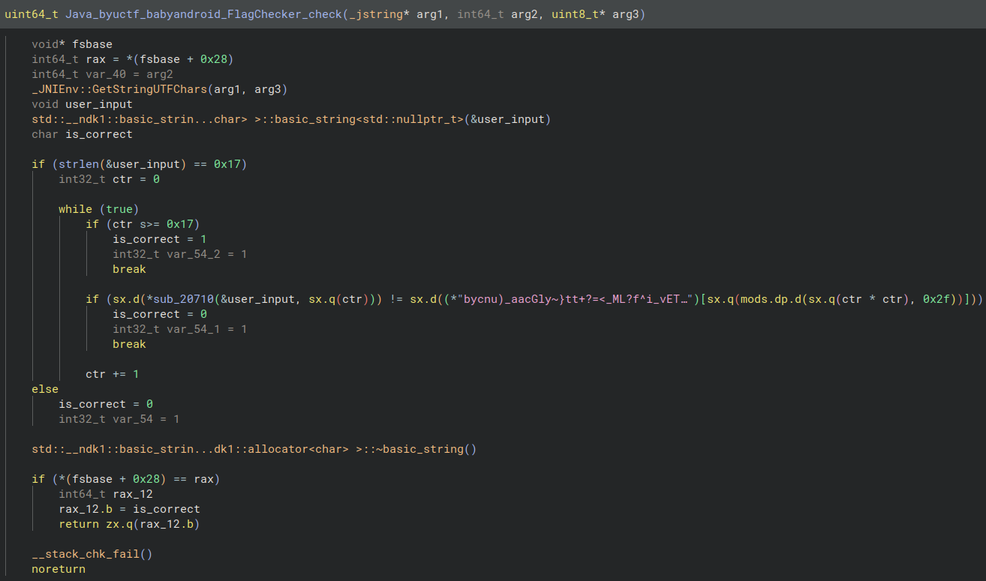
We observe that user_input has to be 0x17 bytes long. Then the characters of the input are checked sequentially if they match the character at index (ctr * ctr) % 0x2f of the string bycnu)_aacGly~}tt+?=<_ML?f^i_vETkG+b{nDJrVp6=)=.
Then I wrote a small script that extracts the flag from the above string:
s = b"bycnu)_aacGly~}tt+?=<_ML?f^i_vETkG+b{nDJrVp6=)="

for i in range(0, 0x17):
    idx = (i*i) % 0x2f
    print(chr(s[idx]), end='')
The flag is byuctf{c++_in_an_apk??}
Note: You can also open APKs in Ghidra, which automatically extracts and decompiles its contents.
Baby Android 1
Like in the last challenge we install the APK (named baby_android-1.apk) onto the emulator with adb install. We then see a new app named Down with the French (I have no idea what the author has against french people or how they relate to this challenge).
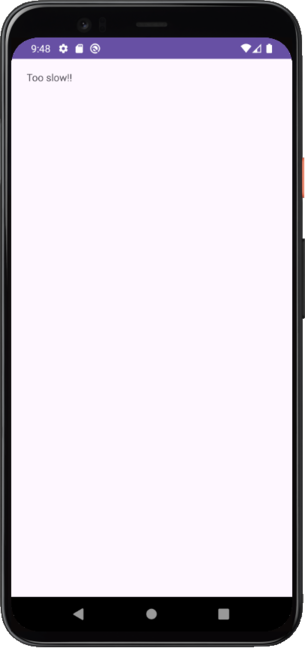
Apparently we were “too slow” for the flag. Starting the app again doesn’t change anything. Let’s have a look into the decompiled MainActivity (again with jadx-gui).
When the application starts onCreate is called and the function setContentView(R.layout.activity_main)1 sets the XML layout to use for the current screen. The function argument R.layout.activity means that the XML file is located in res/layout/activity_main.xml.
Then the function creates a Utilities object and calls its method cleanUp().
Finally, the text that we see in the screenshot above is set.
package byuctf.downwiththefrench;

import android.os.Bundle;
import android.widget.TextView;
import androidx.appcompat.app.AppCompatActivity;

public class MainActivity extends AppCompatActivity {
    @Override
    protected void onCreate(Bundle savedInstanceState) {
        super.onCreate(savedInstanceState);
        setContentView(R.layout.activity_main);
        Utilities util = new Utilities(this);
        util.cleanUp();
        TextView homeText = (TextView) findViewById(R.id.homeText);
        homeText.setText("Too slow!!");
    }
}
Looking into cleanUp() we see that this function clears the text of R.id.flagPart1 through R.id.flagPart28.
public void cleanUp() {
	TextView flag = (TextView) this.activity.findViewById(R.id.flagPart1);
	flag.setText("");
	TextView flag2 = (TextView) this.activity.findViewById(R.id.flagPart2);
	flag2.setText("");
	TextView flag3 = (TextView) this.activity.findViewById(R.id.flagPart3);
	flag3.setText("");
	...
	TextView flag28 = (TextView) this.activity.findViewById(R.id.flagPart28);
	flag28.setText("");
}
Now we know that the flag likely has 28 characters. We can also inspect the flag parts in the aforementioned XML file.
Each TextView widget holds an unique identifier (android:id) and a flag part character (android:text)2. The widgets are also constrained by android:layout_marginBottom and android:layout_marginEnd, which position the individual widgets on the screen3.
<TextView
android:id="@+id/flagPart1"
android:layout_width="wrap_content"
android:layout_height="wrap_content"
android:layout_marginBottom="420dp"
android:text="}"
android:layout_marginEnd="216dp"
app:layout_constraintBottom_toBottomOf="parent"
app:layout_constraintEnd_toEndOf="parent"/>

<TextView
android:id="@+id/flagPart2"
android:layout_width="wrap_content"
android:layout_height="wrap_content"
android:layout_marginBottom="616dp"
android:text="t"
android:layout_marginEnd="340dp"
app:layout_constraintBottom_toBottomOf="parent"
app:layout_constraintEnd_toEndOf="parent"/>

...

<TextView
android:id="@+id/flagPart28"
android:layout_width="wrap_content"
android:layout_height="wrap_content"
android:layout_marginBottom="576dp"
android:text="{"
android:layout_marginEnd="324dp"
app:layout_constraintBottom_toBottomOf="parent"
app:layout_constraintEnd_toEndOf="parent"/>
The only problem now is that the widgets aren’t in the right order (flagPart1 should be b instead of } and flagPart28 should be } instead of {).
I don’t want to arrange the characters manually in a image editing software like GIMP. The easiest solution would be to patch out the cleanUp() function.
However manually trying to patch the smali code in baby-android-1/smali_classes3/byuctf/downwiththefrench/MainActivity.smali and recompiling and resigning the apk proved to be more troublesome than expected, lol.
That’s when I remembered a tool I once used to bypass certificate pinning in Android apps.
Frida
frida is a powerful, open-source dynamic instrumentation toolkit used for inspecting, manipulating, debugging and (most importantly) hooking into running processes.
To hook the cleanUp function in our app with frida we first have to root our android emulator. When using AndroidStudio, you have two options:
- get a non google play image and run
adb shell su - get a google play enabled image and root it manually with rootAVD
Next, upload the frida-server binary (from frida releases) to the emulator and execute it4:
% adb push frida-server /data/local/tmp/
% adb shell "chmod 755 /data/local/tmp/frida-server"
% adb shell "/data/local/tmp/frida-server &"
Now we can write our hook.js script. As our app is written we use the Java object. The perform function ensures that the java runtime is fully initialized and our Utilities class is actually available. Then we can overwrite the implementation of the cleanUp function with our own function, that just does nothing.
// hook.js
Java.perform(function() {
    var Utilities = Java.use('byuctf.downwiththefrench.Utilities');

    Utilities.cleanUp.implementation = function() {
        console.log('cleanUp() called!');

        /* The next line would call the cleanUp
         * function. We don't want this so
         * we comment it out */
        // var result = this.cleanUp();
        // return result;
    };
});
Running the script run with frida -U -f byuctf.downwiththefrench -l hook.js starts the application and the flag is displayed.
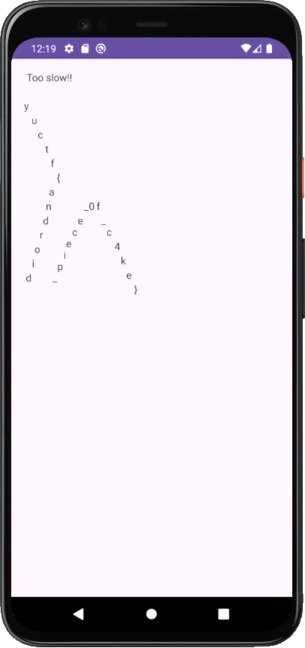
The b of byuctf is missing but we can read the flag nevertheless: byuctf{android_piece_0f_c4k3}.
Conclusion
I really enjoyed these two challenges as they were perfect to get started in reverse engineering android applications. Along the way, I learned about smali bytecode, Java decompilation, Android app structure, and dynamic function hooking with Frida.